PowerDNS Training May 2026
1 Intro
2 New terminology used in DNS
- The terms
masterandslavehave been used to describe primary and secondary authoritative DNS servers in the past.- However this terminology is wrong and misleading, for reasons discussed in the Internet Draft Terminology, Power, and Inclusive Language in Internet-Drafts and RFCs: https://tools.ietf.org/html/draft-knodel-terminology
- In this document, and in configuration examples, we are using the
new terms
primary(instead ofmaster) andsecondary(instead ofslave) whenever possible. - PowerDNS made this switch in version 4.5.0
- The old terminology will also be found in older books and standards documents (RFCs and Internet Drafts)
- DNS terminology can be confusing and is sometimes overloaded. RFC 8499 DNS terminology ( https://tools.ietf.org/html/rfc8499 ) tries to collect and document the current usage of DNS terminology.
3 DNS Basics - how the protocol works
3.1 from HOSTS.TXT to DNS
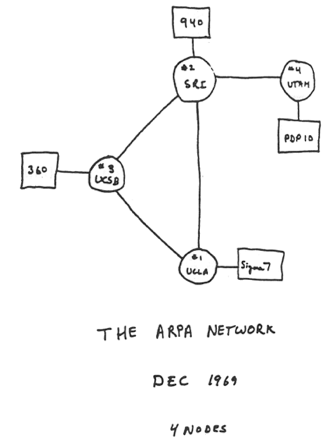
- RFC 226 "STANDARDIZATION OF HOST MNEUMONICS" in 1971-09 was the first standardization of a naming convention for hosts on on the ARPANET.
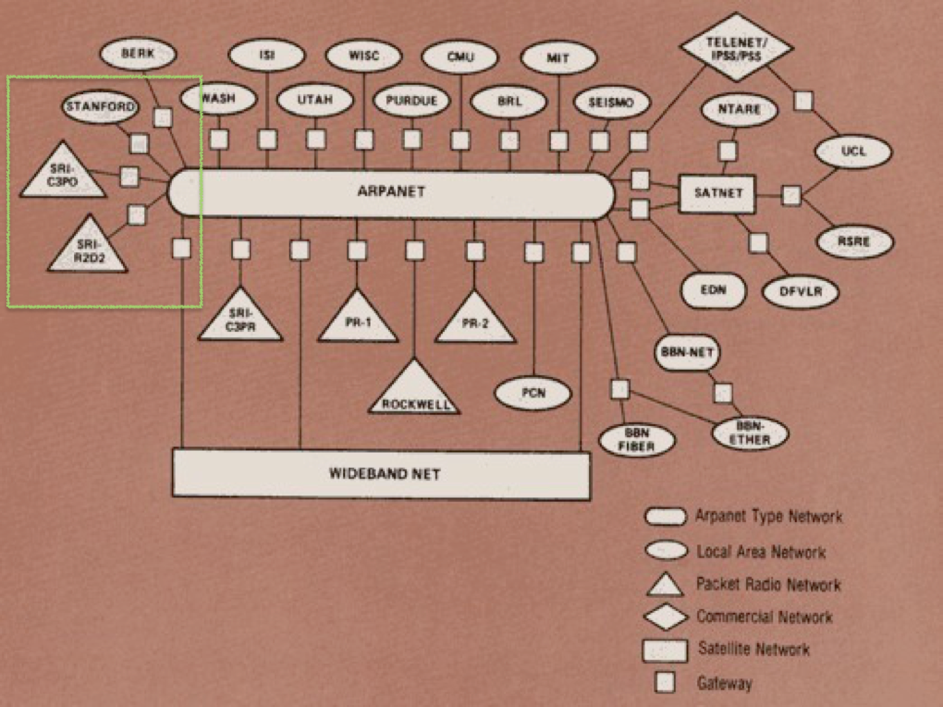
- From 1970-1991 the Stanford Research Institution-Network
Information Center was the information hub for the ARPANET
including maintaining
hosts.txt. - The
hosts.txtfile- Contained IP addresses and names of all of the hosts on the Internet
- Contained host information as well…
- Produced twice per week and available via FTP
- Changes, adds and deletes were sent via e-mail
3.2 the creation of DNS (Domain Name System)
- Problems with
hosts.txt- Maintained by a single entity
- Pulled (manually) from a single host
- Namespace collisions
- Consistency
- In 1983, it was determined that something had to be done

Davis Mills: RFC 799 (1981) - Internet Name Domains 
Jon Postel & Zaw-Sing Su: RFC 819 (1982) - The Domain Naming Convention for Internet User Applications 
Paul Mockapetris: RFC 882 & RFC 883 (1983) - DOMAIN NAMES - CONCEPTS and FACILITIES / DOMAIN NAMES - IMPLEMENTATION and SPECIFICATION - RFC 882 was obsoleted by RFC 1034 (1987-11) and RFC 883 was obsoleted by RFC 1035 (1987-11)
3.3 The DNS namespace
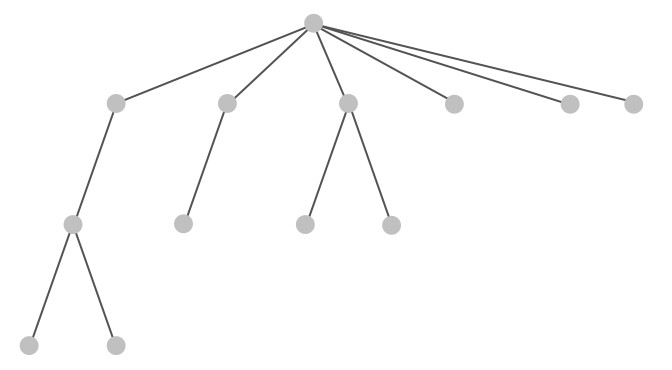
3.4 The DNS namespace
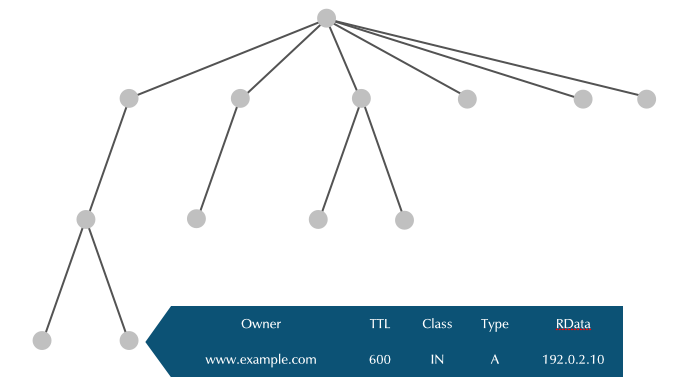
3.5 Nodes contain data
3.6 Node Label
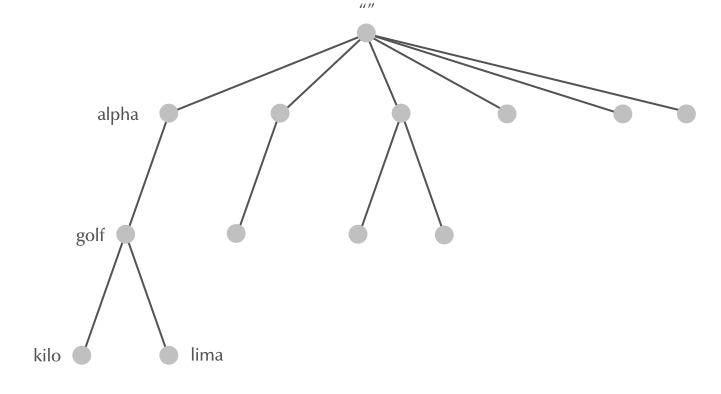
3.7 Node Label
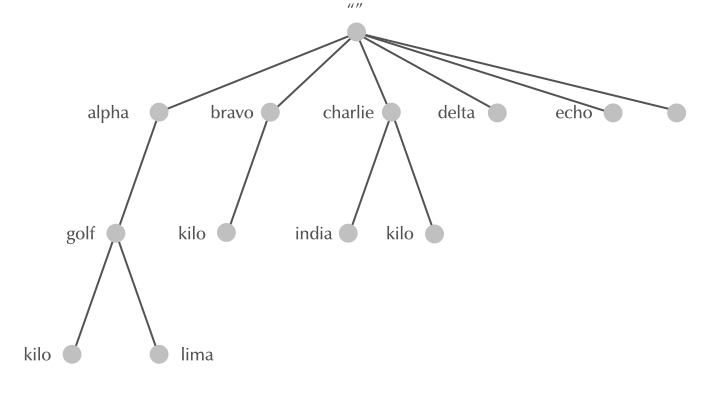
3.8 Domain Names
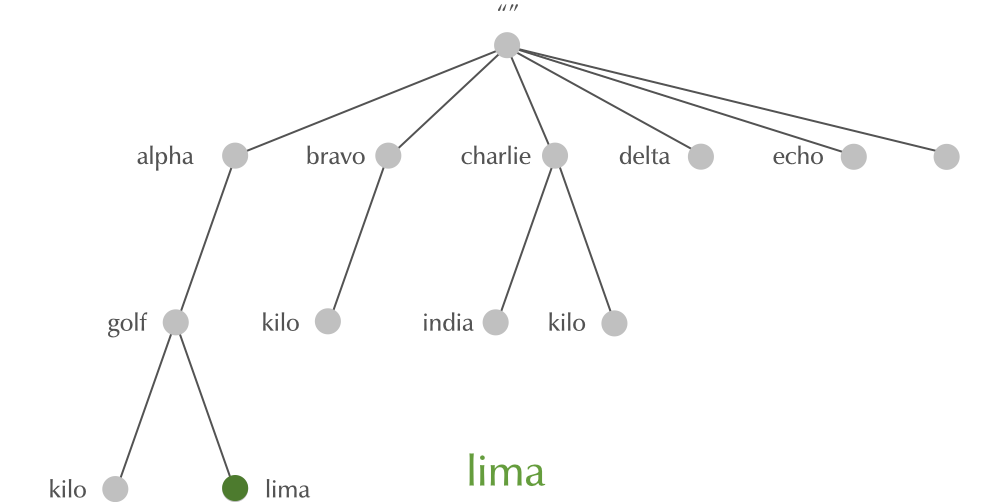
3.9 Domain Names
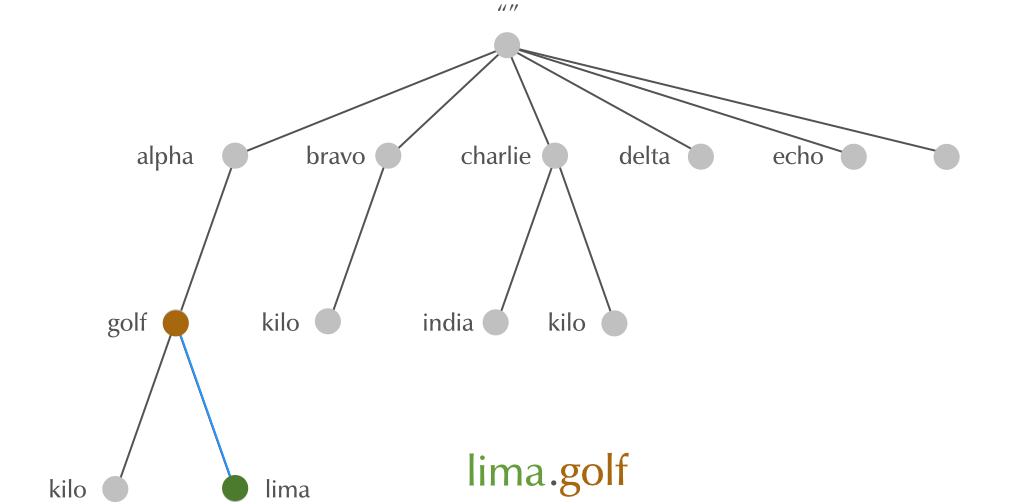
3.10 Domain Names
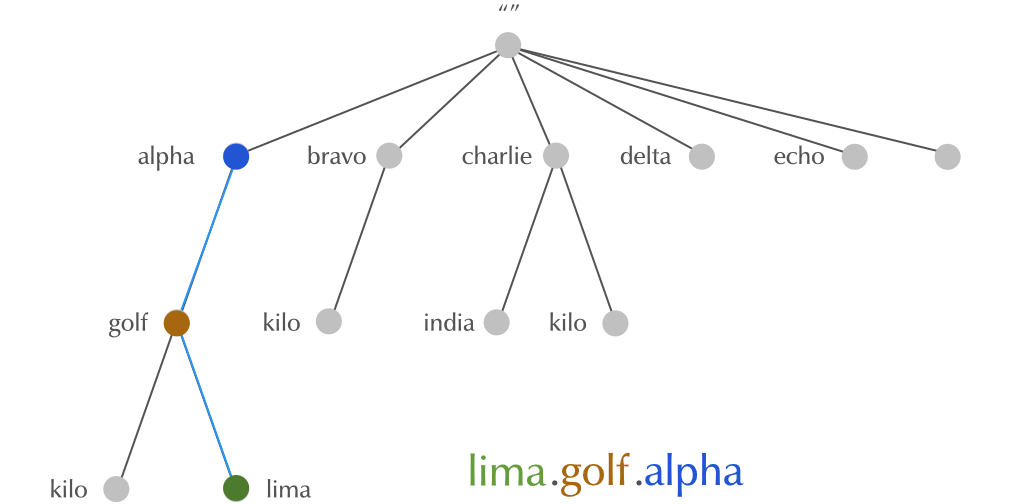
3.11 Domain Names
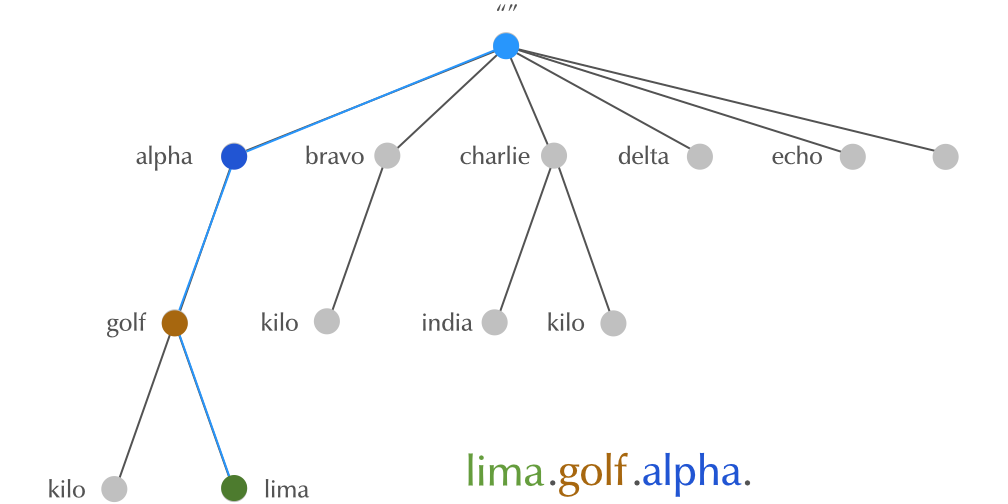
3.12 Domain
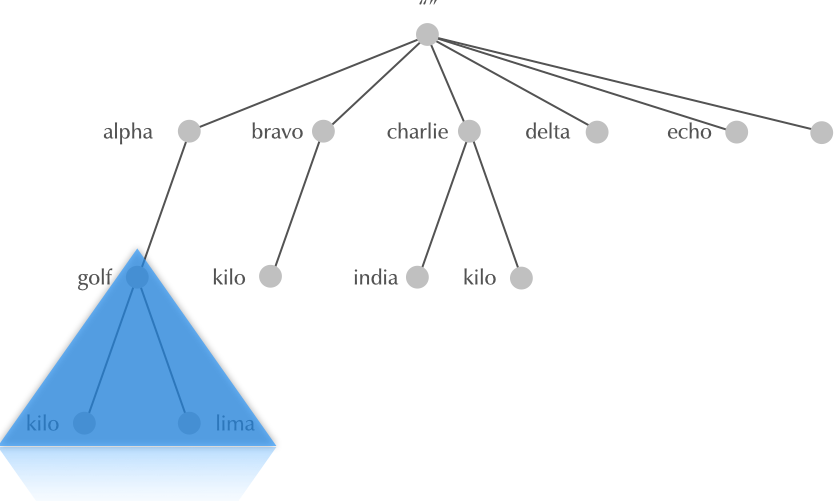
3.13 Subdomain
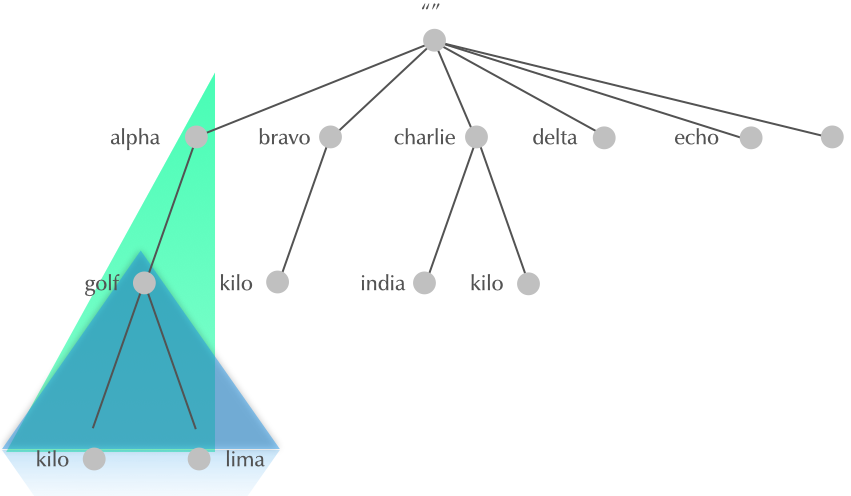
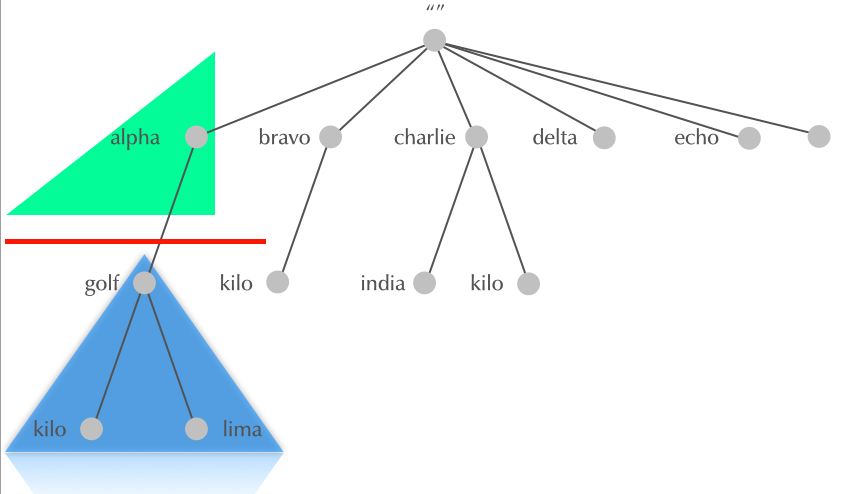
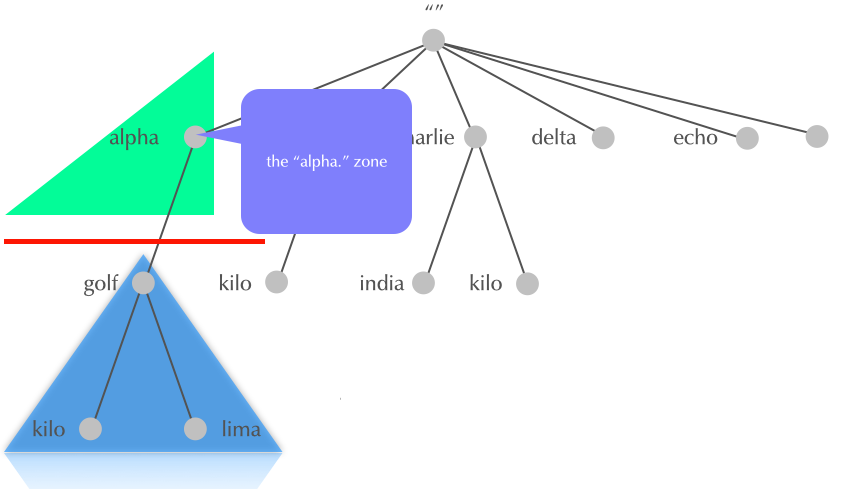
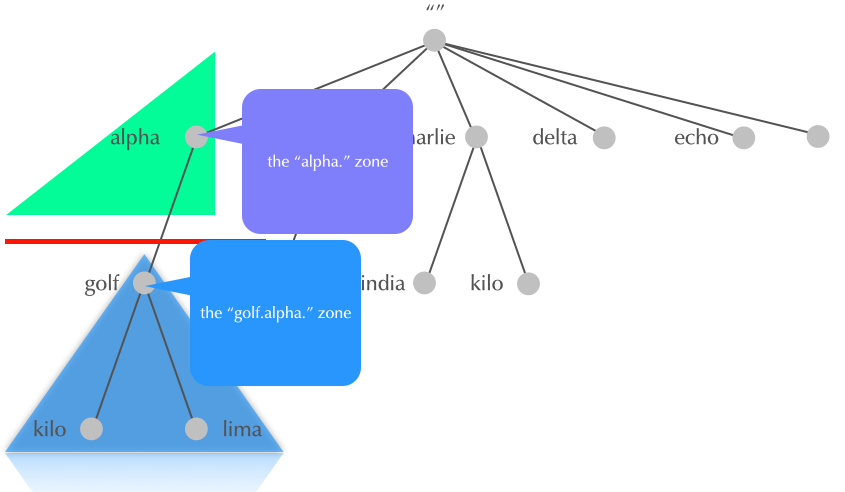
3.14 Why delegation?
HOSTS.TXTwas monolithic, one large file- The DNS system is hierarchical
- parts of the name space are delegated to the owners of the name
- every owner controls the part of the name space she is owning
- every owner can sub-delegate downwards
- delegation goes from parent domain to child domain
- owner of parent domain can revoke delegation (and re-delegate to a different owner)
3.15 Delegation
3.16 Delegation
3.17 Delegation
3.18 Internet DNS: Root-Zone, Top-Level-Domains, Second-Level Domains
- The DNS delegation in the Internet has a specific structure. Other DNS systems (like the DNS used in mobile phone roaming, or local private DNS systems) can have different delegation rules
- RFC 920 defined the original structure of DNS delegation from the root zone
3.18.1 Root-Zone
- The root-zone is the start of all DNS name resolution
- The root-zone is hosted on 13 logical authoritative DNS server
(Root-DNS-Server), named
a.root-servers.nettom.root-servers.net - many logical Root-DNS-Server are spread around the world with identical copies
- You can learn about the Root-DNS-Server system on https://root-servers.org/
- the content of the root-zone is public and can be loaded from some of the root-server systems
dig @f.root-servers.net AXFR .
3.18.2 Generic Top-Level-Domains
- RFC 920 created the original seven generic top-level-domains
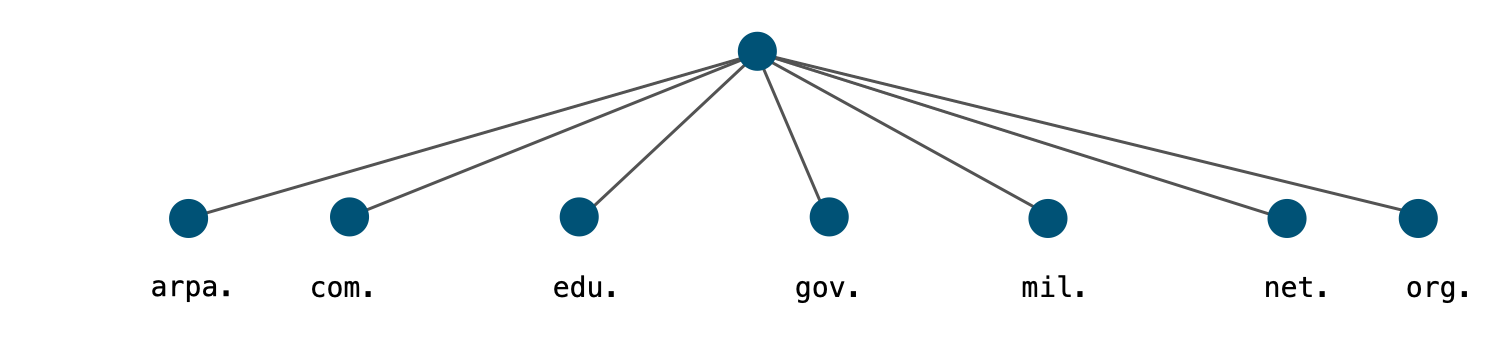
- arpa generic top level domain (gTLD)
- Originally used as a transition device from
HOSTS.TXTto DNS - Now used for Internet infrastructure data, e.g. reverse lookup tree for IPv4 and IPv6 addresses:
- IPv4:
in-addr.arpa. - IPv6:
ip6.arpa.
- IPv4:
- Registry: IANA
- Originally used as a transition device from
- com generic top level domain (gTLD)
- Commercial entities
- Over 150 million subdomains
- Largest Top Level Domain by a factor of six. (2nd is cn:~21 million)
- Registry: Verisign
- edu generic top level domain (gTLD)
- mostly U.S. based, accredited postsecondary institutions
- thousands of subdomains (
berkeley.edu,havard.edu,stanford.edu…) - Registry: Educause (operated by VeriSign)
- gov generic top level domain (gTLD)
- (U.S. Federal) government entities
- hundreds of subdomains (
fbi.gov,gsa.gov,irs.gov… ) - Some U.S. federal agencies use
.fed.us.rather than.gov. - RFC 2146 (U.S. Government Internet Domain Names) defines the use of
.govgTLD - Registry: General Services Administration
- mil generic top level domain (gTLD)
- (U.S.) military entities
- few (public) subdomains (
af.mil,army.mil,navy.mil,usmc.mil… ) - Registry: Defense Information Systems Agency
- net generic top level domain (gTLD)
- formerly networking entities and components
- now a general purpose TLD with nearly 14 million subdomains
- the 4th most popular domain (after
com,cnandde) - Registry: Verisign
- org generic top level domain (gTLD)
- Generally noncommercial entities that do not fit in other categories
- Millions of subdomains (
isc.org,npr.org,pbs.org…) - Finances the Internet Society (ISOC), which itself is responsible for the IETF and IAB
- Registry: Public Interest Registry PIR (operated by Afilias)
3.18.3 Country-Code Top-Level-Domains
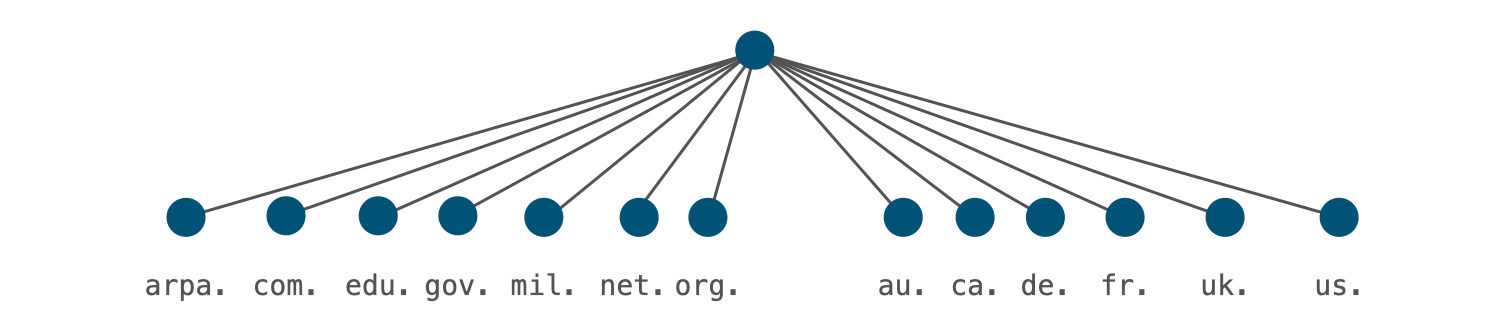
- in 1985 TLDs were reserved for every country
- Called country code top-level domains, or ccTLD (RFC 1591 "Domain Name System Structure and Delegation")
- They match the two-letter abbreviations in ISO-3166-1
- Two were delegated in 1985
- Some that once existed have been deleted (e.g.
.yuYugoslavia)
3.18.4 Special Use Top-Level-Domains
- RFC 2606 (1999 "Reserved Top Level DNS Names") and updates in RFC
6761 (2013 "Special-Use Domain Names") reserved 4 TLDs:
example: for use in examplesinvalid: for use in obviously invalid domain namestest: for use in testslocalhost: to avoid conflict with the use of the (single label) hostnamelocalhostin Unix/Linux systemsexample.com,example.netandexample.orgare also reserved..internalis a new reserved TLD that ICANN has reserved for internal use. This domain is similar to RFC 1912 private IPv4 addresses. (Internet Draft: A Top-level Domain for Private Use)
- Special use domains: pre-internet networks have used domain names
not registered (
.bitnet,.csnet,.uucp). Also newer technologies are using non-registered gTLDs:.onion,.exit: TOR privacy network.swift: SWIFTNet Mail.local: Zeroconf protocol (Apple Bonjour/Rendezvous, Unix/Linux Avahi)
- RFC 8375 - Special-Use Domain 'home.arpa.' defines the special
domain name
home.arpa.. This domain is intended for use inside private networks (similar to RFC 1918 IPv4 addresses). It should not be used in the Internet can be used in internal network DNS systems without risk of collisions with the Internet DNS name space. It is used in the Home Networking Control Protocol (HNCP) suite, but can also used for other cases, such as Microsoft Active Directory domains. - RFC 7050 - Discovery of the IPv6 Prefix Used for IPv6 Address
Synthesis and RFC 8880 - Special Use Domain Name 'ipv4only.arpa'
define the special domain name
ipv4only.arpa. This domain is being used in DNS64 clients on an IPv6-only network to detect the presence of DNS64 and for learning the IPv6 prefix used for protocol translation on the network. - Warning: do no use these reserved names in DNS, not even in a private network, as DNS software treats this domains differently
- IANA Registry for "special use domain names": https://www.iana.org/assignments/special-use-domain-names/special-use-domain-names.xml
3.18.5 New Top-Level-Domains
- in 1988, a new generic top-level domain was introduced:
int.intwas historically used for "Internet infrastructure databases" to replacearpa(for example used asip6.int.)- in 2000, the IAB decided to keep
arpaand useintfor international treaty-based organizations, United Nations agencies, observers at the UN
- Starting in 2000, ICANN allowed several new gTLDs to be created:
info,name,pro,aero,tel,museum,coop,biz…- Today, ICANN policies allow new gTLDs for anyone able to pay:
.xyz,.nrw,.sap,.sport,.search,.google,.etisalat,.grocery…
- Today, ICANN policies allow new gTLDs for anyone able to pay:
3.19 DNS Name Resolution
- DNS Query - what the client sends
[sidebar] image::./images/DNS-Query-00.png[scaledwidth=65%]
[sidebar] image::./images/DNS-Query-01.png[scaledwidth=65%]
[sidebar] image::./images/DNS-Query-02.png[scaledwidth=65%]
[sidebar] image::./images/DNS-Query-03.png[scaledwidth=65%]
- DNS Name Resolution
[sidebar] image::./images/DNS-Name-Resolution-00.png[scaledwidth=65%]
[sidebar] image::./images/DNS-Name-Resolution-01.png[scaledwidth=65%]
[sidebar] image::./images/DNS-Name-Resolution-02.png[scaledwidth=65%]
[sidebar] image::./images/DNS-Name-Resolution-03.png[scaledwidth=65%]
[sidebar] image::./images/DNS-Name-Resolution-04.png[scaledwidth=65%]
[sidebar] image::./images/DNS-Name-Resolution-05.png[scaledwidth=65%]
[sidebar] image::./images/DNS-Name-Resolution-06.png[scaledwidth=65%]
[sidebar] image::./images/DNS-Name-Resolution-07.png[scaledwidth=65%]
[sidebar] image::./images/DNS-Name-Resolution-08.png[scaledwidth=65%]
[sidebar] image::./images/DNS-Name-Resolution-09.png[scaledwidth=65%]
[sidebar] image::./images/DNS-Name-Resolution-10.png[scaledwidth=65%]
[sidebar] image::./images/DNS-Name-Resolution-11.png[scaledwidth=65%]
[sidebar] image::./images/DNS-Name-Resolution-12.png[scaledwidth=65%]
[sidebar] image::./images/DNS-Name-Resolution-13.png[scaledwidth=65%]
[sidebar] image::./images/DNS-Name-Resolution-14.png[scaledwidth=65%]
[sidebar] image::./images/DNS-Name-Resolution-15.png[scaledwidth=65%]
[sidebar] image::./images/DNS-Name-Resolution-16.png[scaledwidth=65%]
[sidebar] image::./images/DNS-Name-Resolution-17.png[scaledwidth=65%]
[sidebar] image::./images/DNS-Name-Resolution-18.png[scaledwidth=65%]
[sidebar] image::./images/DNS-Name-Resolution-19.png[scaledwidth=65%]
3.20 Caching
- DNS Resolver caching
[sidebar] image::./images/DNS-Caching-00.png[scaledwidth=65%]
[sidebar] image::./images/DNS-Caching-01.png[scaledwidth=65%]
[sidebar] image::./images/DNS-Caching-02.png[scaledwidth=65%]
[sidebar] image::./images/DNS-Caching-03.png[scaledwidth=65%]
[sidebar] image::./images/DNS-Caching-04.png[scaledwidth=65%]
[sidebar] image::./images/DNS-Caching-05.png[scaledwidth=65%]
3.21 Negative Caching
NXDOMAIN- the domain name does not exist.NOERROR/NODATA- the domain name exists, but not the RR type. AKA:NOERROR/NOANSWER.- For
NXDOMAINandNOERROR/NODATA, the zone'sSOAis returned in the authoritative section. - The negative TTL is the minimum of SOA's TTL and the SOA's RDATA MIN field. (RFC 2308)
3.21.1 Quiz
- What is the TTL value in resource records?
- Seconds a packet with this RR is allowed to be forwarded
- Seconds the RR is allowed to be stored in a recursive server's cache
- Days the RR is valid in the Internet
3.22 how DNS data is stored and sent / Anatomy of DNS resource records
- DNS Data is stored and sent in units of "DNS resource records" (or DNS RR)
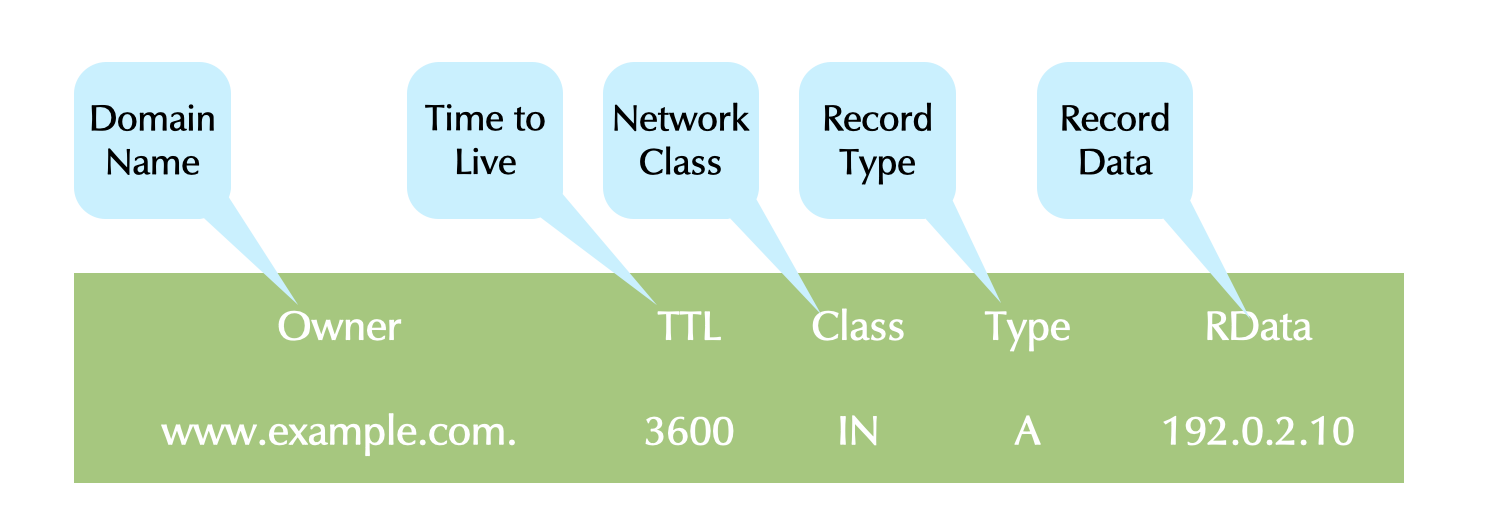
- The fields of DNS resource records
- owner: the domain name that owns the data. This is the index to the DNS database
- TTL: the Time-to-Live, the time in seconds that this DNS data is guaranteed to be valid. This is used to timeout data in caches. It is also sometimes used by applications.
- Class: The network infrastructure this data is useful in. In TCP/IP networks, this is typically IN for Internet protocol.
- Type: The type of data, it can be A for IPv4 Address records, AAAA for IPv6 Addresses, TXT for free form text, NS for nameserver entries and many more
- RData: record data, the data that is attached to the domain name. Depending on the type of record, the RData can have one to many fields
- we find DNS resource records
- in DNS zone database files on authoritative DNS servers
- in the caches of DNS resolver servers
- in the output of a DNS query and troubleshooting tools
- on the wire, the data is transported in binary form (non readable for humans)
- DNS tools convert the DNS resource records from binary form into text form for human consumption
3.23 Resource Record Sets
- A Resource Record Set (RRSet) is all RRs with identical: owner name, network class, TTL, and record type
- Each RR of a RRSet has different RDATA.
- A RRSet is not-explicit, and the RRs do not have to be contiguous in the zone file.
- All RRs in a RRSet are sent in a query response.
- They may be returned in any order.
- The TTLs of all RRs in a RRSet must be identical.
- Otherwise caching can lead to a single point of failure.
- A valid DNS resource record set
| Owner | TTL | Class | Type | RData |
|---|---|---|---|---|
| example.com. | 86400 | IN | NS | a.iana-servers.net. |
| example.com. | 86400 | IN | NS | b.iana-servers.net. |
- An invalid DNS resource record set (different TTLs, duplicate record data)
| Owner | TTL | Class | Type | RData |
|---|---|---|---|---|
| example.invalid. | 86400 | IN | NS | a.iana-servers.net. |
| example.invalid. | 3600 | IN | NS | b.iana-servers.net. |
| example.invalid. | 7200 | IN | NS | b.iana-servers.net. |
4 DNS Clients, DNS Resolvers, and Authoritative Servers
4.1 DNS components
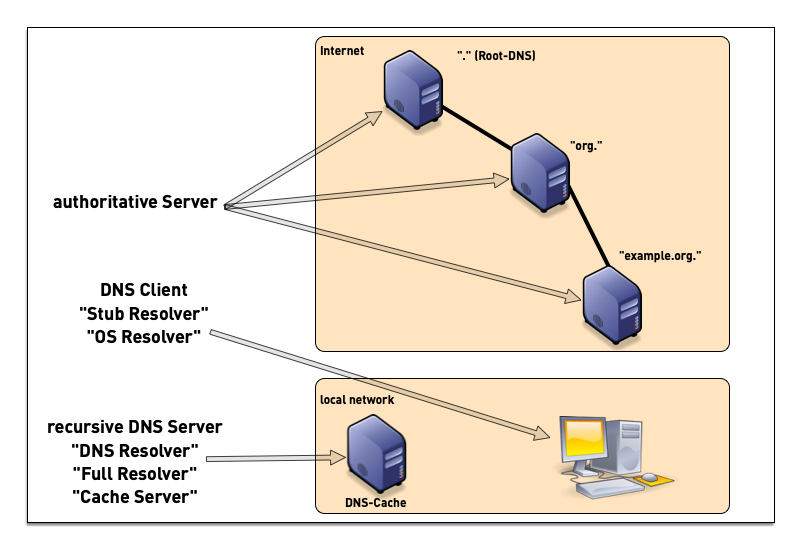
- a DNS installation constists of multiple components
- DNS clients (smartphones, tablets, desktop, laptop, server, IoT devices etc)
- DNS resolver (also named "Caching Server", "Smart Resolver", "recursive DNS Server"
- authoritative DNS Server
4.2 DNS Resolver placement
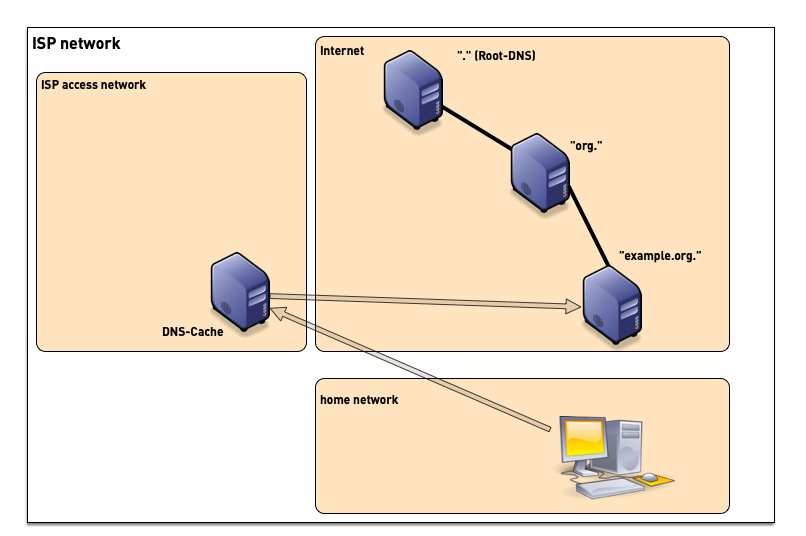
- in managed networks (company, university) the IT department manages one or more dedicated DNS resolvers
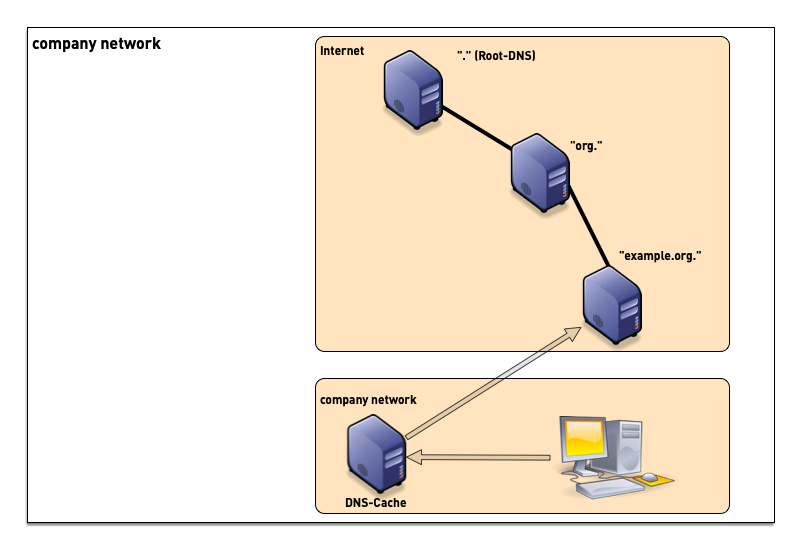
- ISP (Internet Service Provider) customers often use the DNS resolvers provided by the ISP
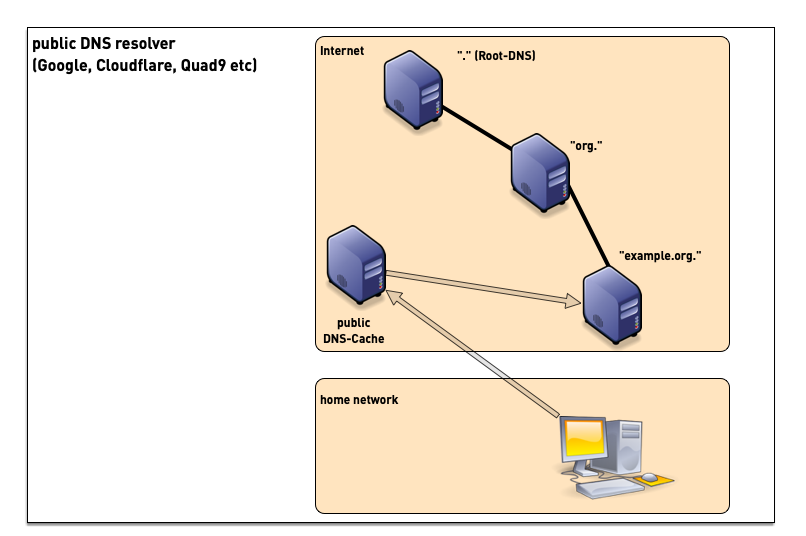
- although sometimes problematic from privacy and security point of view, many users today use public DNS resolvers in the Internet
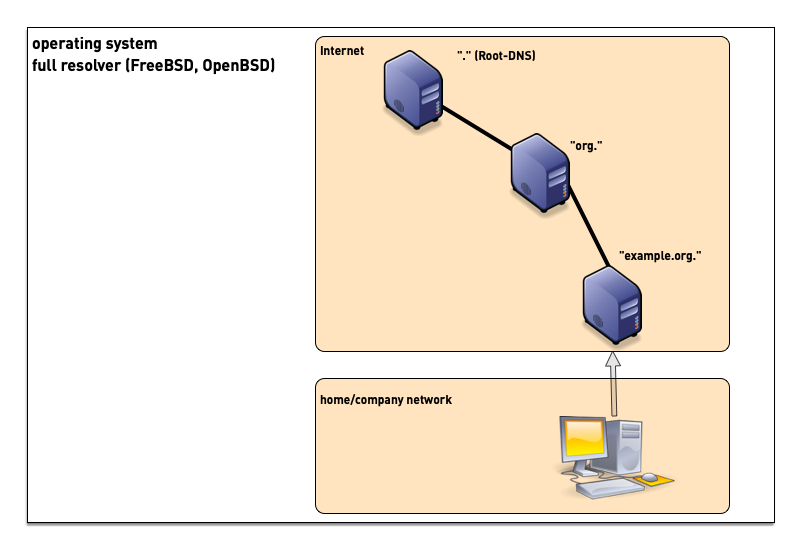
- some operating systems support operating a full DNS resolver on each system
4.3 Authoritative Server, Primary and Secondaries
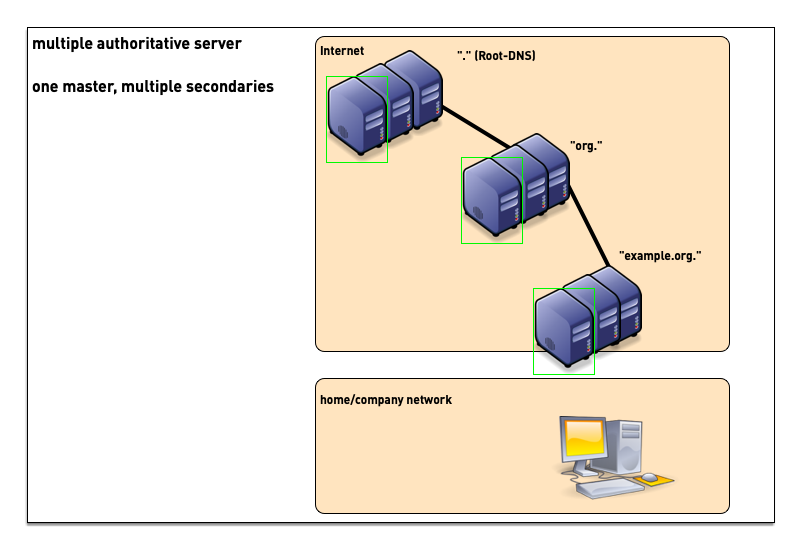
- For redundancy reasons, each DNS zone has multiple authoritative servers (one primary, multiple secondaries holding copies of the zone database)
5 DNS resolver: Authoritative Selection
- A referral commonly has multiple NS entries.
- There is no ranking or prioritization among the servers.
- None is believed to have better information than another.
- Which NS should a resolving server use?
- The same question applies to selecting a root server.
[sidebar] image::./images/Roundtrip-Time-00.png[scaledwidth=65%]
[sidebar] image::./images/Roundtrip-Time-01.png[scaledwidth=65%]
[sidebar] image::./images/Roundtrip-Time-02.png[scaledwidth=65%]
[sidebar] image::./images/Roundtrip-Time-03.png[scaledwidth=65%]
[sidebar] image::./images/Roundtrip-Time-04.png[scaledwidth=65%]
[sidebar] image::./images/Roundtrip-Time-05.png[scaledwidth=65%]
[sidebar] image::./images/Roundtrip-Time-06.png[scaledwidth=65%]
[sidebar] image::./images/Roundtrip-Time-07.png[scaledwidth=65%]
[sidebar] image::./images/Roundtrip-Time-08.png[scaledwidth=65%]
[sidebar] image::./images/Roundtrip-Time-09.png[scaledwidth=65%]
[sidebar] image::./images/Roundtrip-Time-10.png[scaledwidth=65%]
[sidebar] image::./images/Roundtrip-Time-11.png[scaledwidth=65%]
[sidebar] image::./images/Roundtrip-Time-12.png[scaledwidth=65%]
[sidebar] image::./images/Roundtrip-Time-13.png[scaledwidth=65%]
[sidebar] image::./images/Roundtrip-Time-14.png[scaledwidth=65%]
[sidebar] image::./images/Roundtrip-Time-15.png[scaledwidth=65%]
[sidebar] image::./images/Roundtrip-Time-16.png[scaledwidth=65%]
[sidebar] image::./images/Roundtrip-Time-17.png[scaledwidth=65%]
[sidebar] image::./images/Roundtrip-Time-18.png[scaledwidth=65%]
[sidebar] image::./images/Roundtrip-Time-19.png[scaledwidth=65%]
[sidebar] image::./images/Roundtrip-Time-20.png[scaledwidth=65%]
[sidebar] image::./images/Roundtrip-Time-21.png[scaledwidth=65%]
[sidebar] image::./images/Roundtrip-Time-22.png[scaledwidth=65%]
[sidebar] image::./images/Roundtrip-Time-23.png[scaledwidth=65%]
- Most DNS resolver use a clever algorithm called "round trip time measurement"
to probe all authoritative DNS server for a domain at least once
and then uses the fastest while counting down the penalty of the
slower ones (decay).
- using this algorithm, the resolver uses the fastest authoritative from the set, while still probing all others from time to time
6 PowerDNS recursor
6.1 Compiling and Installing the PowerDNS Recursor
- There are several options to install a PowerDNS recursor on a
Linux/Unix operating system
- Using pre-compiled packages from the operating system repositories
- Using pre-compiled packages from PowerDNS B.V. The packages provided by PowerDNS B.V. might be more recent or have special features enabled that are not available in the Linux/Unix repository packages (https://repo.powerdns.com)
- Using a package manager that compiles the software from source, such as pkgsrc (http://www.pkgsrc.org) or nix (https://nixos.org/download.html)
- Compiling directly from source (https://github.com/PowerDNS)
6.1.1 Installation of the PowerDNS recursor on Debian 13
- In the hands-on lab sessions for this training, we will be installing the PowerDNS recursor from the Debain 11 repositories
% apt install pdns-recursor
- After installation, the PowerDNS recursor should be up and running
with the default configuration. You can use the
rec_controltool to check that all PowerDNS recursor threads are alive
% rec_control ping
pong
pong
pong
- The PowerDNS recursor main binary is
pdns_recursor. Beside being used to start the PowerDNS recursor process, it can be used to print out the compile time configuration
# pdns_recursor --version
PowerDNS Recursor 5.2.9 (C) PowerDNS.COM BV
Using 64-bits mode. Built using gcc 14.2.0.
PowerDNS comes with ABSOLUTELY NO WARRANTY. This is free software, and you are welcome to redistribute it according to the terms of the GPL version 2.
Features: libcrypto-ecdsa libcrypto-ed25519 libcrypto-ed448 libcrypto-eddsa lua nod protobuf dnstap-framestream snmp sodium curl DoT scrypt
Configured with: " '--build=x86_64-linux-gnu'
                   '--prefix=/usr'
		   '--includedir=${prefix}/include'
		   '--mandir=${prefix}/share/man'
		   '--infodir=${prefix}/share/info'
		   '--sysconfdir=/etc'
		   '--localstatedir=/var'
		   '--disable-option-checking'
		   '--libdir=${prefix}/lib/x86_64-linux-gnu'
		   '--runstatedir=/run'
		   '--disable-maintainer-mode'
		   '--disable-dependency-tracking'
		   '--sysconfdir=/etc/powerdns'
		   '--enable-systemd'
		   '--with-systemd='
		   '--enable-reproducible'
		   '--disable-silent-rules'
		   '--enable-unit-tests'
		   '--with-service-user=pdns'
		   '--with-service-group=pdns'
		   '--with-libcap'
		   '--with-libsodium'
		   '--with-lua'
		   '--with-net-snmp'
		   '--with-protobuf=yes'
		   '--enable-dns-over-tls'
		   '--enable-dnstap'
		   '--with-libcrypto=/usr'
		   'build_alias=x86_64-linux-gnu'
		   'CFLAGS=-g -O2 -Werror=implicit-function-declaration -ffile-prefix-map=/build/reproducible-path/pdns-recursor-5.2.9=. -fstack-protector-strong -fstack-clash-protection -Wformat -Werror=format-security -fcf-protection' 'LDFLAGS=-Wl,-z,relro -Wl,-z,now' 'CPPFLAGS=-Wdate-time -D_FORTIFY_SOURCE=2' 'CXXFLAGS=-g -O2 -ffile-prefix-map=/build/reproducible-path/pdns-recursor-5.2.9=. -fstack-protector-strong -fstack-clash-protection -Wformat -Werror=format-security -fcf-protection -DPACKAGEVERSION='\''"5.2.9-0+deb13u1.Debian"'\'''"
- The default security settings of the PowerDNS recursor service is
already quite good, as can be seen with
systemd-analyze:
% systemd-analyze security pdns-recursor
- However some additional hardening steps are possible (optional):
MemoryDenyWriteExecute- enables a function in the memory management unit (and modern CPUs) that makes memory pages either write-able (data) or executable (program code), but never both. This prevents certain attacks, such as buffer overflow attacksumask- Files created by the PowerDNS recursor processes can only be read or written by the PowerDNS recursor user orroot, but not by any other userMemoryMax- Restrict the memory consumption of the PowerDNS process to 1 GB. This is usually more than enough for an DNS resolver server and prevents system instability in case of a memory leak. For a DNS resolver with a large user base (millions of user), this setting might need to be adjusted. However values over 2 GB are usually not needed.TasksMax- restricts the number of threads (tasks) of the PowerDNS service to 512. This prevents DoS attacks through a security vulnerability that would allow and external attacker to start new threads. This setting should be monitored and adjusted to the real world scenario where PowerDNS is deloyed (number of CPU cores, network interfaces etc).
MemoryDenyWriteExecute=true
UMask=077
MemoryMax=1G
TasksMax=512
6.1.2 Exercise
- Login to your hands-on lab machine
pdnsrNNN.dnslab.org - Become
root - Install the PowerDNS recursor server from the Debian 13 package repository
- Use
systemctl edit --full pdns-recursorto add the additional hardening configuration seen above. Add the additional lines inside the[service]section - Restart the PowerDNS service, and check with
systemctl statusthat the Task and Memory restrictions are in place
6.2 PowerDNS recursor testen
- Normale DNS-Anfrage:
dig @localhost heise.de - Anfrage einer DNSSEC gesicherten Domain
dig @localhost linuxhotel.de(AD-Flag sollte vorhanden sein) - Anfrage nach einer Reverse-Auflösung:
dig -x 49.12.11.242 @localhost - Anfrage nach einer nicht existierenden Domain (negatives Caching, NXDOMAIN-Antwort):
dig @localhost xyz.heise.de
6.3 PowerDNS recursor configuration
- The PowerDNS recursor configuration file is in
/etc/powerdns/recursor.conf. - Below is a basic working configuration for a PowerDNS recursor
dnssec:
  # validation: process # default
  trustanchorfile: /usr/share/dns/root.key
recursor:
  hint_file: /usr/share/dns/root.hints
  include_dir: /etc/powerdns/recursor.d
  security_poll_suffix: ''
incoming:
 # listen:
 # - 127.0.0.1 # default
outgoing:
 # source_address:
 # - 0.0.0.0 # default
- After restart, the PowerDNS recursor listens on the loopback address 127.0.0.1 on port 53 (DNS) UDP and TCP
% lsof -Poni :53
COMMAND     PID USER   FD   TYPE DEVICE OFFSET NODE NAME
pdns_recu 22415 pdns    6u  IPv4  90499    0t0  UDP 127.0.0.1:53
pdns_recu 22415 pdns    9u  IPv4  90502    0t0  TCP 127.0.0.1:53 (LISTEN)
- The resolver should now resolve DNS queries
% dig @127.0.0.1 linuxhotel.de

; <<>> DiG 9.20.21-1~deb13u1-Debian <<>> @127.0.0.1 linuxhotel.de
; (1 server found)
;; global options: +cmd
;; Got answer:
;; ->>HEADER<<- opcode: QUERY, status: NOERROR, id: 45218
;; flags: qr rd ra ad; QUERY: 1, ANSWER: 1, AUTHORITY: 0, ADDITIONAL: 1

;; OPT PSEUDOSECTION:
; EDNS: version: 0, flags:; udp: 512
;; QUESTION SECTION:
;linuxhotel.de.                 IN      A

;; ANSWER SECTION:
linuxhotel.de.          3600    IN      A       49.12.11.242

;; Query time: 96 msec
;; SERVER: 127.0.0.1#53(127.0.0.1) (UDP)
;; WHEN: Wed May 06 05:47:49 UTC 2026
;; MSG SIZE  rcvd: 58
6.4 Konfiguration anpassen
- ändere die PowerDNS-Recursor Konfiguration, so das der Recursor auf der IPv6-Loopback (::1) und auch auf der IPv4-Loopback-Adresse (127.0.0.1) horcht
- Starte den PowerDNS-Recursor neu:
systemctl restart pdns-recursor - Prüfe das der PowerDNS-Recursor erfolgreich neu gestartet wurde:
systemctl status pdns-recursor - Teste eine DNS-Anfrage über IPv6-Loopback:
dig -6 @localhost linuxhotel.de
6.5 Solution
dnssec:
  # validation: process # default
  trustanchorfile: /usr/share/dns/root.key
recursor:
  hint_file: /usr/share/dns/root.hints
  include_dir: /etc/powerdns/recursor.d
  security_poll_suffix: ''
incoming:
  listen:
    - 127.0.0.1 # default
    - ::1
outgoing:
 # source_address:
 # - 0.0.0.0 # default
6.6 DNS Cache
- Providing a DNS cache for faster DNS name resolution is a major
part of a DNS resolver (the other important function is the smart
resolver that can traverse the DNS namespace tree)
- Most of the time, the DNS cache is maintenance free
- But in case of attacks or external mis-configurations, the DNS resolver administrator might need to maintain the cache content manually
6.6.1 PowerDNS cache maintenance
- Sometimes wrong DNS data might be stored in the cache (caused by an operational error on the authoritative zone side, or through an cache-poisioning attack
- The command
rec_control dump-cachecan be used to write the content of the cache into a file in human readable form (RFC 1035 master file format)- Such a file can be quite large, up to 400% larger than the (binary) cache content in memory. Check the available space on the file system first before dumping a large cache!
% rec_control dump-cache /some/path/in/the/filesystem/cache.txt
dumped 88 records
- Malicious or wrong content in the cache can be removed with the
wipe-cachesub-command ofrec_control- This command takes one or more domain names and removed all cached entries (all record types) of that name (but only that name).
- When the domain name is suffixed with a
$, the domain name and all sub-domains are removed as well
% rec_control wipe-cache powerdns.com$
- The sub-command
wipe-cache-typedcan be used to remove a specific record type (A, AAAA, MX, TXT …) of a domain name from the cache
% rec_control wipe-cache-typed MX powerdns.com$
6.6.2 Exercise
- Resolve the name
yahoo.co.jp(Yahoo Japan) from your PowerDNS recursor. Note the DNS resolution time - Repeat the query. The DNS resolution time should now be much lower,
as the answer comes from the cache
- Repeat the query, see the TTL decrease
- Wipe the name
yahoo.co.jpfrom the cache, repeat the query, note the query time - Wipe the top-level-domain
jpand all sub-domains from the cache, repeat the query foryahoo.co.jp, note the query time - Dump the content of the cache into
/tmp/cache.txt, try to view the file. Are you able to view the file? What might be wrong? How to solve this? Discuss with the other training participants.
6.6.3 Solution
- As a security measure, PowerDNS recursor run with a private
/tmpand/var/tmpdirectory- The file is written, but only the same process can see and access it (see systemd hardening above)
% rec_control dump-cache /tmp/cache.txt
dumped 88 records
% less /tmp/cache.txt
/tmp/cache.txt: No such file or directory
- We need to write the file into a non-temp directory
% mkdir /var/cache/pdns
% chown pdns /var/cache/pdns/
% rec_control dump-cache /var/cache/pdns/cache.txt
% less /var/cache/pdns/cache.txt
6.7 Check PowerDNS-Recursor config
- Before loading a new configuration into the PowerDNS recursor, it is recommended to check the configuration file for errors:
# pdns_recursor --config=check
6.8 Webserver
- As the other PowerDNS products (PowerDNS authoritative server,
DNSdist), the PowerDNS recursor comes with a build in web-server
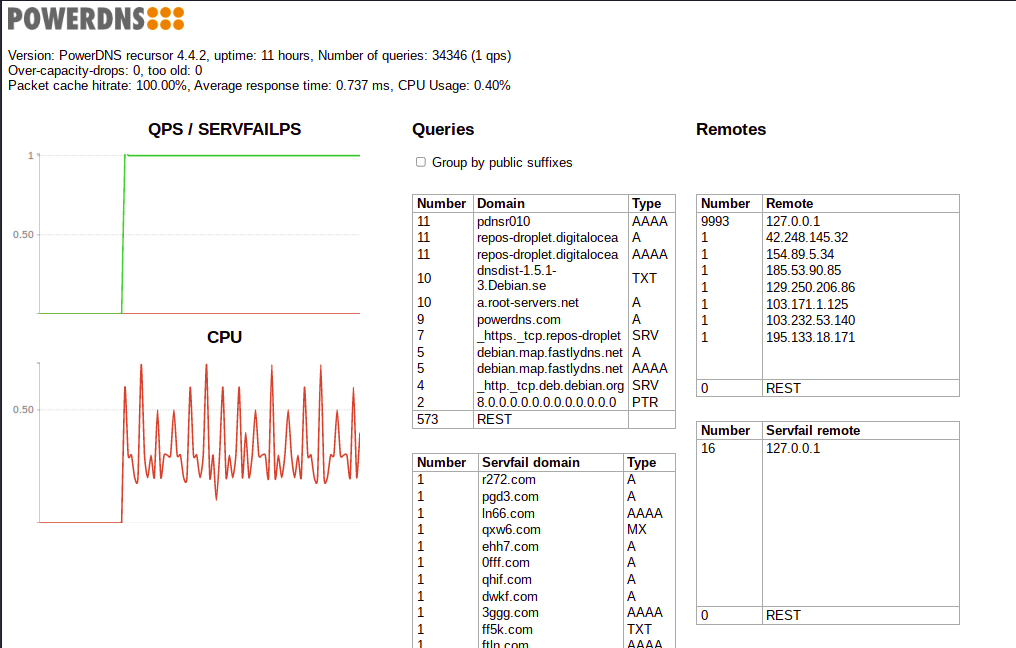
- The web-server does show the CPU utilization, current queries per second (QPS) and SERVFAIL per second, Query-Names and remote IP addresses from DNS clients
- For the PowerDNS recursor web-server to work, the API-key must be
configured, even if not used. At least 16 byte of random key is
recommended. Such a key can be generated as a hexadecimal string
with
openssl:
% openssl rand -hex 16
- Example configuration
# Webserver
webservice:
  webserver: true
  address: 209.38.102.166
  allow_from:
    - 0.0.0.0/0
  password: PowerDNS
  port: 8053
  api_key: <hex-string> # enter your unique hex string, see above
6.8.1 Exercise
- Enable the web-interface for PowerDNS recursor
- Login to the web-interface with a web-browser, example URL: http://pdnsrNNN.dnslab.org:8053/
- Send some DNS queries to the PowerDNS recursor, see the statistics change
6.9 SplitDNS and Forward-Zones
- Sometimes it is desired that a DNS resolver can resolve names that
are not delegated from the Internet DNS root down
- Internal versions of a zone that also exists on the Internet (Split-DNS)
- Internal Active Directory domains
- Local-Domains (
home.arpa) - For testing purposes of new Internet domains, before connecting them to the Internet DNS delegation tree
- DNS resolver can send queries to upstream server in two different
modes
- Recursive mode (
RD– recursion desired – flag set) - these queries should be send to other DNS resolver - Iterative mode (
RD– recursion desired – flag clear) - these queries should be send to authoritative DNS server
- Recursive mode (
- In other DNS server software (BIND 9, Windows DNS),
forwardingalways is operating inrecursive mode. Iterative name resolution to authoritative server is implemented through Stub-Zones- The PowerDNS recursor can be configured to do forwarding in
recursiveoriterativemode
- The PowerDNS recursor can be configured to do forwarding in
6.9.1 Forwarding (Recursive mode)
- Forwarding in recursive mode is configured with one or more
zone.recursestatements in the configuration file Use.to generate a global forwarding where all queries to being forwarded to the upstream DNS resolver
forward_zones_recurse:
  - zone: example.com
    forwarders:
    - 192.0.2.53
    - 100.64.1.10
- Exercise
- Configure a forwarding to 2 (!) upstream DNS resolver from Quad9
(https://www.quad9.net) for the domain name
powerdns.com(and everything below) - Restart the PowerDNS recursor
- Run
tcpdumpin a separate terminal window (or usetmux) to observe the DNS queries going out from the server machine. Send test queries forpowerdns.comand other domains. Validate that the requests forpowerdns.comare being send to Quad9.
- Configure a forwarding to 2 (!) upstream DNS resolver from Quad9
(https://www.quad9.net) for the domain name
- Solution
- PowerDNS recusor configuration
forward_zones_recurse:
- zone: powerdns.com
  forwarders:
  - 9.9.9.9
  - 149.112.112.112
tcpdumpcommand
% tcpdump port 53 and host 9.9.9.9 or host 149.112.112.112
tcpdump: verbose output suppressed, use -v[v]... for full protocol decode
listening on eth0, link-type EN10MB (Ethernet), snapshot length 262144 bytes
15:34:03.721440 IP pdnsrNNN.dnslab.org.31778 > dns9.quad9.net.domain: 30694+% [1au] DS? www.powerdns.com. (45)
15:34:03.733552 IP dns9.quad9.net.domain > pdnsrNNN.dnslab.org.31778: 30694$ 0/4/1 (500)
15:34:03.733852 IP pdnsrNNN.dnslab.org.18160 > dns9.quad9.net.domain: 23994+% [1au] DNSKEY? powerdns.com. (41)
15:34:03.742156 IP dns9.quad9.net.domain > pdnsrNNN.dnslab.org.18160: 23994$ 3/0/1 DNSKEY, DNSKEY, RRSIG (765)
15:34:03.742854 IP pdnsrNNN.dnslab.org.22697 > dns9.quad9.net.domain: 57733+% [1au] A? www.powerdns.com. (45)
15:34:03.929210 IP dns9.quad9.net.domain > pdnsrNNN.dnslab.org.22697: 57733$ 2/0/1 A 188.166.104.92, RRSIG (233)
6.9.2 Sending queries to a non-delegated zone (Iterative forwarding)
- Iterative forwarding is configured with the
forward-zonestatement. The statement format is identical withforward_zone_recurse.
forward_zones:
- zone: zone.internal
  forwarders:
  - 10.0.0.1
  - 192.168.10.53
- Exercise
- There is an undelegated DNS zone with the name
undelegated.home.arpahosted on the authoritative DNS serverns3.myinfrastructure.org- Check that this zone cannot be resolved with normal DNS name resolution
dig @localhost undelegated.home.arpa(should be aNXDOMAINanswer) - Configure a non-recursive (iterative) forwarding for this zone
- Restart the PowerDNS recursor and test if you can now resolve the zone
- Check that this zone cannot be resolved with normal DNS name resolution
- There is an undelegated DNS zone with the name
- Solution
- PowerDNS recursor configuration:
forward_zones:
- zone: undelegated.home.arpa
  forwarders:
  - 5.45.109.212
- Now the DNS resolver can reach the undelegated zone
$ dig @localhost undelegated.home.arpa

; <<>> DiG 9.16.22-Debian <<>> undelegated.home.arpa
;; global options: +cmd
;; Got answer:
;; ->>HEADER<<- opcode: QUERY, status: NOERROR, id: 56466
;; flags: qr rd ra; QUERY: 1, ANSWER: 1, AUTHORITY: 0, ADDITIONAL: 1

;; OPT PSEUDOSECTION:
; EDNS: version: 0, flags:; udp: 512
;; QUESTION SECTION:
;undelegated.home.arpa.         IN      A

;; ANSWER SECTION:
undelegated.home.arpa.  3600    IN      A       5.45.109.212

;; Query time: 27 msec
;; SERVER: 127.0.0.1#53(127.0.0.1)
;; WHEN: Tue Nov 02 20:12:16 UTC 2021
;; MSG SIZE  rcvd: 66
7 Recursion-Depth – changes to BIND 9 (and other DNS resolver) in October 2025
- Due to attacks on non-DNSSEC DNS zone in 2025, the authors of DNS
resolver software changed the processing of delegation "glue"
records:
- BIND now only trusts glue records if, in the associated NS record, the target name (right side) is a subdomain of the owner name (left side). Glue associated with other names is ignored, and those names are iteratively resolved instead.
- This enhances the security posture of BIND, but some unintended side effects may also be encountered. Operators should be aware of the potential consequences.
- On an "cold" (empty) cache, some queries with deep recursion depth can return "SERVFAIL" for the first few queries
- Some domain might not resolve at all (circular dependencies, broken delegations) that used to resolve with older versions of BIND 9
- Used the "Transitive Trust Checker" to visualize the delegation dependencies of a zone https://trans-trust.verisignlabs.com/?z=teams.microsoft.com
- See " Operational Notification: Impact of Stricter Glue Checking" https://kb.isc.org/docs/strict-glue
- ISC is working on new code inside BIND 9 to mitigate the effects of these new security fixes (See https://gitlab.isc.org/isc-projects/bind9/-/merge_requests/11205 [Free ISC Gitlab account required])
7.1 Recommendations for Domain owner
- Check the "transitive trust" of your domain with https://trans-trust.verisignlabs.com/
- Try to flatten the delegation depth
- Fix issues in the delegation (circular dependencies, missing "glue")
- Remove false "glue": glue records in the associated NS record where the target name (right side) is not a subdomain of the owner name (left side)
- Deploy DNSSEC (so that these hardenings of insecure DNS is not needed anymore)
8 Operating a PowerDNS authoritative Server
8.1 Virtual machines for this lab
- User :
user - Password:
PowerDNS - Root-Shell via
sudo -i
8.2 Secondary Authoritative PowerDNS
| NNN | Name | URL for Web-based Terminal | SSH Access | Zone |
|---|---|---|---|---|
| 001 | https://pdns001b.dnslab.org | ssh user@pdns001b.dnslab.org | zone001.dnslab.org | |
| 002 | https://pdns002b.dnslab.org | ssh user@pdns002b.dnslab.org | zone002.dnslab.org | |
| 003 | https://pdns003b.dnslab.org | ssh user@pdns003b.dnslab.org | zone003.dnslab.org | |
| 004 | https://pdns004b.dnslab.org | ssh user@pdns004b.dnslab.org | zone004.dnslab.org | |
| 005 | https://pdns005b.dnslab.org | ssh user@pdns005b.dnslab.org | zone005.dnslab.org | |
| 006 | https://pdns006b.dnslab.org | ssh user@pdns006b.dnslab.org | zone006.dnslab.org | |
| 007 | --- | https://pdns007b.dnslab.org | ssh user@pdns007b.dnslab.org | zone007.dnslab.org |
| 008 | --- | https://pdns008b.dnslab.org | ssh user@pdns008b.dnslab.org | zone008.dnslab.org |
| 009 | --- | https://pdns009b.dnslab.org | ssh user@pdns009b.dnslab.org | zone009.dnslab.org |
| 010 | Carsten (Trainer) | https://pdns010b.dnslab.org | ssh user@pdns010b.dnslab.org | zoneNNN.dnslab.org |
8.3 Typographical conventions
- A prompt starting with
$marks a user shell (unprivileged user) - A prompt starting with
%marks a root shell (super user). We've used%instead the more popular#to separate the shell prompt from configuration examples that contain comments starting with the hash (or octothorb) character#
8.4 Authoritative DNS server deployment strategies (hidden primary, DNSSEC signer, anycast)
8.4.1 Authoritative DNS Server location
- Authoritative DNS server, such as the PowerDNS server, can be deployed in various different setups
- Classic DNS
- In a classic case, one DNS server hosts the primary (master) zones
and one or more other server host the secondary zones (slave zones)
- The zone content is maintained on the machine hosting the primary zone
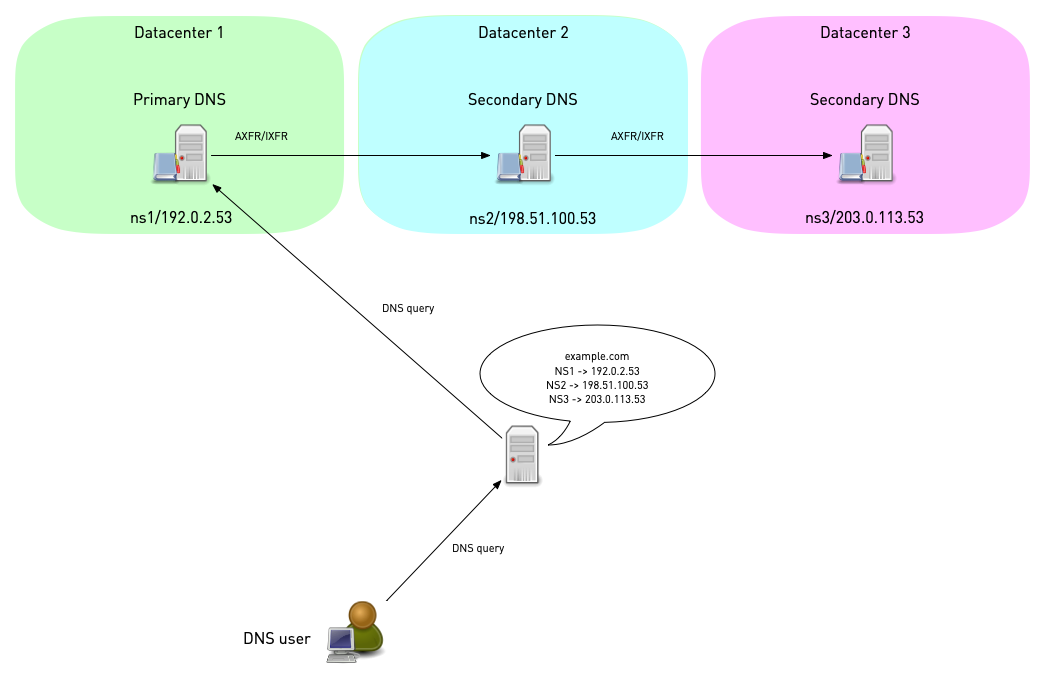
- The secondary zones are synchronized via full zone transfer (AXFR) or incremental zone transfer (IXFR)
- The server should be placed in different data-center and in different autonomous systems (AS)
- There should be authoritative server near each customer population to make use of the DNS resolver round-trip-time measurement
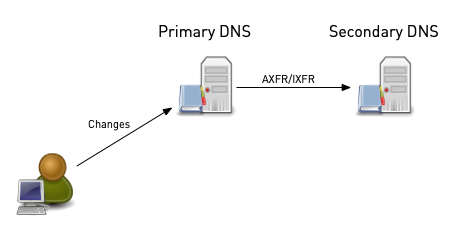
- In classic DNS deployments, each authoritative server has one or more dedicated IP-addresses and a single domain name for the DNS service
- In a classic case, one DNS server hosts the primary (master) zones
and one or more other server host the secondary zones (slave zones)
- Anycast deployments
- To enhance resilience against certain attacks (like distributed denial of service attacks), authoritative server can be deployed with anycast addresses and routing
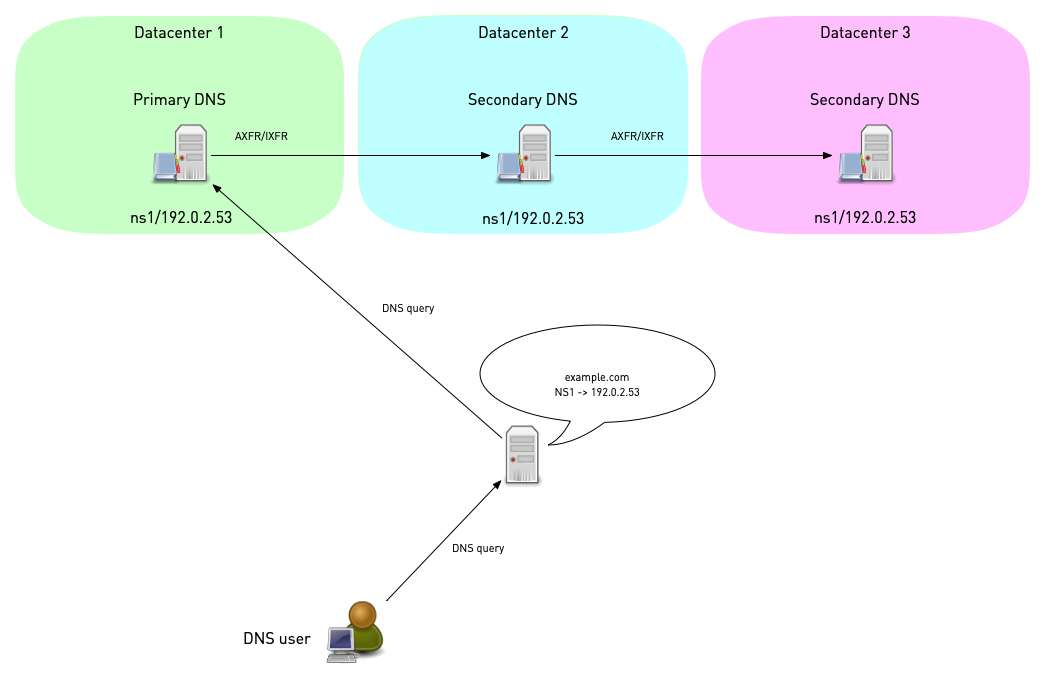
- In an anycast deployment, all authoritative server have the same IP address (IPv6 or IPv4) and the same domain name and are located in different routing domains / autonomous systems (AS)
- The routing protocol (BGP for Internet routing or OSPF for
internal routing) is being used to direct the DNS query to an
authoritative DNS server with optimal network distance to the
client
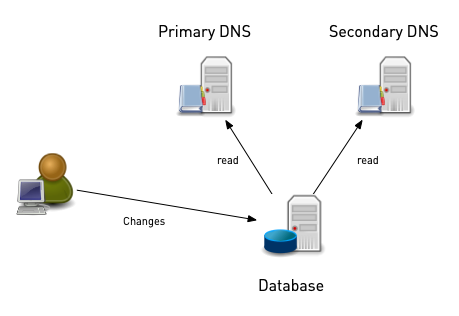
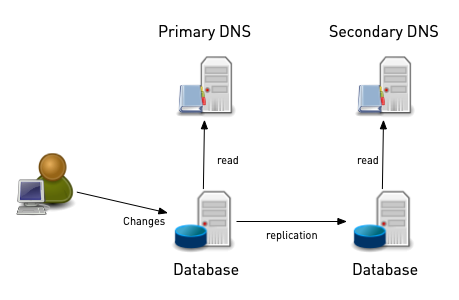
- Database zone storage
- Some DNS server products (such as PowerDNS, BIND 9, Microsoft DNS) support zone storage in database systems (SQL or other, like NoSQL, LDAP/Active directory)
- In such an setup, all authoritative DNS server are primaries (multi-master)
- One option is to have all DNS server to connect to the same
database (shared database setup)
- Alternatively, multiple databases can be used. The DNS data is then
either synchronized with database replication or with traditional
DNS functions such as AXFR/IXFR zone-transfer
8.4.2 Hidden Primaries
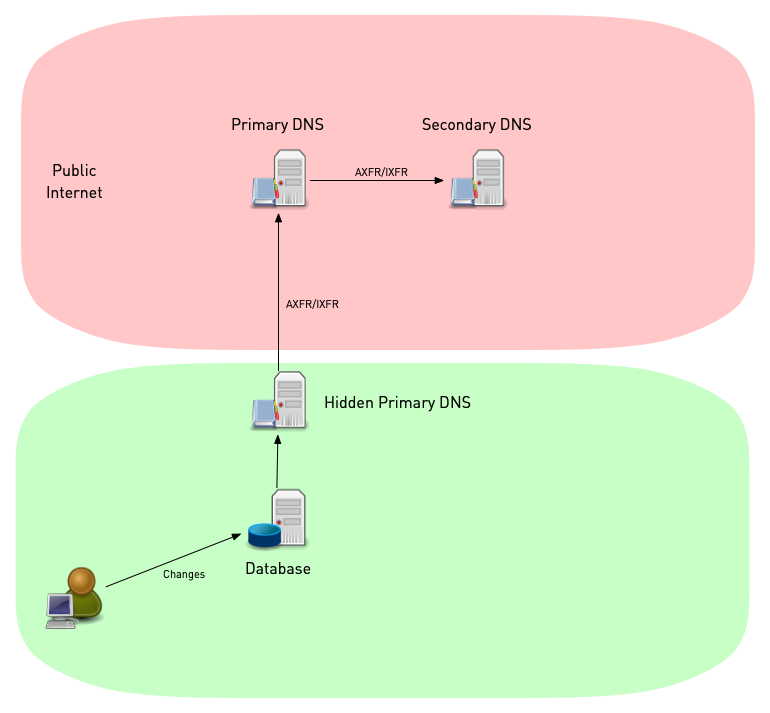
- For security reasons, it sometimes not desirable to have the zone
data write-able on a server that is exposed to the Internet
- In such situations, a hidden primary setup can be useful
- In an hidden primary setup, the server hosting the primary zone is located inside a protected network (often behind a firewall)
- The public secondaries are exposed to the Internet, but as secondaries the zone data is read-only.
- In a hidden primary setup, the delegation and in-zone NS-records
do only list the publicly reachable secondaries
- As an option, the domain name of the hidden primary can be
listed in the SOA record
MNAMEfield to support synamic updates to the zone
- As an option, the domain name of the hidden primary can be
listed in the SOA record
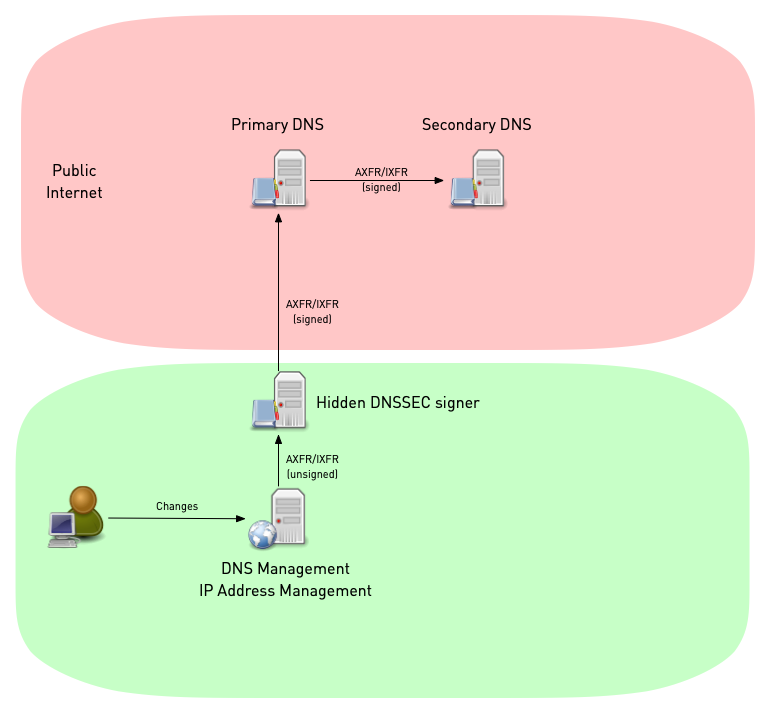
- For DNSSEC signed zones, the hidden master could also act as a
DNSSEC signer, adding DNSSEC data to the zones
- The precious DNSSEC keys are not exposed to the Internet
- Non-DNSSEC aware DNS management software can be augmented with DNSSEC capabilities using such a hidden signer (also known as a bump-in-the-wire signer.
8.5 Downloading, Compiling and Installing PowerDNS authoritative Server
- There are several options to install a PowerDNS authoritative DNS
server on a Linux/Unix operating system
- Using pre-compiled packages from the operating system repositories
- Using pre-compiled packages from PowerDNS B.V. The packages provided by PowerDNS B.V. might be more recent or have special features enabled that are not available in the Linux/Unix repository packages (https://repo.powerdns.com)
- Using a package manager that compiles the software from source, such as pkgsrc (http://www.pkgsrc.org) or nix (https://nixos.org/download.html)
- Compiling directly from source (https://github.com/PowerDNS)
8.5.1 Installing PowerDNS authoritative Server on Debian 13
- In the hands-on lab sessions for this training, we will be installing the PowerDNS server from the Debain 13 repositories
apt-get install pdns-server
- PowerDNS supports a range of different backend (SQL Database, BIND 9, LDAP, Lua, Pipe etc). To list the available PowerDNS backends (on Debian 13):
# apt search pdns-backend
Sorting... Done
Full Text Search... Done
pdns-backend-bind/stable,now 4.4.1-1 amd64 [installed,automatic]
  BIND backend for PowerDNS

pdns-backend-geoip/stable 4.4.1-1 amd64
  GeoIP backend for PowerDNS

pdns-backend-ldap/stable 4.4.1-1 amd64
  LDAP backend for PowerDNS

pdns-backend-lmdb/stable 4.4.1-1 amd64
  LMDB backend for PowerDNS

pdns-backend-lua2/stable 4.4.1-1 amd64
  Lua2 backend for PowerDNS

pdns-backend-mysql/stable 4.4.1-1 amd64
  MySQL backend for PowerDNS

pdns-backend-odbc/stable 4.4.1-1 amd64
  UnixODBC backend for PowerDNS

pdns-backend-pgsql/stable 4.4.1-1 amd64
  PostgreSQL backend for PowerDNS

pdns-backend-pipe/stable 4.4.1-1 amd64
  pipe/coprocess backend for PowerDNS

pdns-backend-remote/stable 4.4.1-1 amd64
  remote backend for PowerDNS

pdns-backend-sqlite3/stable 4.4.1-1 amd64
  sqlite 3 backend for PowerDNS

pdns-backend-tinydns/stable 4.4.1-1 amd64
  tinydns compatibility backend for PowerDNS
- Select and install once or more of the available backends. In this example we're installing the MySQL/MariaDB backend:
% apt install pdns-backend-mysql
- After installation, the PowerDNS server should be up and running
with a default configuration. To check the status of the PowerDNS
service, we use
systemctl status pdns:
# systemctl status pdns.service
● pdns.service - PowerDNS Authoritative Server
     Loaded: loaded (/lib/systemd/system/pdns.service; enabled; vendor preset: enabled)
     Active: active (running) since Fri 2021-10-29 06:38:25 UTC; 14s ago
       Docs: man:pdns_server(1)
	     man:pdns_control(1)
	     https://doc.powerdns.com
   Main PID: 22789 (pdns_server)
      Tasks: 8 (limit: 1132)
     Memory: 43.6M
	CPU: 139ms
     CGroup: /system.slice/pdns.service
	     └─22789 /usr/sbin/pdns_server --guardian=no --daemon=no --disable-syslog --log-timestamp=no --write-pid=no

Oct 29 06:38:25 pdns01 pdns_server[22789]: TCP server bound to [::]:53
Oct 29 06:38:25 pdns01 pdns_server[22789]: PowerDNS Authoritative Server 4.4.1 (C) 2001-2020 PowerDNS.COM BV
Oct 29 06:38:25 pdns01 pdns_server[22789]: Using 64-bits mode. Built using gcc 10.2.1 20210110.
Oct 29 06:38:25 pdns01 pdns_server[22789]: PowerDNS comes with ABSOLUTELY NO WARRANTY. This is free software, and you are welcome to redistribute it according to the terms >
Oct 29 06:38:25 pdns01 pdns_server[22789]: Creating backend connection for TCP
Oct 29 06:38:25 pdns01 pdns_server[22789]: [bindbackend] Parsing 0 domain(s), will report when done
Oct 29 06:38:25 pdns01 pdns_server[22789]: [bindbackend] Done parsing domains, 0 rejected, 0 new, 0 removed
Oct 29 06:38:25 pdns01 systemd[1]: Started PowerDNS Authoritative Server.
Oct 29 06:38:25 pdns01 pdns_server[22789]: About to create 3 backend threads for UDP
Oct 29 06:38:25 pdns01 pdns_server[22789]: Done launching threads, ready to distribute questions
- The default security settings of the PowerDNS service is already
quite good, as can be seen with
systemd-analyze:
% systemd-analyze security pdns
- However some additional hardening steps are possible (optional):
MemoryDenyWriteExecute- enables a function in the memory management unit (and modern CPUs) that makes memory pages either write-able (data) or executable (program code), but never both. This prevents certain attacks, such as buffer overflow attacksumask- Files created by the PowerDNS processes can only be read or written by the PowerDNS user orroot, but not by any other userMemoryMax- Restrict the memory consumption of the PowerDNS process to 2 GB. This is usually more than enough for an authoritative server even with large zone files and prevents system instability in case of a memory leakTasksMax- restricts the number of threads (tasks) of the PowerDNS service to 20. This prevents DoS attacks through a security vulnerability that would allow and external attacker to start new threads. This setting should be monitored and adjusted to the real world scenario where PowerDNS is deloyed (number of CPU cores, network interfaces etc).
# Additional hardening for the PowerDNS systemd unit
MemoryDenyWriteExecute=true
UMask=077
MemoryMax=2G
TasksMax=20
8.5.2 Exercise
- Login to your hands-on lab machine
pdnsNNNa.dnslab.org- Account
user - Password
PowerDNS - use
sshorhttpsfrom a web browser
- Account
- Become
root - Install the PowerDNS authoritative server from the Debian 13 package repository
- Use
systemctl edit --full pdnsto add the additional hardening configuration shown above. Add the additional lines inside the[service]section - Restart the PowerDNS service, and check with
systemctl statusthat the Task and Memory restrictions are in place
8.6 SQL Database-Backend (MySQL/MariaDB)
- MySQL (or MariaDB) is a popular backend for PowerDNS server. To install MariaDB/MySQL on Debian 13, execute:
% apt install mariadb-server
- Use
systemctl statusto verify that the database process is started
% systemctl status mysql
● mariadb.service - MariaDB 10.5.12 database server
     Loaded: loaded (/lib/systemd/system/mariadb.service; enabled; vendor preset: enabled)
     Active: active (running) since Fri 2021-10-29 06:46:53 UTC; 23s ago
       Docs: man:mariadbd(8)
	     https://mariadb.com/kb/en/library/systemd/
    Process: 23536 ExecStartPre=/usr/bin/install -m 755 -o mysql -g root -d /var/run/mysqld (code=exited, status=0/SUCCESS)
    Process: 23537 ExecStartPre=/bin/sh -c systemctl unset-environment _WSREP_START_POSITION (code=exited, status=0/SUCCESS)
    Process: 23539 ExecStartPre=/bin/sh -c [ ! -e /usr/bin/galera_recovery ] && VAR= ||   VAR=`cd /usr/bin/..; /usr/bin/galera_recovery`; [ $? -eq 0 ]   && systemctl set-en>
    Process: 23598 ExecStartPost=/bin/sh -c systemctl unset-environment _WSREP_START_POSITION (code=exited, status=0/SUCCESS)
    Process: 23600 ExecStartPost=/etc/mysql/debian-start (code=exited, status=0/SUCCESS)
   Main PID: 23586 (mariadbd)
     Status: "Taking your SQL requests now..."
      Tasks: 12 (limit: 1132)
     Memory: 81.1M
	CPU: 1.092s
     CGroup: /system.slice/mariadb.service
	     └─23586 /usr/sbin/mariadbd

Oct 29 06:46:54 pdns01 /etc/mysql/debian-start[23605]: mysql
Oct 29 06:46:54 pdns01 /etc/mysql/debian-start[23605]: performance_schema
Oct 29 06:46:54 pdns01 /etc/mysql/debian-start[23605]: Phase 6/7: Checking and upgrading tables
Oct 29 06:46:54 pdns01 /etc/mysql/debian-start[23605]: Processing databases
Oct 29 06:46:54 pdns01 /etc/mysql/debian-start[23605]: information_schema
Oct 29 06:46:54 pdns01 /etc/mysql/debian-start[23605]: performance_schema
Oct 29 06:46:54 pdns01 /etc/mysql/debian-start[23605]: Phase 7/7: Running 'FLUSH PRIVILEGES'
Oct 29 06:46:54 pdns01 /etc/mysql/debian-start[23605]: OK
Oct 29 06:46:54 pdns01 /etc/mysql/debian-start[23811]: Checking for insecure root accounts.
Oct 29 06:46:55 pdns01 /etc/mysql/debian-start[23819]: Triggering myisam-recover for all MyISAM tables and aria-recover for all Aria tables
- Login to the database command line tool to create the database for
PowerDNS zones. Database-User is
root, password is empty by default
% mysql -u root -p
Enter password:
Welcome to the MariaDB monitor.  Commands end with ; or \g.
Your MariaDB connection id is 44
Server version: 10.5.12-MariaDB-0+deb11u1 Debian 13

Copyright (c) 2000, 2018, Oracle, MariaDB Corporation Ab and others.

Type 'help;' or '\h' for help. Type '\c' to clear the current input statement.

MariaDB [(none)]>
- Create the database
MariaDB [(none)]> CREATE DATABASE powerdns;
- Create a database user for PowerDNS and set the password (don't use the insecure password shown here, use your own secure password):
MariaDB [(none)]> GRANT ALL ON powerdns.* TO 'pdnsuser'@'localhost' IDENTIFIED BY 'securepw';
MariaDB [(none)]> FLUSH PRIVILEGES;
MariaDB [(none)]> \q
- Save the SQL schema below into the file
pdns47.sql(taken from https://doc.powerdns.com/authoritative/backends/generic-mysql.html)
CREATE TABLE domains (
  id                    INT AUTO_INCREMENT,
  name                  VARCHAR(255) NOT NULL,
  master                VARCHAR(128) DEFAULT NULL,
  last_check            INT DEFAULT NULL,
  type                  VARCHAR(8) NOT NULL,
  notified_serial       INT UNSIGNED DEFAULT NULL,
  account               VARCHAR(40) CHARACTER SET 'utf8' DEFAULT NULL,
  options               VARCHAR(64000) DEFAULT NULL,
  catalog               VARCHAR(255) DEFAULT NULL,
  PRIMARY KEY (id)
) Engine=InnoDB CHARACTER SET 'latin1';

CREATE UNIQUE INDEX name_index ON domains(name);
CREATE INDEX catalog_idx ON domains(catalog);


CREATE TABLE records (
  id                    BIGINT AUTO_INCREMENT,
  domain_id             INT DEFAULT NULL,
  name                  VARCHAR(255) DEFAULT NULL,
  type                  VARCHAR(10) DEFAULT NULL,
  content               VARCHAR(64000) DEFAULT NULL,
  ttl                   INT DEFAULT NULL,
  prio                  INT DEFAULT NULL,
  disabled              TINYINT(1) DEFAULT 0,
  ordername             VARCHAR(255) BINARY DEFAULT NULL,
  auth                  TINYINT(1) DEFAULT 1,
  PRIMARY KEY (id)
) Engine=InnoDB CHARACTER SET 'latin1';

CREATE INDEX nametype_index ON records(name,type);
CREATE INDEX domain_id ON records(domain_id);
CREATE INDEX ordername ON records (ordername);


CREATE TABLE supermasters (
  ip                    VARCHAR(64) NOT NULL,
  nameserver            VARCHAR(255) NOT NULL,
  account               VARCHAR(40) CHARACTER SET 'utf8' NOT NULL,
  PRIMARY KEY (ip, nameserver)
) Engine=InnoDB CHARACTER SET 'latin1';


CREATE TABLE comments (
  id                    INT AUTO_INCREMENT,
  domain_id             INT NOT NULL,
  name                  VARCHAR(255) NOT NULL,
  type                  VARCHAR(10) NOT NULL,
  modified_at           INT NOT NULL,
  account               VARCHAR(40) CHARACTER SET 'utf8' DEFAULT NULL,
  comment               TEXT CHARACTER SET 'utf8' NOT NULL,
  PRIMARY KEY (id)
) Engine=InnoDB CHARACTER SET 'latin1';

CREATE INDEX comments_name_type_idx ON comments (name, type);
CREATE INDEX comments_order_idx ON comments (domain_id, modified_at);


CREATE TABLE domainmetadata (
  id                    INT AUTO_INCREMENT,
  domain_id             INT NOT NULL,
  kind                  VARCHAR(32),
  content               TEXT,
  PRIMARY KEY (id)
) Engine=InnoDB CHARACTER SET 'latin1';

CREATE INDEX domainmetadata_idx ON domainmetadata (domain_id, kind);


CREATE TABLE cryptokeys (
  id                    INT AUTO_INCREMENT,
  domain_id             INT NOT NULL,
  flags                 INT NOT NULL,
  active                BOOL,
  published             BOOL DEFAULT 1,
  content               TEXT,
  PRIMARY KEY(id)
) Engine=InnoDB CHARACTER SET 'latin1';

CREATE INDEX domainidindex ON cryptokeys(domain_id);


CREATE TABLE tsigkeys (
  id                    INT AUTO_INCREMENT,
  name                  VARCHAR(255),
  algorithm             VARCHAR(50),
  secret                VARCHAR(255),
  PRIMARY KEY (id)
) Engine=InnoDB CHARACTER SET 'latin1';

CREATE UNIQUE INDEX namealgoindex ON tsigkeys(name, algorithm);
- Apply the schema to the
powerdnsdatabase to initialize the database
% mysql -u root -p powerdns < pdns47.sql
8.6.1 Exercise
- Work to your hands-on lab machine
pdnsNNNa.dnslab.org - Install the MariaDB database server from the Debian 13 package repository
- Create and initialize a database for PowerDNS as shown above
8.7 PowerDNS Configuration Files
- The PowerDNS configuration file is in
/etc/powerdns/pdns.conf. The default configuration file can be overwhelming in the beginning, so we start with a clean file and build our configuration from there. We backup the original configuration files.
% mv /etc/powerdns/pdns.conf /etc/powerdns/pdns.conf.debian13
% mkdir /etc/powerdns/pdns.d.disabled
% mv /etc/powerdns/pdns.d/bind.conf /etc/powerdns/pdns.d.disabled/
% touch /etc/powerdns/pdns.conf
- PowerDNS configuration can be stored either in a monolithic
(all-on-one-file) or a split configuration file (smaller
configuration files included into the main file). For a split
configuration, the configuration snippets are stored in
/etc/powerdns/pdns.d. Which configuration scheme to use is a matter of taste or sometimes demanded by a configuration management tool. This training lab sessions will use a monolithic configuration file. - Example on how to include configuration snippets from the main
configuration file
/etc/powerdns/pdns.conf:
#################################
# include-dir   Include *.conf files from this directory
#
# include-dir=
include-dir=/etc/powerdns/pdns.d
- First we add the Database configuration for our MySQL/MariaDB
instance in
/etc/powerdns/pdns.conf
# MySQL / MariaDB Database access configuration
launch=gmysql
gmysql-socket=/run/mysqld/mysqld.sock
gmysql-dbname=powerdns
gmysql-user=pdnsuser
gmysql-password=securepw
- Restart the PowerDNS server so that the new configuration becomes active
% systemctl restart pdns
- Test that the PowerDNS server listens on UDP port 53 and responds to DNS queries
% dig @localhost ch txt version.bind

; <<>> DiG 9.20.21-1~deb13u1-Debian <<>> @localhost txt ch version.bind
; (2 servers found)
;; global options: +cmd
;; Got answer:
;; ->>HEADER<<- opcode: QUERY, status: NOERROR, id: 56619
;; flags: qr aa rd; QUERY: 1, ANSWER: 1, AUTHORITY: 0, ADDITIONAL: 1
;; WARNING: recursion requested but not available

;; OPT PSEUDOSECTION:
; EDNS: version: 0, flags:; udp: 1232
;; QUESTION SECTION:
;version.bind.                  CH      TXT

;; ANSWER SECTION:
version.bind.           5       CH      TXT     "PowerDNS Authoritative Server 4.9.14"

;; Query time: 0 msec
;; SERVER: ::1#53(localhost) (UDP)
;; WHEN: Wed May 06 15:22:23 UTC 2026
;; MSG SIZE  rcvd: 90
- Here we get a DNS answer (good), it is of Return-Code
REFUSED, as PowerDNS is not authoritative for the root zone
8.7.1 Exercise
- Add the configuration for the MariaDB database to PowerDNS configuration
- Check the configuration with
pdns_server --config=check - If there are no syntax errors in the configuration file, restart the PowerDNS server
- Test with
digthat the PowerDNS server responds to DNS requests
8.8 Hosting a primary zone
- There are multiple options on how to create a new primary zone on a
PowerDNS server
- One is converting a RFC standard zone file into SQL statements that are used to provisioning the zone data into the SQL database
- Others are using a BIND 9 configuration file
named.conf(for the BIND backend),pdnsutil, dynamic updates or graphical user interfaces
- DNS zones are often stored in RFC 1035 "MASTER FILE FORMAT". This format is supported my almost all DNS server products
- We need a zone-file for our new zone. The zone-name will be
zoneNNN.dnslab.org. Our authoritative name-server is namedpdnsNNNa.dnslab.org. - Use the zone template below (replace the
NNNwith your attendee number) to create a new zone-file with the filenamezoneNNN.dnslab.orgsomewhere on the file system (proposal:/etc/powerdns/zones). Having a low TTL of 60 seconds is important in our lab environment. For production environments, the recommendation is 3600 seconds (1 hour) as a default TTL. - the period
.at the end of domain names is very important in zone files. Don't omit it. - Change the IPv4 and IPv6 Address records to match the IP-addresses of your lab server. To display the IPv4 and IPv6 addresses of a Linux-Server
% hostname -I
- The Zone Template:
$TTL 60
zoneNNN.dnslab.org.             IN SOA    pdnsNNNa.dnslab.org.  (
						hostmaster  1001
						1h 30m 41d 60s )
zoneNNN.dnslab.org.             IN NS     pdnsNNNa.dnslab.org.
zoneNNN.dnslab.org.             IN A      <ipv4-address-of-the-lab-server>
zoneNNN.dnslab.org.             IN AAAA   <ipv6-address-of-the-lab-server>
- We use the PowerDNS tool
zone2sqlto convert the DNS zone from RFC1035 format into SQL statements for MariaDB/MySQL
% zone2sql --gmysql --transactions --zone-name=zoneNNN.dnslab.org --zone=zoneNNN.dnslab.org
BEGIN;
insert into domains (name,type) values ('zoneNNN.dnslab.org','NATIVE');
insert into records (domain_id, name, type,content,ttl,prio,disabled) select id ,'zoneNNN.dnslab.org', 'SOA', 'pdnsNNNa.dnslab.org hostmaster.zoneNNN.dnslab.org 1NNN 3600 1800 3542400 60', 60, 0, 0 from domains where name='zoneNNN.dnslab.org';
insert into records (domain_id, name, type,content,ttl,prio,disabled) select id ,'zoneNNN.dnslab.org', 'NS', 'pdnsNNNa.dnslab.org', 60, 0, 0 from domains where name='zoneNNN.dnslab.org';
insert into records (domain_id, name, type,content,ttl,prio,disabled) select id ,'zoneNNN.dnslab.org', 'A', '192.0.2.53', 60, 0, 0 from domains where name='zoneNNN.dnslab.org';
insert into records (domain_id, name, type,content,ttl,prio,disabled) select id ,'zoneNNN.dnslab.org', 'AAAA', '2001:db8:100::133d:1', 60, 0, 0 from domains where name='zoneNNN.dnslab.org';
1 domains were fully parsed, containing 4 records
COMMIT WORK;
- We can pipe the output of
zone2sqlinto the MySQL/MariaDB command line tool to create the zone content
% zone2sql --gmysql --transactions --zone-name=zoneNNN.dnslab.org --zone=zoneNNN.dnslab.org | mysql -u root -p powerdns
- Our PowerDNS server will now answer to queries for this zone (if
the response is
REFUSED, try to restart the PowerDNS-Server process and try again)
# dig @localhost zoneNNN.dnslab.org soa +norec

; <<>> DiG 9.16.22-Debian <<>> @localhost zoneNNN.dnslab.org soa
; (1 server found)
;; global options: +cmd
;; Got answer:
;; ->>HEADER<<- opcode: QUERY, status: NOERROR, id: 50489
;; flags: qr aa rd; QUERY: 1, ANSWER: 1, AUTHORITY: 0, ADDITIONAL: 1

;; OPT PSEUDOSECTION:
; EDNS: version: 0, flags:; udp: 1232
;; QUESTION SECTION:
;zoneNNN.dnslab.org.            IN      SOA

;; ANSWER SECTION:
zoneNNN.dnslab.org.     60      IN      SOA     pdnsNNNa.dnslab.org. hostmaster.zoneNNN.dnslab.org. 1001 3600 1800 3542400 60

;; Query time: 3 msec
;; SERVER: 127.0.0.1#53(127.0.0.1)
;; WHEN: Fri Oct 29 07:59:28 UTC 2021
;; MSG SIZE  rcvd: 101
8.9 Querying the DNS with "dig"
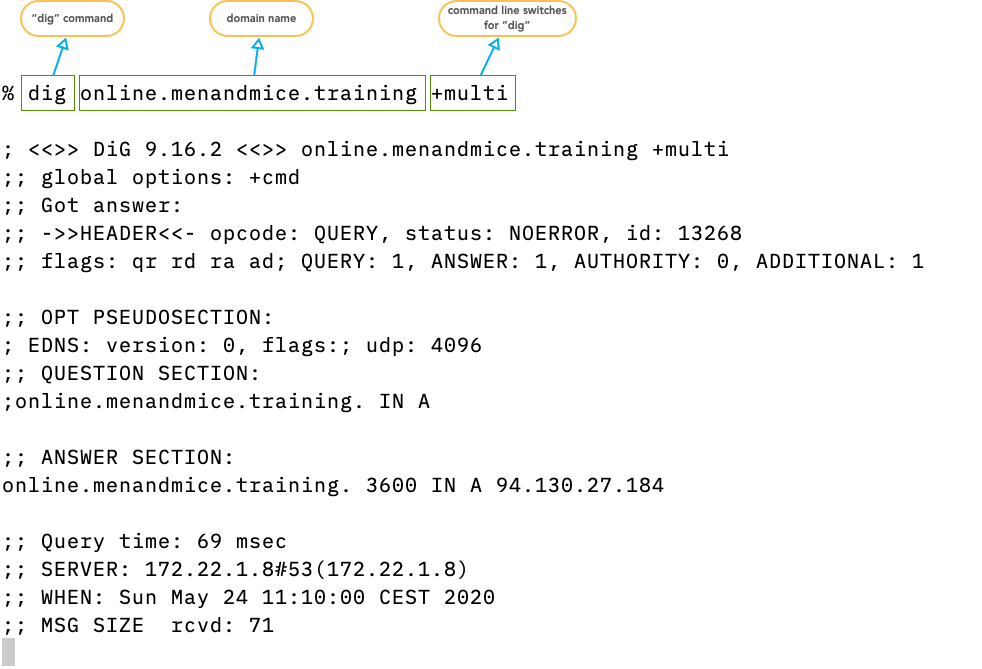
digis the standard tool to send DNS queries.- It replaces the older (and obsolete
nslookup) - the output of
digresembles the structure of DNS packets on the wire
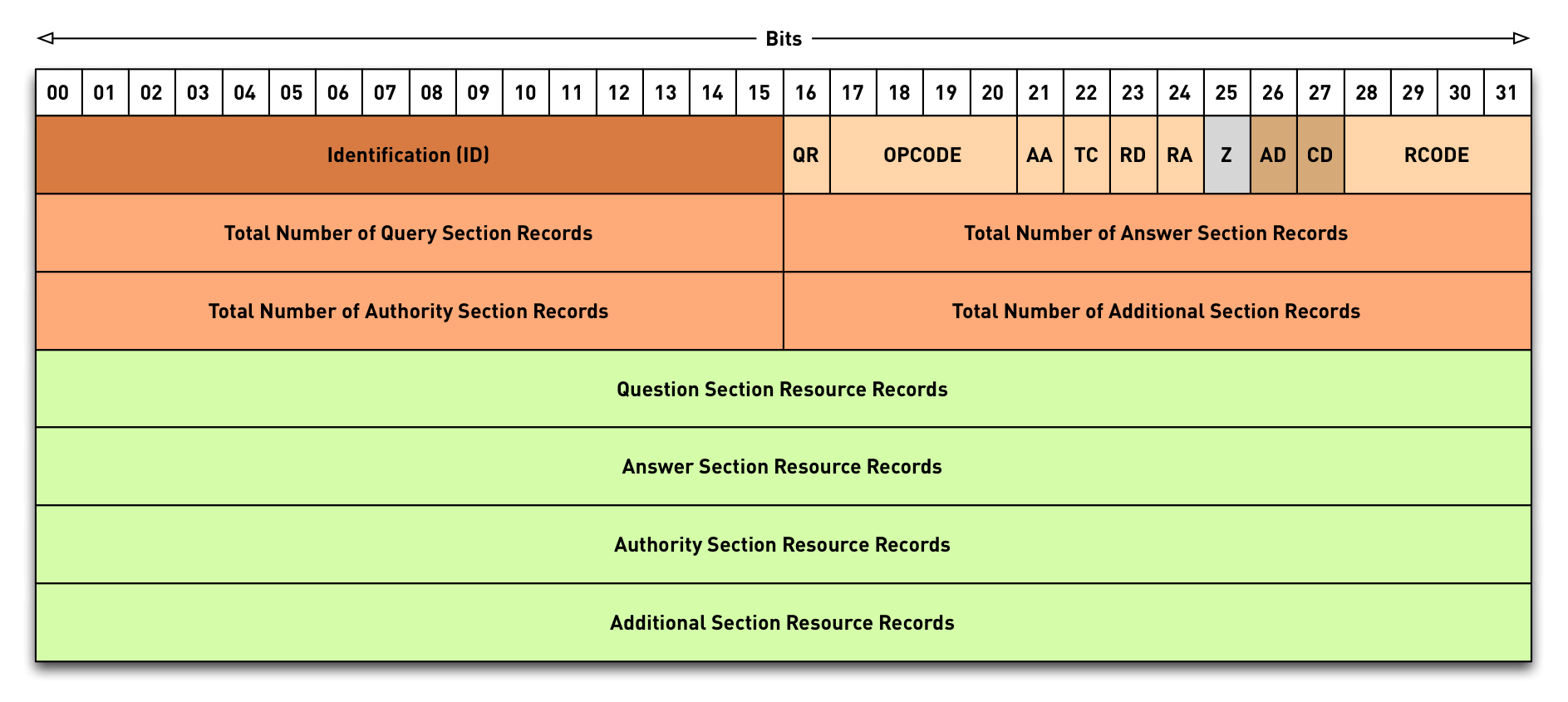
- The
digoutput explained
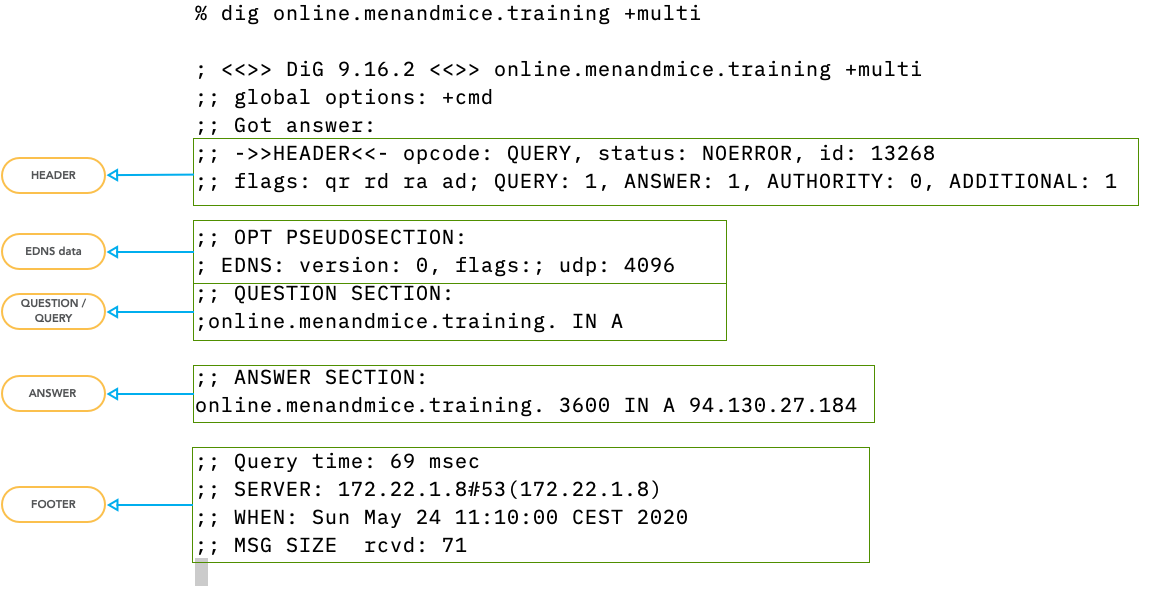
- the DNS data is separated in sections
8.9.1 DNS Packet Header
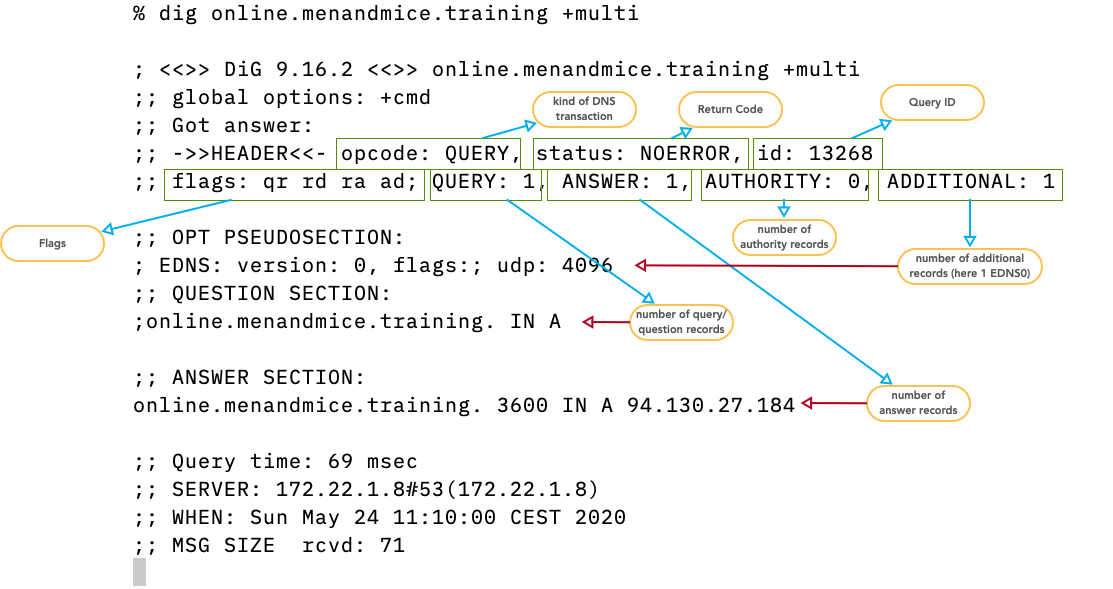
- opcode:
query,notify,update,DSO… see IANA registry for DNS OpCodes - status/rcode:
NOERROR- the operation was successfulNXDOMAIN- the domain name requested does not exist (or is not delegated)SERVFAIL- some remote DNS server failure or DNSSEC validation failureFORMERR- the query was not correct DNSREFUSED- this server has an access control list that forbids the answer to this clientNOTIMPL- a feature used/requested that this server does not implementBADCOOKIE- Bad/missing Server Cookie
- queryid: 16bit value to sort DNS answers to DNS queries
- flags: information on the query and the answer
(see
IANA registry for DNS Header Flags)
AAauthoritative answer - answer is coming directly from an authoritative serverTCtruncated - answer does not fit into the advertised UDP packet size, please re-query over TCPRDrecursion desired - this is a query from a client machine, please provide a full complete answer (no referral please)RArecursion available - this answer comes from a DNS resolver that is willing to accept queries withRDflag set
- DNSSEC flags: AD- and CD-Flag
ADauthentic data - the DNS resolver sending this answer has performed a successful DNSSEC validation on the data. If we trust the resolver, we can trust the dataCDchecking disabled - a client asking a DNSSEC validating DNS resolver to not perform DNSSEC validation but to pass all DNSSEC data unaltered (even if the data is invalid). Used for troubleshooting DNSSEC issues.
- QUERY: number of query resource records (usually one)
- ANSWER: count of DNS resource records in the answer. Can be more than one. Can be zero if no data is available for the query.
- AUTHORITY: number of authority records in the answer. Can be a SOA-Record (for negative answers) or NS-Records for referrals or positive answers. Many modern DNS server only fill the authority section if required by the protocol to keep answer packets small
- ADDITIONAL: additional resource records that not have been requested but might help with the name resolution, and the EDNS (Extended DNS) OPT-Record (see RFC 6891 Extension Mechanisms for DNS (EDNS(0))
8.9.2 Extended DNS OPT Section
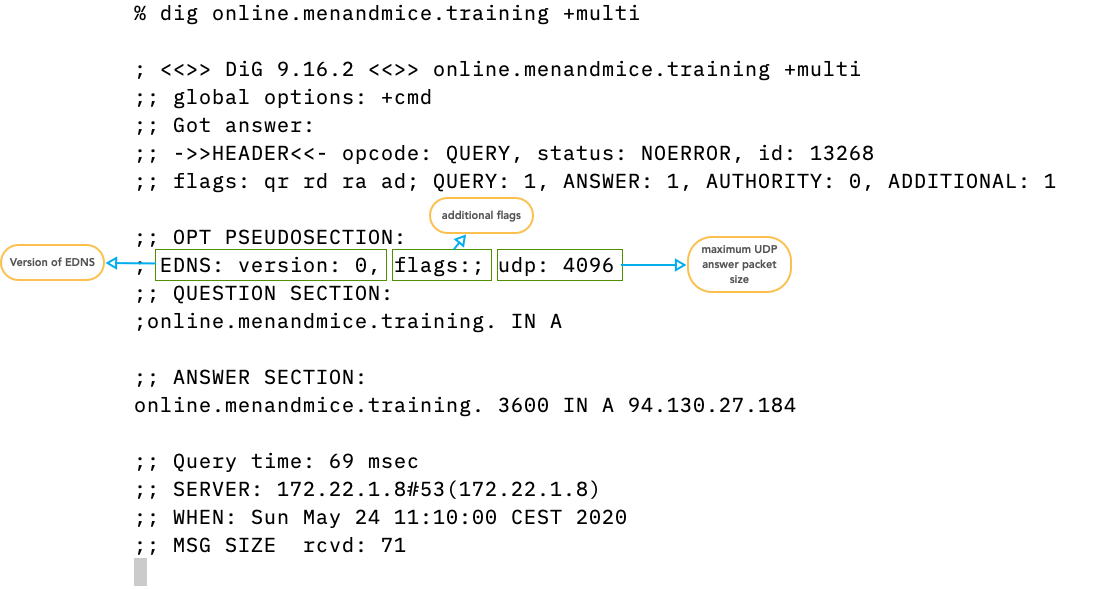
- EDNS Version 0 is the current version
- new Versions are being discussed in the IETF
- additional EDNS flags.
DO- DNSSEC OK, this DNS client supports DNSSEC records - maximum UDP answer packet size in byte as negotiated between
digand the DNS server/resolver. Current default is 4096, must be between 512 and 4096. The default changed to 1232 on DNS flag day 2020
8.9.3 Answer Section
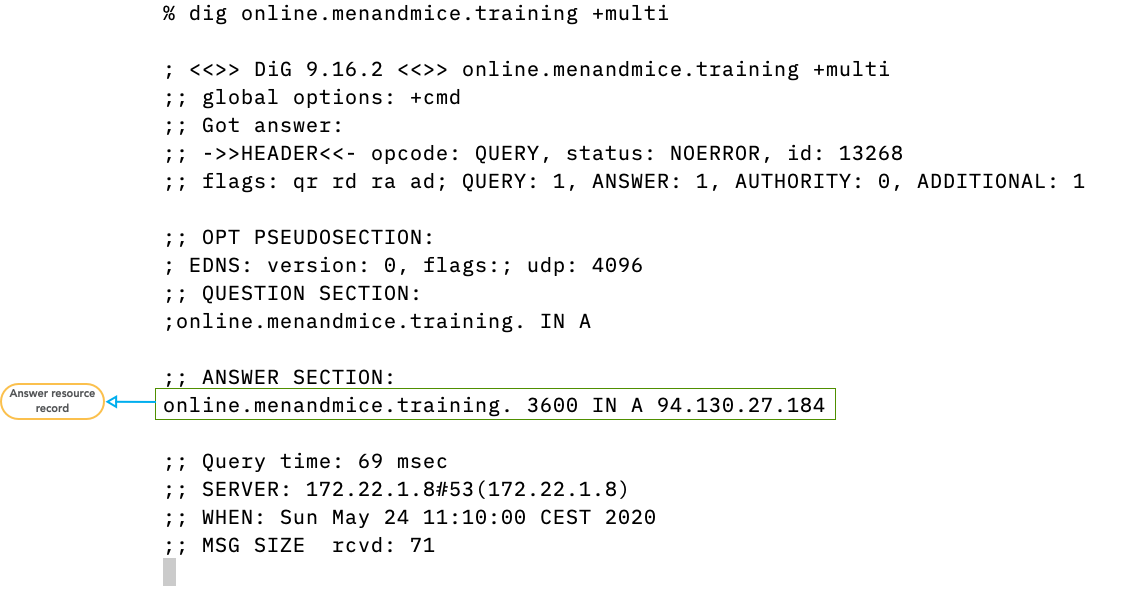
- The answer section contains zero (if there is no data available), one or more DNS resource records that match the query
8.9.4 Authority Section
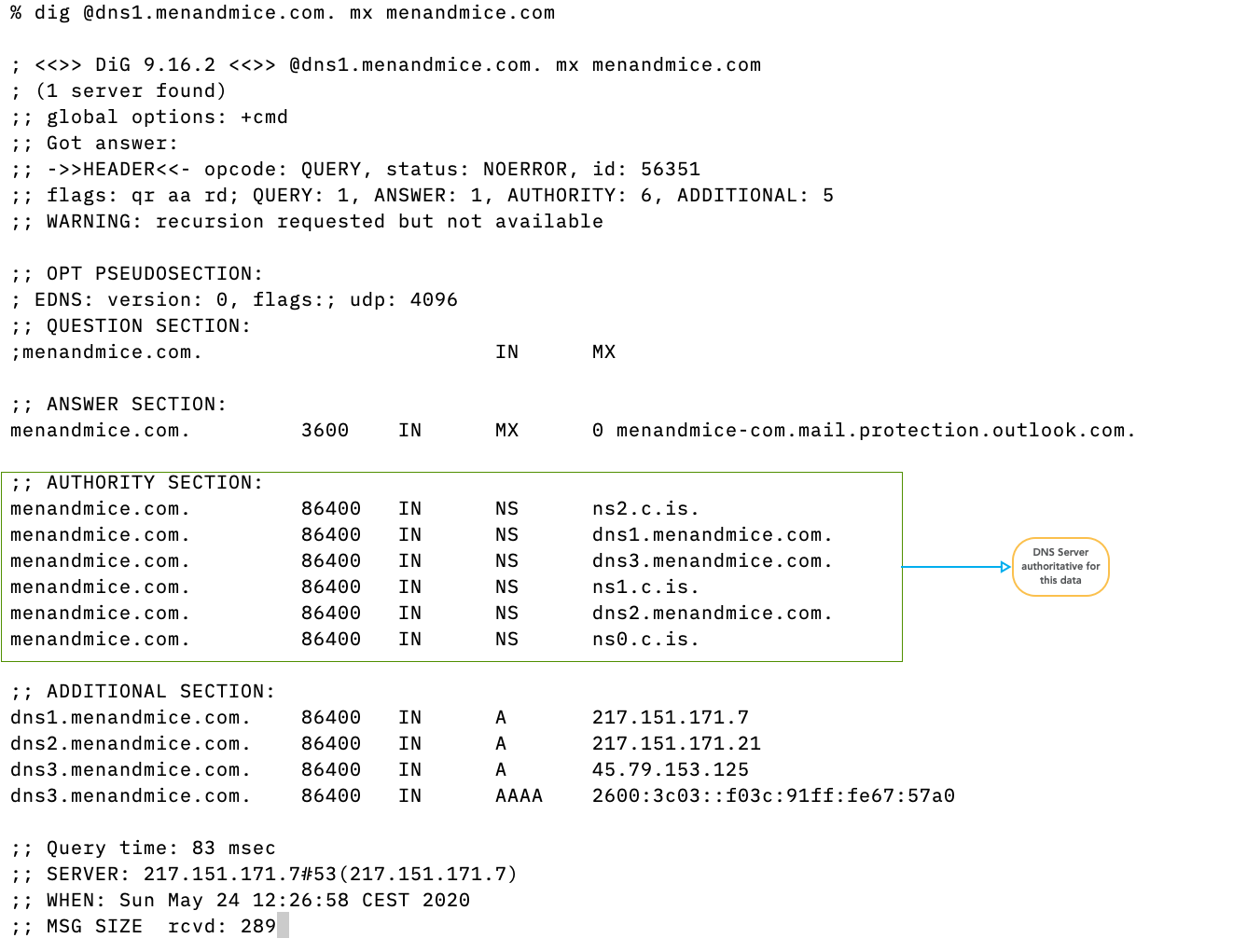
- if present, the authority section contains the authoritative name server that hosts the content delivered in the answer. For negative (NXDOMAIN/NOERROR-NODATA) answers, the authority section contains the SOA record of the zone that is authoritative for the negative answer.
8.9.5 Additional Section
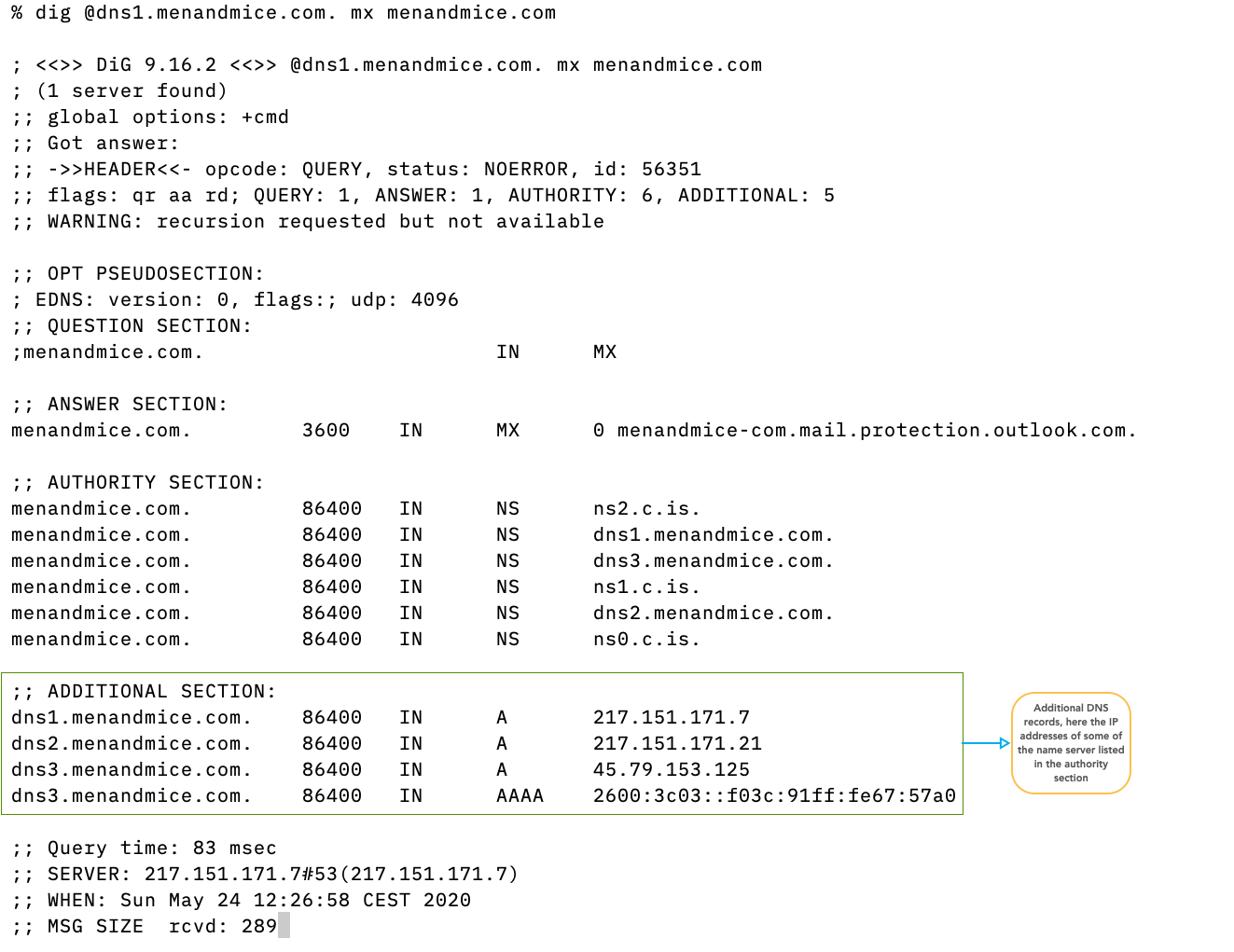
- if present, the additional section contains additional DNS records that have not been explicitly requested, but might help in the name resolution process. Because the additional section can be misused in attacks, modern DNS server software minimizes the additional section data.
- If EDNS data is available, it is also in the
additional section, but
digdisplays this data in the OPT pseudo-section
8.9.6 Footer
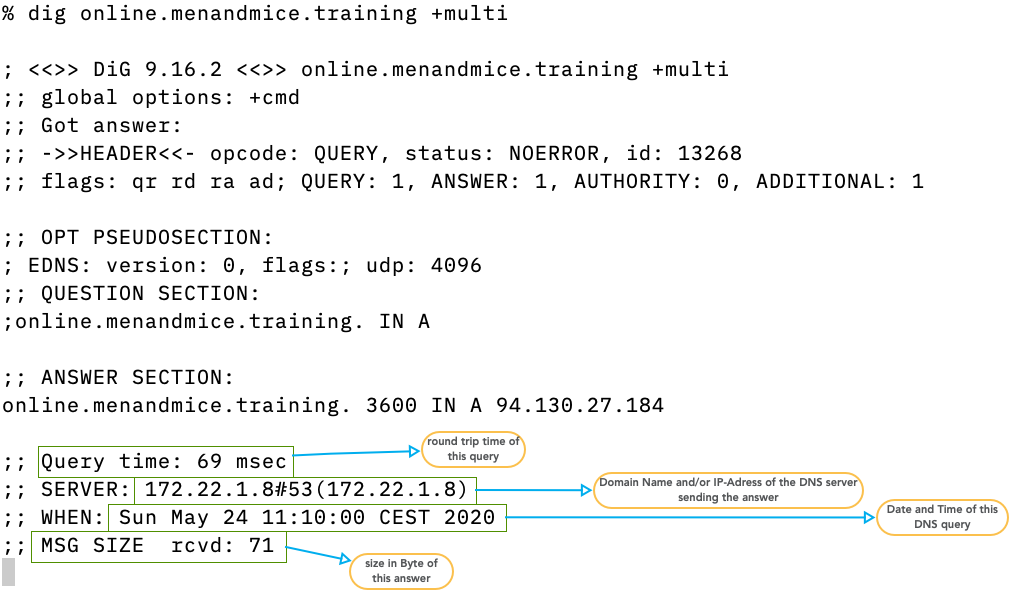
- the footer contains the size (in bytes) of the answer packet, the DNS server that has send the answer, the time it took to receive the answer and the time and date of the DNS communication
8.9.7 Sending the query to a specific DNS server/resolver
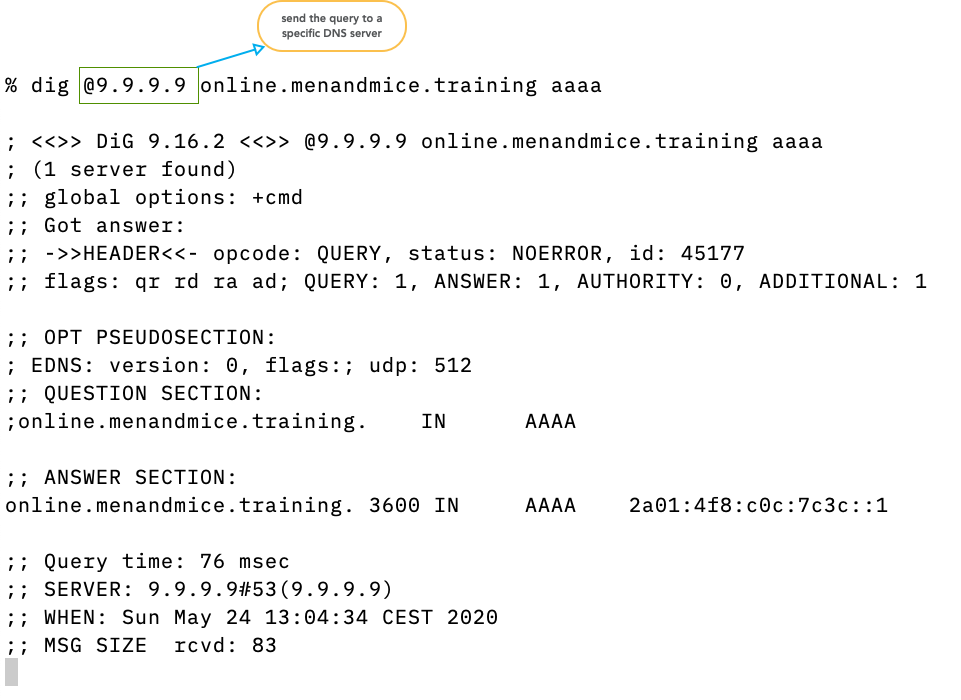
- usually
digsends the query to the DNS resolver configured in the operating system (file/etc/resolv.confon Unix/Linux) - with the
@syntax the query can be sent to other DNS servers (resolver or authoritative server)
8.9.8 Sending non-recursive queries
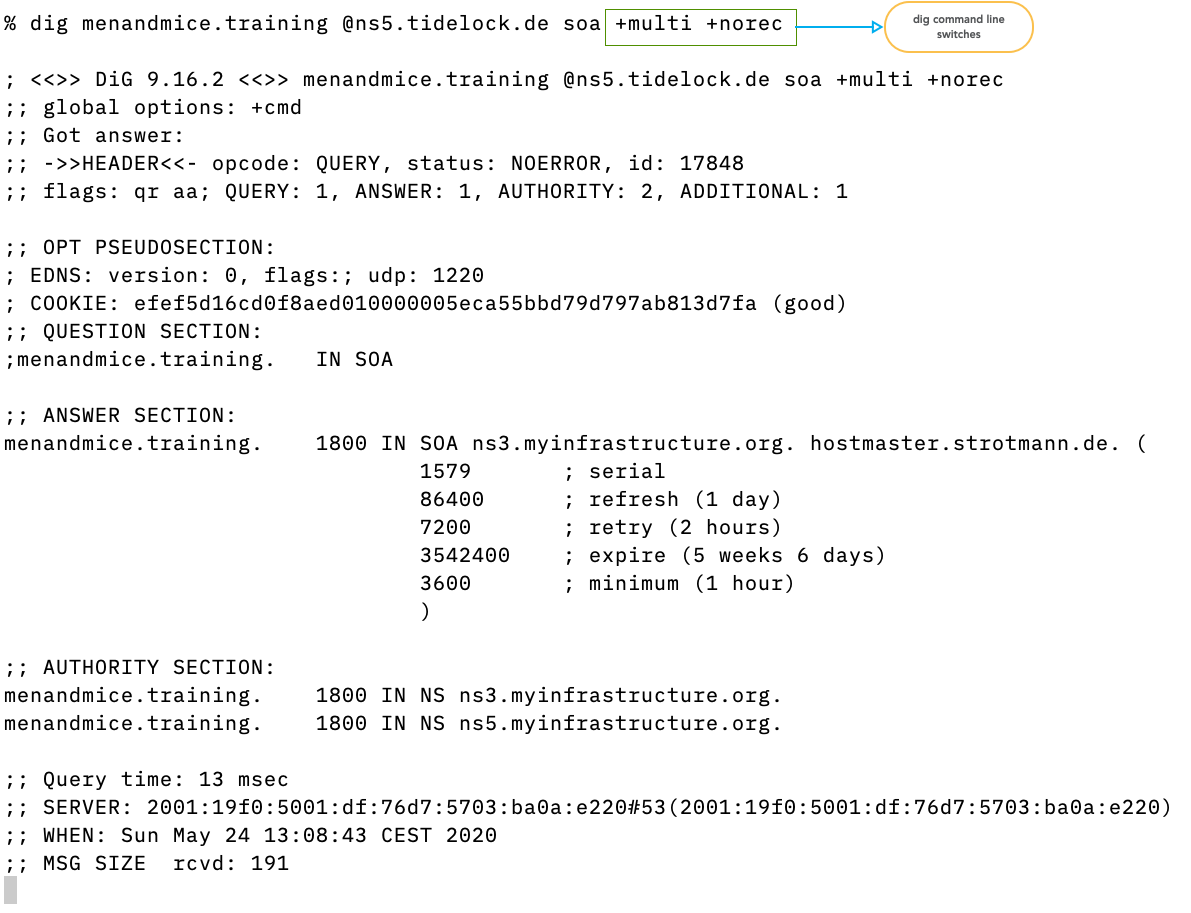
- command line switches can alter the query sent by
dig.+multiformats the output in human readable form (wrapped for 80 column terminal)+norecsends a query withoutRDflag (non-recursive or iterative query)
8.9.9 Asking for DNSSEC data
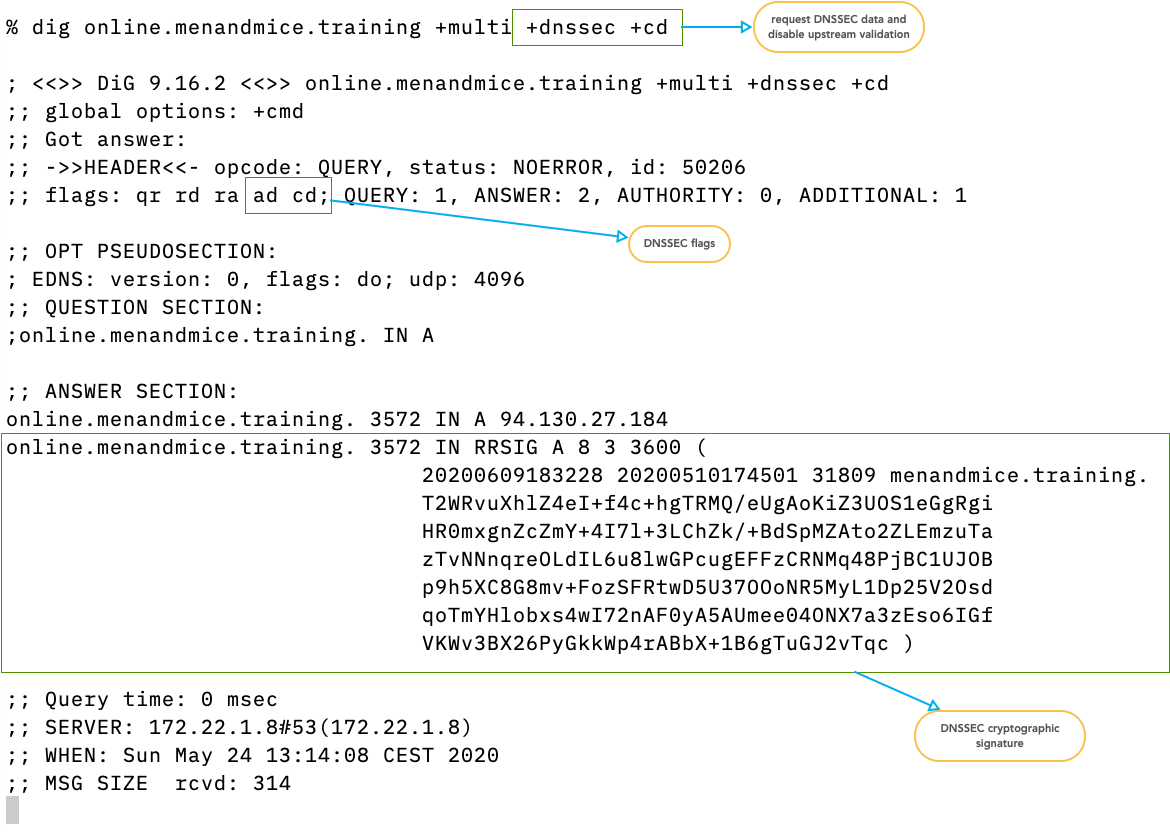
- the switch
+dnssecrequests DNSSEC data from the upstream server - the switch
+cdsends theCD(checking disabled) flag to disable upstream DNSSEC validation (if the target of the query is a DNS resolver)
8.9.10 Zone-Transfer
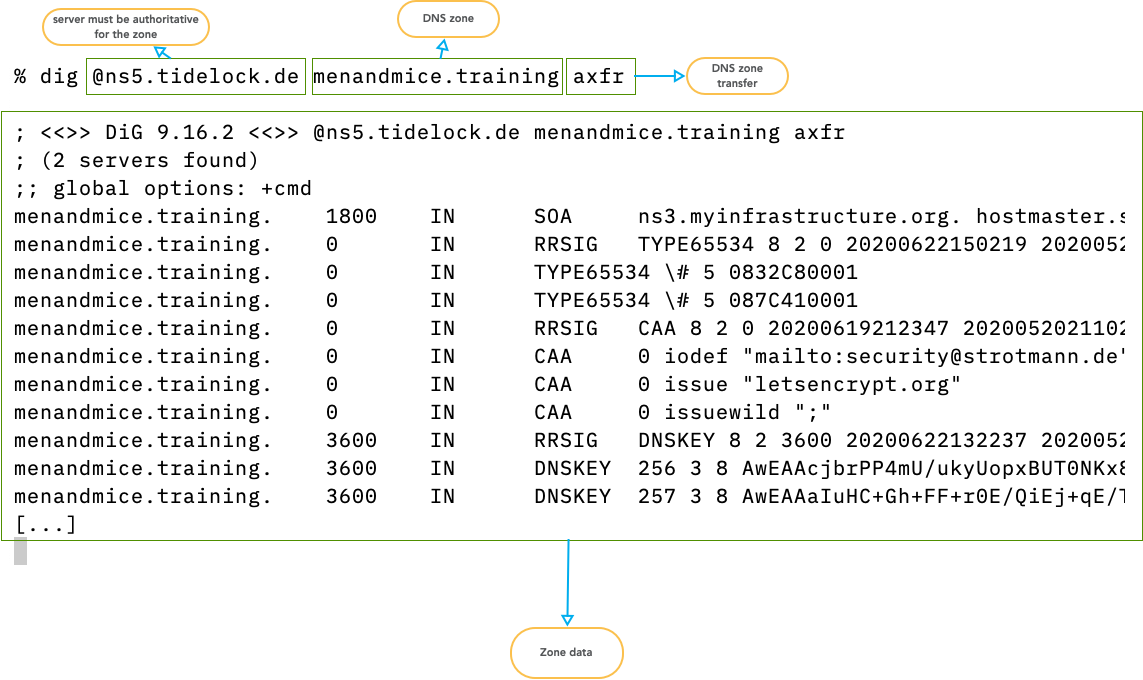
digcan initiate a zone transfer from an authoritative server that contains the zone database (primary or secondary server)- the data is printed in the Master Zone Format and can be used to start a new zone database file
- Example: list top level domains with DNSSEC delegation:
$ dig @f.root-servers.net AXFR . +noidnout | \
  grep DS | \
  grep -v RRSIG | \
  cut -d "." -f 1 | \
  uniq
8.10 PowerDNS Management Tools
- The PowerDNS Server comes with a couple of command line tools that help operating and maintaining the PowerDNS service
- The tools
pdns_controlandpdnsutiloverlap sometimes in their functionality.pdnsutilwas originally a tool to manage DNSSEC data in PowerDNS installations, and later morphed into a general management tool.
8.10.1 pdns_server
pdns_serveris the actual PowerDNS server binary. Besides starting the PowerDNS service, this command can be used to check the configuration file
% pdns_server --config=check
Apr 28 08:31:46 Loading '/usr/lib/x86_64-linux-gnu/pdns/libgmysqlbackend.so'
- The parameter
--versionshows some help information, but also the compile time configuration of the PowerDNS server binary. This is helpful to recompile a newer PowerDNS version with the same configuration, or to check for the existence of a compile-time feature
% pdns_server --version
Apr 28 08:32:29 PowerDNS Authoritative Server 4.9.7 (C) PowerDNS.COM BV
Apr 28 08:32:29 Using 64-bits mode. Built using gcc 14.2.0.
Apr 28 08:32:29 PowerDNS comes with ABSOLUTELY NO WARRANTY. This is free software, and you are welcome to redistribute it according to the terms of the GPL version 2.
Apr 28 08:32:29 Features: libcrypto-ecdsa libcrypto-ed25519 libcrypto-ed448 libcrypto-eddsa libgeoip libmaxminddb lua lua-records PKCS#11 protobuf sodium curl scrypt
Apr 28 08:32:29 Built-in modules:
Apr 28 08:32:29 Loading '/usr/lib/x86_64-linux-gnu/pdns/libbindbackend.so'
Apr 28 08:32:29 Loading '/usr/lib/x86_64-linux-gnu/pdns/libgmysqlbackend.so'
Apr 28 08:32:29 Loaded modules: bind gmysql
Apr 28 08:32:29 Configured with: " '--build=x86_64-linux-gnu'
                   '--prefix=/usr'
		   '--includedir=${prefix}/include'
		   '--mandir=${prefix}/share/man'
		   '--infodir=${prefix}/share/info'
		   '--sysconfdir=/etc'
		   '--localstatedir=/var'
		   '--disable-option-checking'
		   '--libdir=${prefix}/lib/x86_64-linux-gnu'
		   '--runstatedir=/run'
		   '--disable-maintainer-mode'
		   '--disable-dependency-tracking'
		   '--sysconfdir=/etc/powerdns'
		   '--enable-systemd'
		   '--with-systemd=/usr/lib/systemd/system'
		   '--with-dynmodules=bind ldap lmdb lua2 pipe gmysql godbc gpgsql gsqlite3 geoip remote tinydns'
		   '--with-modules='
		   '--enable-ixfrdist'
		   '--enable-tools'
		   '--with-protobuf'
		   '--enable-unit-tests'
		   '--enable-lua-records'
		   '--enable-experimental-pkcs11'
		   '--enable-reproducible'
		   '--disable-silent-rules'
		   '--with-libcrypto=/usr'
		   'build_alias=x86_64-linux-gnu'
		   'CFLAGS=-g -O2 -Werror=implicit-function-declaration -ffile-prefix-map=/build/reproducible-path/pdns-4.9.7=. -fstack-protector-strong -fstack-clash-protection -Wformat -Werror=format-security -fcf-protection' 'LDFLAGS=-Wl,-z,relro -Wl,-z,now' 'CPPFLAGS=-Wdate-time -D_FORTIFY_SOURCE=2' 'CXXFLAGS=-g -O2 -ffile-prefix-map=/build/reproducible-path/pdns-4.9.7=. -fstack-protector-strong -fstack-clash-protection -Wformat -Werror=format-security -fcf-protection -DPACKAGEVERSION='\''"4.9.7-1.Debian"'\'''"
8.10.2 Tool: pdns_control
pdns_controlis the older of the two PowerDNS command line utilities. It contains many functions to maintain the running PowerDNS server
- Basic operation
- Is the server alive and listening?
% pdns_control rping
PONG
- Show the uptime of the PowerDNS process
% pdns_control uptime
47 minutes
- Show the version of the running PowerDNS server
% pdns_control version
4.9.14
- Statistics
- Dump out all available statistics to the standard output
% pdns_control list
backend-queries=8,corrupt-packets=0,deferred-cache-inserts=0,deferred-cache-lookup=0,deferred-packetcache-inserts=0,deferred-packetcache-lookup=0,dnsupdate-answers=0,dnsupdate-changes=0,dnsupdate-queries=0,dnsupdate-refused=0,incoming-notifications=0,noerror-packets=0,nxdomain-packets=0,overload-drops=0,packetcache-hit=0,packetcache-miss=6,packetcache-size=3,query-cache-hit=0,query-cache-miss=8,query-cache-size=4,rd-queries=7,recursing-answers=0,recursing-questions=0,recursion-unanswered=0,security-status=0,servfail-packets=0,signatures=0,tcp-answers=0,tcp-answers-bytes=0,tcp-queries=0,tcp4-answers=0,tcp4-answers-bytes=0,tcp4-queries=0,tcp6-answers=0,tcp6-answers-bytes=0,tcp6-queries=0,timedout-packets=0,udp-answers=7,udp-answers-bytes=338,udp-do-queries=2,udp-queries=7,udp4-answers=7,udp4-answers-bytes=338,udp4-queries=7,udp6-answers=0,udp6-answers-bytes=0,udp6-queries=0,unauth-packets=3,cpu-iowait=1296,cpu-steal=56,fd-usage=21,key-cache-size=0,latency=15,meta-cache-size=1,open-tcp-connections=0,qsize-q=0,real-memory-usage=104902656,ring-logmessages-capacity=10000,ring-logmessages-size=0,ring-noerror-queries-capacity=10000,ring-noerror-queries-size=0,ring-nxdomain-queries-capacity=10000,ring-nxdomain-queries-size=0,ring-queries-capacity=10000,ring-queries-size=0,ring-remotes-capacity=10000,ring-remotes-corrupt-capacity=10000,ring-remotes-corrupt-size=0,ring-remotes-size=0,ring-remotes-unauth-capacity=10000,ring-remotes-unauth-size=0,ring-servfail-queries-capacity=10000,ring-servfail-queries-size=0,ring-unauth-queries-capacity=10000,ring-unauth-queries-size=0,signature-cache-size=0,sys-msec=253,udp-in-errors=0,udp-noport-errors=494,udp-recvbuf-errors=0,udp-sndbuf-errors=0,uptime=1819,user-msec=119,xfr-queue=0,
- The statistics output can be piped into a monitoring tool, or it
can be processed on a shell pipe
- Here we're changing the formatting to display the statistics one line per metric
% pdns_control list | sed s/,/\\n/g
- Show a single statistics value (name of metric is taken from the
pdns_control listoutput)
% pdns_control show backend-queries
- Show the statistics on DNS query types (QTYPES)
% pdns_control qtypes
NS      1
SOA     1
TXT     3
ANY     2
- Display histogram of response sizes. For optimal performance, the majority (> 99%) if responses should be below 1232 bytes. If larger responses are generated, the zone content should be optimized (large resource record reviewed etc) to prevent TCP traffic
# pdns_control respsizes
20      5
40      0
60      1
80      0
100     1
150     0
200     0
400     0
600     0
800     0
[...]
- Zone Management
- List all configured zones loaded into the PowerDNS server
% pdns_control list-zones
zone001.dnslab.org.
All zonecount:1
- Purge entries from cache (Cache in PowerDNS for DNS queries fetched from a backend. Might be needed if changes should appear immediately after changing the database). This command will return the number of cache entries being deleted from the cache.
% pdns_control purge              # purge the complete cache
% pdns_control purge example.com  # purge "example.com" cache entries
- Check the Backend (Database) for new domains that have been configured
% pdns_control rediscover
Ok
- Reload all known zones (will not add new zones)
% pdns_control reload
Ok
8.10.3 Tool "pdnsutil"
pdnsutilis the newer command line management tools. It contains functions to work with DNSSEC and TSIG security protocols (which will be covered on day 3 of this training).- It also contains functions to manage zones and zone content
- Zone management
- List all available zones
% pdnsutil list-all-zones
zone001.dnslab.org
- Dump the zone content in RFC1035 format
# pdnsutil list-zone zone001.dnslab.org
$ORIGIN .
test.zone001.dnslab.org 60      IN      TXT     "Hello PowerDNS"
zone001.dnslab.org      60      IN      A       138.68.87.93
zone001.dnslab.org      60      IN      AAAA    2a03:b0c0:3:d0::133d:1
zone001.dnslab.org      60      IN      NS      ns001a.dnslab.org.
zone001.dnslab.org      60      IN      SOA     ns001a.dnslab.org hostmaster.zone001.dnslab.org 1001 3600 1800 3542400 60
- Show the status of a zone (including DNSSEC status)
% pdnsutil show-zone zone001.dnslab.org
This is a Native zone
Zone is not actively secured
Metadata items: None
No keys for zone 'zone001.dnslab.org'.
- Increment the SOA serial of a zone, triggering a zone transfer to all secondaries
% pdnsutil increase-serial zone001.dnslab.org
SOA serial for zone zone001.dnslab.org set to 1002
- Create a new, empty zone. The new zone will have a bogus SOA records that needs to be changed
% pdnsutil create-zone pdns001.dnslab.org
Creating empty zone 'pdns001.dnslab.org'
% pdnsutil list-zone pdns001.dnslab.org
$ORIGIN .
pdns001.dnslab.org      3600    IN      SOA     a.misconfigured.dns.server.invalid hostmaster.pdns001.dnslab.org 0 10800 3600 604800 3600
- The command
clear-zonewill remove all DNS resource records from the zone (including NS and SOA), but will keep the zone in the configuration (and database)
% pdnsutil clear-zone pdns001.dnslab.org
% pdnsutil list-zone pdns001.dnslab.org
$ORIGIN .
- The command
delete-zonewill remove a zone from the configuration and the database
% pdnsutil delete-zone pdns001.dnslab.org
% pdnsutil list-zone pdns001.dnslab.org
Domain 'pdns001.dnslab.org' not found!
- Adding / Removing zone content
- The tool
pdnsutilcan be used to add DNS resource records to existing DNS zones. The RDATA (Data part of the record) must be in double quotes. As the shell normally removes the double quote after parsing, the double quotes"need to be escaped, for example with single quotes'. The domain name of the new record cannot be fully qualified, it should not contain the name of the zone! Here we create a TXT record with the labeltestin the zonezoneNNN.dnslab.org:
% pdnsutil add-record zone001.dnslab.org test TXT 60 '"Hello PowerDNS"'
New rrset:
test.zone001.dnslab.org. 60 IN TXT "Hello PowerDNS"
- The new record should be public immediately
% dig @localhost test.zone001.dnslab.org txt

; <<>> DiG 9.16.22-Debian <<>> @localhost test.zone001.dnslab.org txt
; (1 server found)
;; global options: +cmd
;; Got answer:
;; ->>HEADER<<- opcode: QUERY, status: NOERROR, id: 35999
;; flags: qr aa rd; QUERY: 1, ANSWER: 1, AUTHORITY: 0, ADDITIONAL: 1
;; WARNING: recursion requested but not available

;; OPT PSEUDOSECTION:
; EDNS: version: 0, flags:; udp: 1232
;; QUESTION SECTION:
;test.zone001.dnslab.org.       IN      TXT

;; ANSWER SECTION:
test.zone001.dnslab.org. 60     IN      TXT     "Hello PowerDNS"

;; Query time: 3 msec
;; SERVER: 127.0.0.1#53(127.0.0.1)
;; WHEN: Fri Oct 29 08:32:24 UTC 2021
;; MSG SIZE  rcvd: 79
- Deleting a resource record set. This will remove all records for the given domain name and record type:
% pdnsutil delete-rrset zone001.dnslab.org test txt
- Changing a resource record set
# pdnsutil replace-rrset zone001.dnslab.org test TXT 60    '"Hello PowerDNS, how are you?"'
Current records for test.zone001.dnslab.org IN TXT will be replaced
New rrset:
test.zone001.dnslab.org. 60 IN TXT "Hello PowerDNS, how are you?"
- Editing a zone with the text editor stored in the
EDITORenvironment variable, or the defaul editor of the system. After editing, the tool displays a diff of all the changes and checks if the SOA serial has been incremented. If the SOA serial is still the same, it offers to increment it.
% export EDITOR=emacs
% pdnsutil edit-zone zone001.dnslab.org
Checked 5 records of 'zone001.dnslab.org', 0 errors, 0 warnings.
Detected the following changes:
-test.zone001.dnslab.org 60 IN TXT "Hello PowerDNS"
+test.zone001.dnslab.org 60 IN TXT "Hello PowerDNS, how are you?"

You have not updated the SOA record! Would you like to increase-serial?
(y)es - increase serial, (n)o - leave SOA record as is, (e)dit your changes, (q)uit:
y
(a)pply these changes, (e)dit again, (r)etry with original zone, (q)uit: a
Adding empty non-terminals for non-DNSSEC zone
- The tool
- Checking Zones
- Check all zones for errors
% pdnsutil check-all-zones
Checked 4 records of 'zone001.dnslab.org', 0 errors, 0 warnings.
Checked 1 zones, 0 had errors.
- Check a single zone
% pdnsutil check-zone zone001.dnslab.org
Checked 4 records of 'zone001.dnslab.org', 0 errors, 0 warnings.
- Exercise
- Use the command
pdnsutil add-recordto add two or more records that create a DNS resource record set (RRSet). Give each record of the set a different (!) TTL. - Use
pdnsutil check-zoneto check the zone for errors. Does it report the issue?
- Use the command
9 EDNS - Response Size Limits in DNS
9.1 The early years - 512byte is enough
- The original DNS protocol had a size limit for DNS messages over UDP of 512 bytes
- The aim was to prevent fragmentation on the network path
- esp. in the early days of TCP/IP, fragmentation was slow
- The aim was to prevent fragmentation on the network path
9.2 RFC 1035
- RFC 1035 states in 2.3.4. Size limits:
UDP messages 512 octets or less
- and in section 4.2.1 UDP usage:
Messages carried by UDP are restricted to 512 bytes (not counting the IP or UDP headers). Longer messages are truncated and the TC bit is set in the header.
9.3 The 13 Root DNS Servers
- One artifact of the size limit of the original DNS protocol is the
number of authoritative DNS servers for the root zone in the
Internet (aka Root-Server)
- There are 13 logical Root-Servers (
a.root-servers.nettom.root-servers.net) - This is because without IPv6 and without the later EDNS0, 13 DNS names and IPv4 addresses fit nicely into the 512 byte limit
- There are 13 logical Root-Servers (
- The thirteen names
$ dig -4 @a.root-servers.net NS . +noedns +nodnssec

; <<>> DiG 9.16.7 <<>> -4 @a.root-servers.net ns . +noedns +nodnssec
; (1 server found)
;; global options: +cmd
;; Got answer:
;; ->>HEADER<<- opcode: QUERY, status: NOERROR, id: 19932
;; flags: qr aa rd; QUERY: 1, ANSWER: 13, AUTHORITY: 0, ADDITIONAL: 15
[...]
;; ANSWER SECTION:
.			518400	IN	NS	a.root-servers.net.
.			518400	IN	NS	b.root-servers.net.
.			518400	IN	NS	c.root-servers.net.
.			518400	IN	NS	d.root-servers.net.
.			518400	IN	NS	e.root-servers.net.
.			518400	IN	NS	f.root-servers.net.
.			518400	IN	NS	g.root-servers.net.
.			518400	IN	NS	h.root-servers.net.
.			518400	IN	NS	i.root-servers.net.
.			518400	IN	NS	j.root-servers.net.
.			518400	IN	NS	k.root-servers.net.
.			518400	IN	NS	l.root-servers.net.
.			518400	IN	NS	m.root-servers.net.
[...]
;; Query time: 37 msec
;; SERVER: 198.41.0.4#53(198.41.0.4)
;; WHEN: Mon Oct 26 10:14:30 CET 2020
;; MSG SIZE  rcvd: 492
9.4 DNS over TCP
- When a DNS server needs to send a DNS response message larger than
the UDP size limit, it will send an incomplete response with the TC
"Truncated" flag set in the DNS header
- The DNS client (could be a DNS resolver), will detect the TC flag
and will repeat the query over TCP
- There is no size limit on DNS responses over TCP
- But TCP is not as fast as UDP, so this should be avoided
- The DNS client (could be a DNS resolver), will detect the TC flag
and will repeat the query over TCP
- Because the DNS protocol can switch from UDP to TCP on larger
responses (> 512 byte), DNS servers (authoritative as well as DNS
resolvers) should always support DNS over TCP
- And the firewall should allow DNS port 53 on UDP and TCP
$ dig -4 larger.dnssec.works TXT +noedns
;; Truncated, retrying in TCP mode.

; <<>> DiG 9.16.7 <<>> -4 larger.dnssec.works txt +noedns
;; global options: +cmd
;; Got answer:
;; ->>HEADER<<- opcode: QUERY, status: NOERROR, id: 64327
;; flags: qr rd ra ad; QUERY: 1, ANSWER: 8, AUTHORITY: 0, ADDITIONAL: 0
[...]
9.5 New developments in DNS
- In the mid 1990ies, there was new development around the DNS protocol
- DNS security (DNSSEC)
- Cryptographic Signatures (TSIG and SIG(0))
- IPv6 Resource records
- DNS as a distribution channel for cryptographic keys for applications
- The 512byte limit was becoming a hindrance
9.6 EDNS0
- The IETF created an extension to DNS, called EDNS0
- RFC 2671 Extension Mechanisms for DNS (EDNS0) (1999-08) and RFC 6891 (2013-04)
- EDNS Version 0 (EDNS0) allows DNS messages sizes over UDP for up to 4096 bytes
9.7 EDNS0 features
- Besides lifting the limit on the maximum DNS response size, EDNS allows for additional DNS flags and payload:
9.8 EDNS1 (2,3,4 …)
- The current version of EDNS is version 0
- There had been discussions in the IETF on newer EDNS versions (such as EDNS1 https://datatracker.ietf.org/doc/draft-andrews-edns1/)
- But so far no new EDNS version has been standardized
9.9 Extended DNS (EDNS) im PowerDNS
- EDNS is an extension to the original DNS protocol RFC 6891 Extension Mechanisms for DNS (EDNS(0))
- The original DNS RFCs 1034/1035 set a maximum size for DNS messages
to 512 byte to avoid costly UDP fragmentation.
- EDNS allows for larger DNS messages, usually up to 4096 byte.
- However packets larger than 1280 byte (1232 byte DNS payload) are prone to DNS fragmentation attacks (Fragmentation Considered Poisonous by Amir Herzberg, Haya Shulman, http://arxiv-export-lb.library.cornell.edu/abs/1205.4011).
- It is recommended to restrict the UDP messages to 1232 byte (see DNS Flag day 2020: https://dnsflagday.net/2020/)
udp-truncation-threshold=1232
9.10 Hide CHAOS Class Information
- A PowerDNS Server will respond to a query for
txt chaos version.bindwith information about the current PowerDNS software version- A PowerDNS server will not respond to queries for
hostname.bindorauthors.bind
- A PowerDNS server will not respond to queries for
- Use the setting
version-stringto change or hide the version information. Possible values:full- full version information (default)powerdns- generic information about PowerDNS, no version informationanonymous- responds withSERVFAILerror<your own string>- respond with the configured string
9.11 DNS cookies
- DNS Cookies provide protection for:
- Queriers (stub resolvers or RDNS servers)
- Domain name owners
- The innocent
- DNS servers
9.11.1 Protection for the Querier
- Cookies protect a querier against bogus answers.
- If the querier is a DNS resolver, cache poisoning is thwarted.
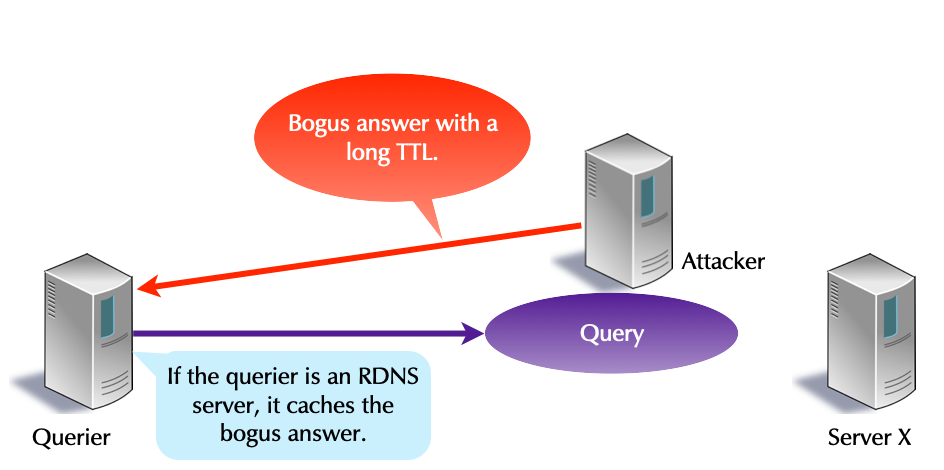
9.11.2 Protection for the Domain Name Owner/Publisher
- A bogus answer additionally injures the owner of the fraudulently answered domain name.
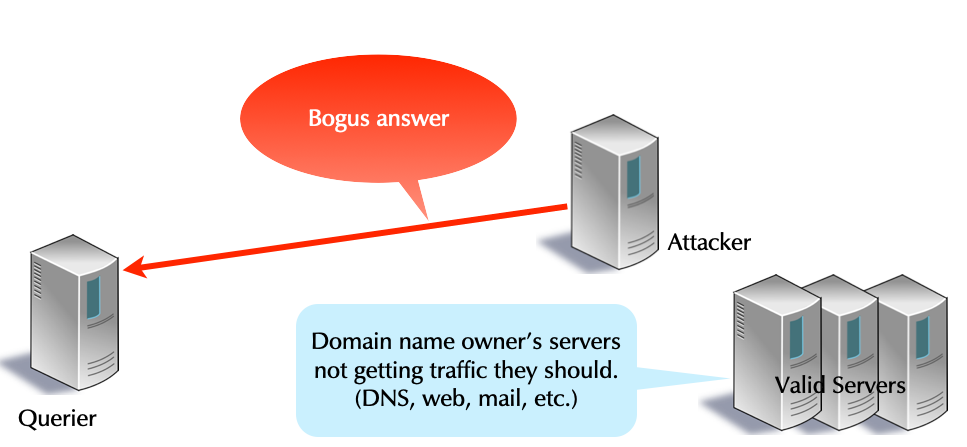
9.11.3 Protection for the Innocent
- Cookie protect an innocent victim against spoofed IP address attacks.
[sidebar] image::./images/Reflection-Attack-00.png[scaledwidth=65%]
[sidebar] image::./images/Reflection-Attack-01.png[scaledwidth=65%]
9.11.4 Protection for the DNS Server
- Cookie protects DNS servers from being DoS victims & from being misused in reflection attacks.
- This works for both authoritative and resolver servers.
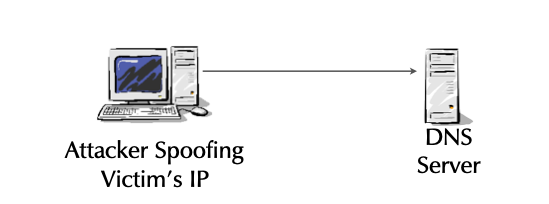
Cookies allow DNS servers to quickly respond to spoofed IPs, avoiding the cost of handling the query, avoiding applying other secure mechanisms (e.g response rate limiting), and reducing CPU usage. (This protects the server from being a victim of a DoS attack) With cookies, the server limits its misuse in a reflection, making the Internet a better place.
9.11.5 DNS Client Cookies
- Client cookies automatically protect a querier from bogus answers and from cache poisoning.
- This further protects the domain owner!
- An attacker can not provide bogus RRs for her domain.
9.11.6 DNS Server Cookies
- Server cookies allow a server to authenticate that queries are not from a spoofed IP.
- This protects a victim whose IP has been spoofed.
- This protects the server against DoS.
- It can quickly respond to the query before executing costly work (e.g. DNSSEC crypto for any server, recursion for DNS resolver)
- Server Cookies require BIND configuration.
9.11.7 Off-Path Attacks
- Cookie security is against off-path attacks.
- If an attacker has the packets between the querier & server, cookies add no security.
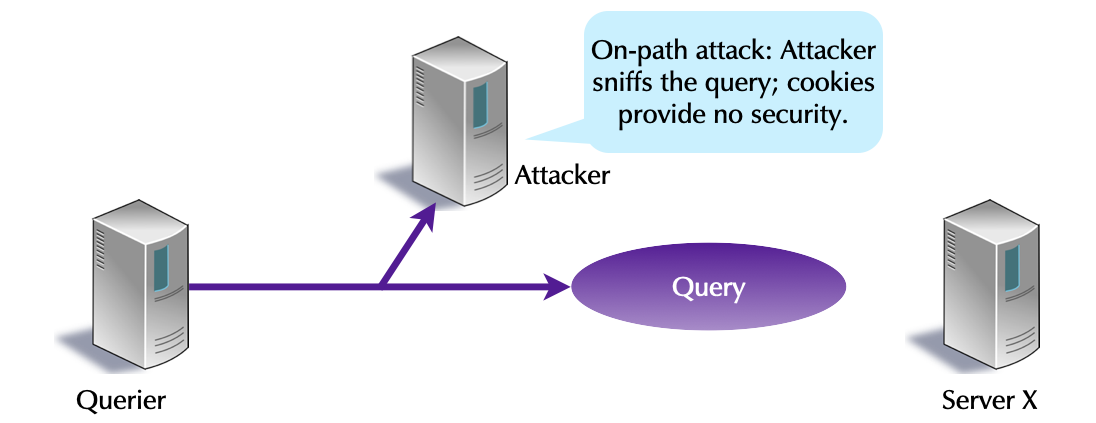
9.11.8 Client/Server Support
- Cookies require support from querier and server.
- If implemented by only one side, cookies are ignored.
- With cookies, port randomization is not required.
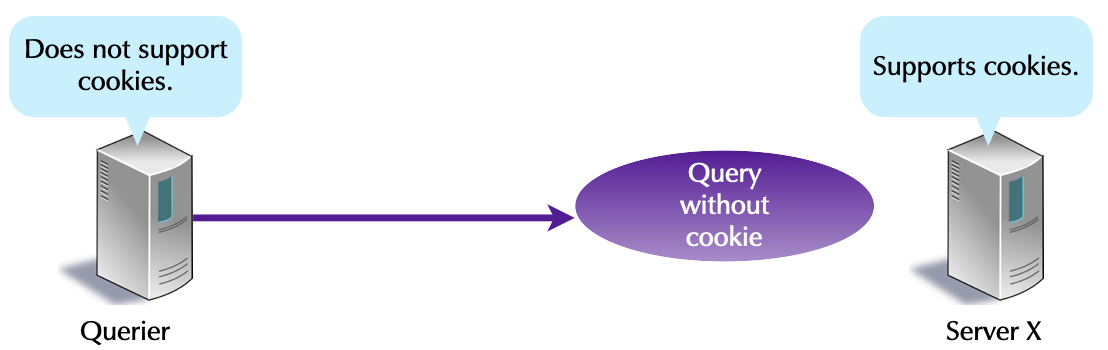
9.11.9 DNS Cookie Facts
- Cookies are 64-bit pseudorandom values.
- They are an OPT RR option, and thus require EDNS.
- A server doesn't store per-client state.
- It doesn't store any cookie state.
- DNS cookies are not related to browser cookies.
- RFC 7873. 2016-05. Domain Name System (DNS) Cookies
9.11.10 Cookies: Initial Query
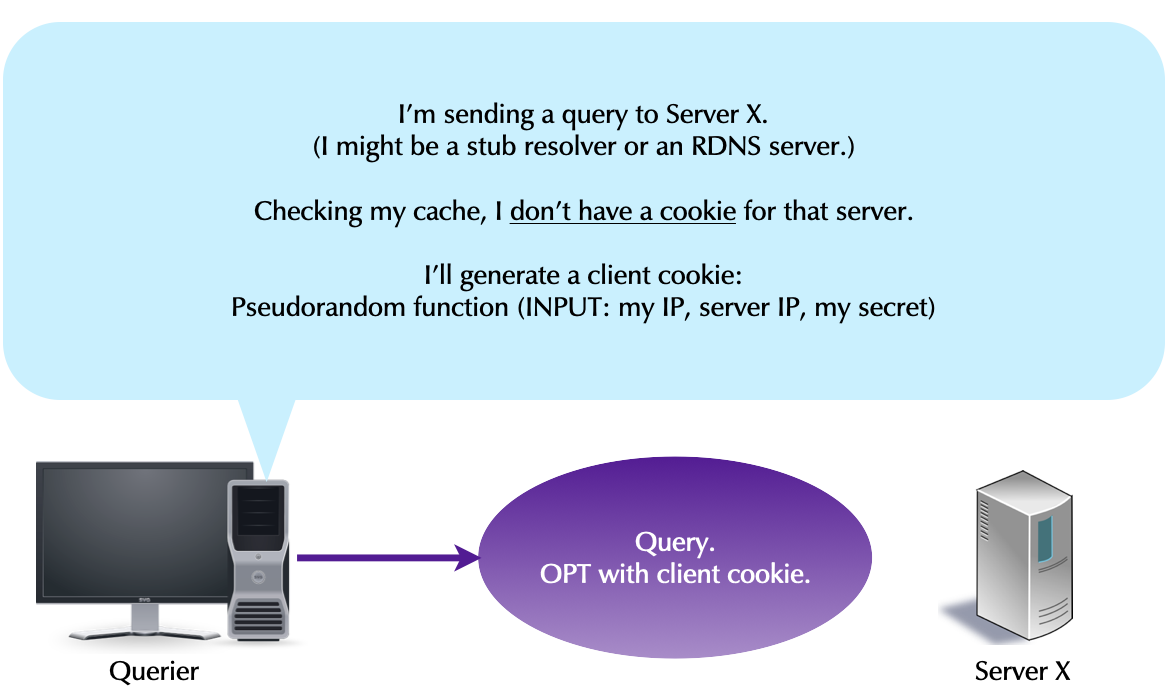
9.11.11 Cookies: Initial Query Response
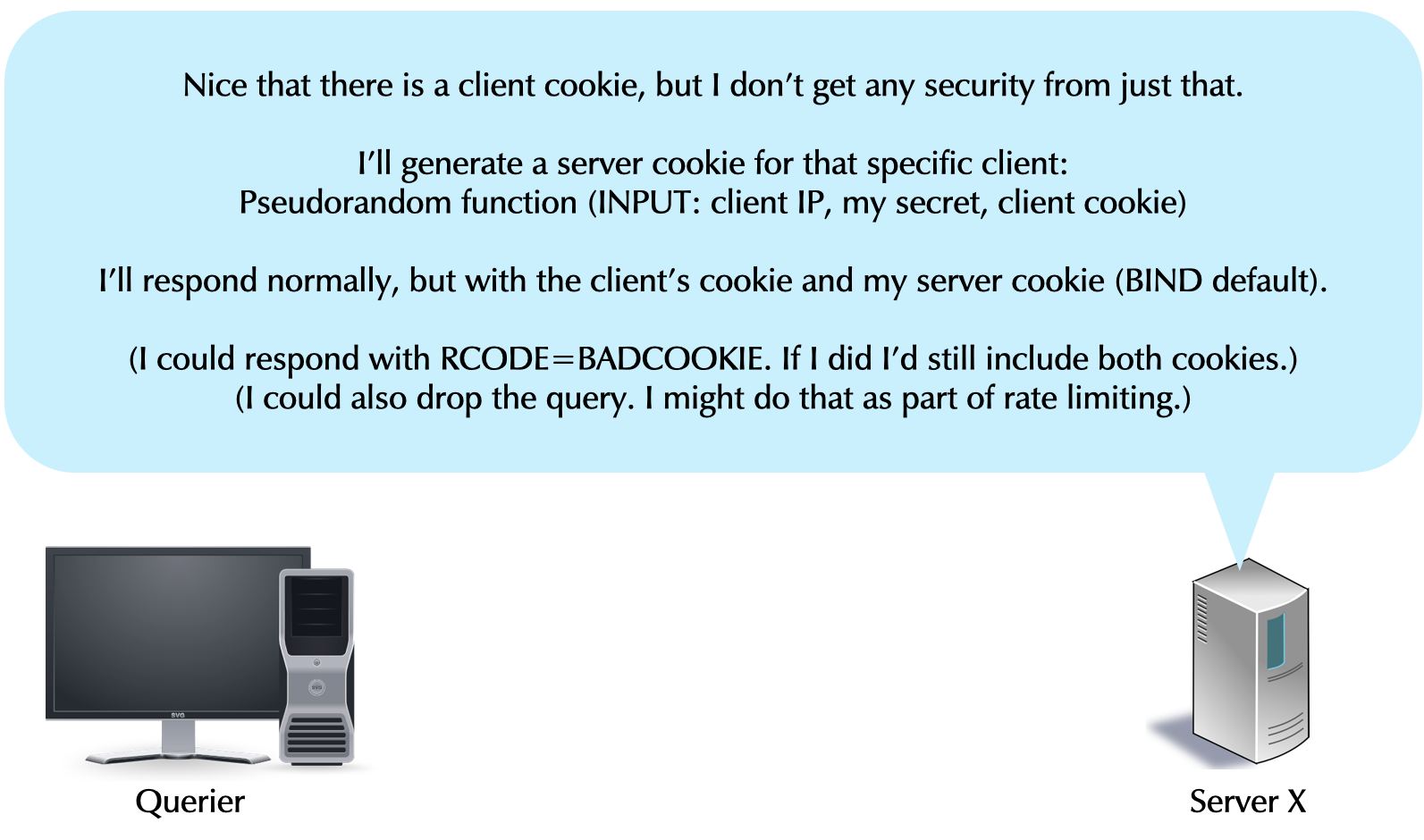
9.11.12 Cookies: Client Security
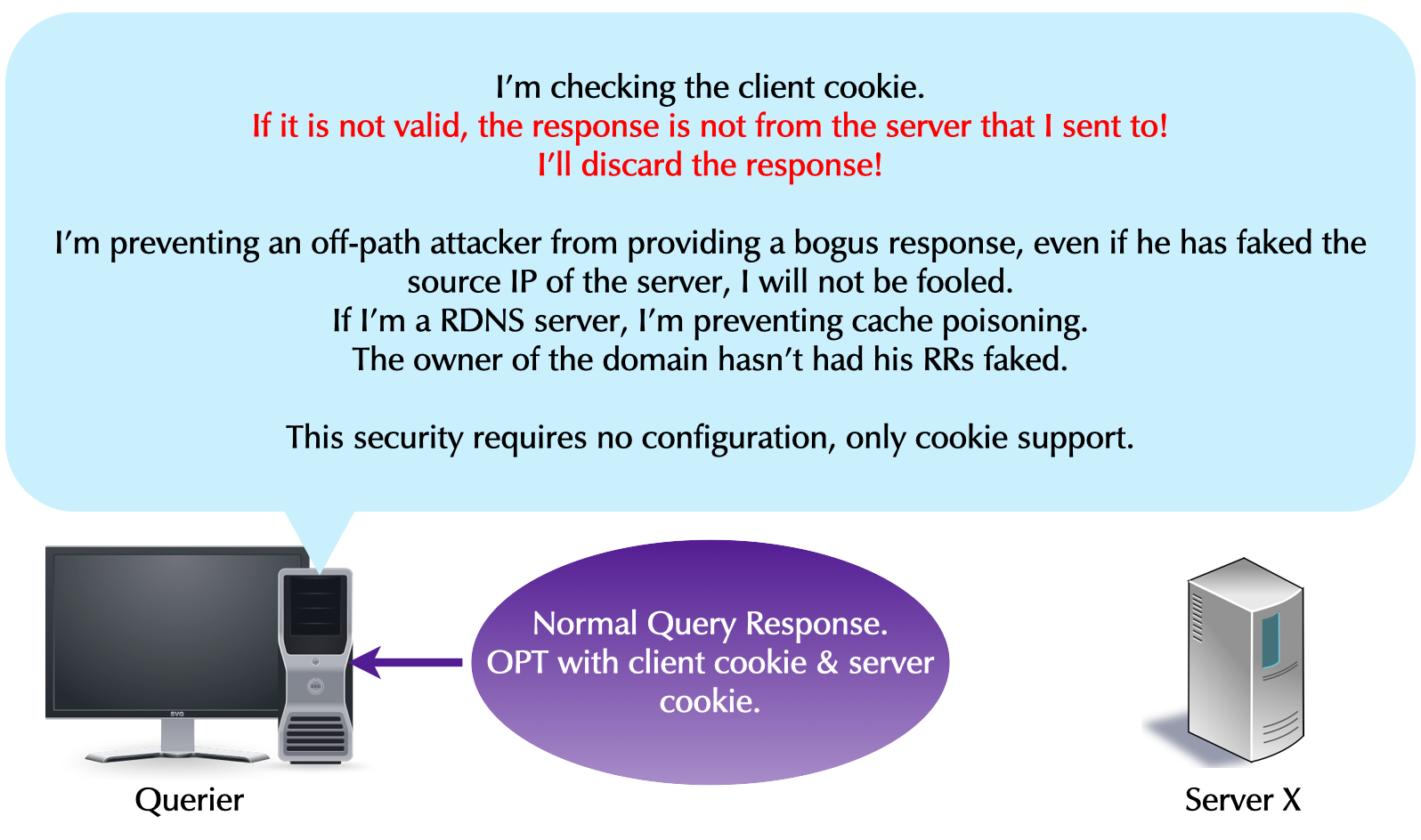
9.11.13 Cookies: Client Caching
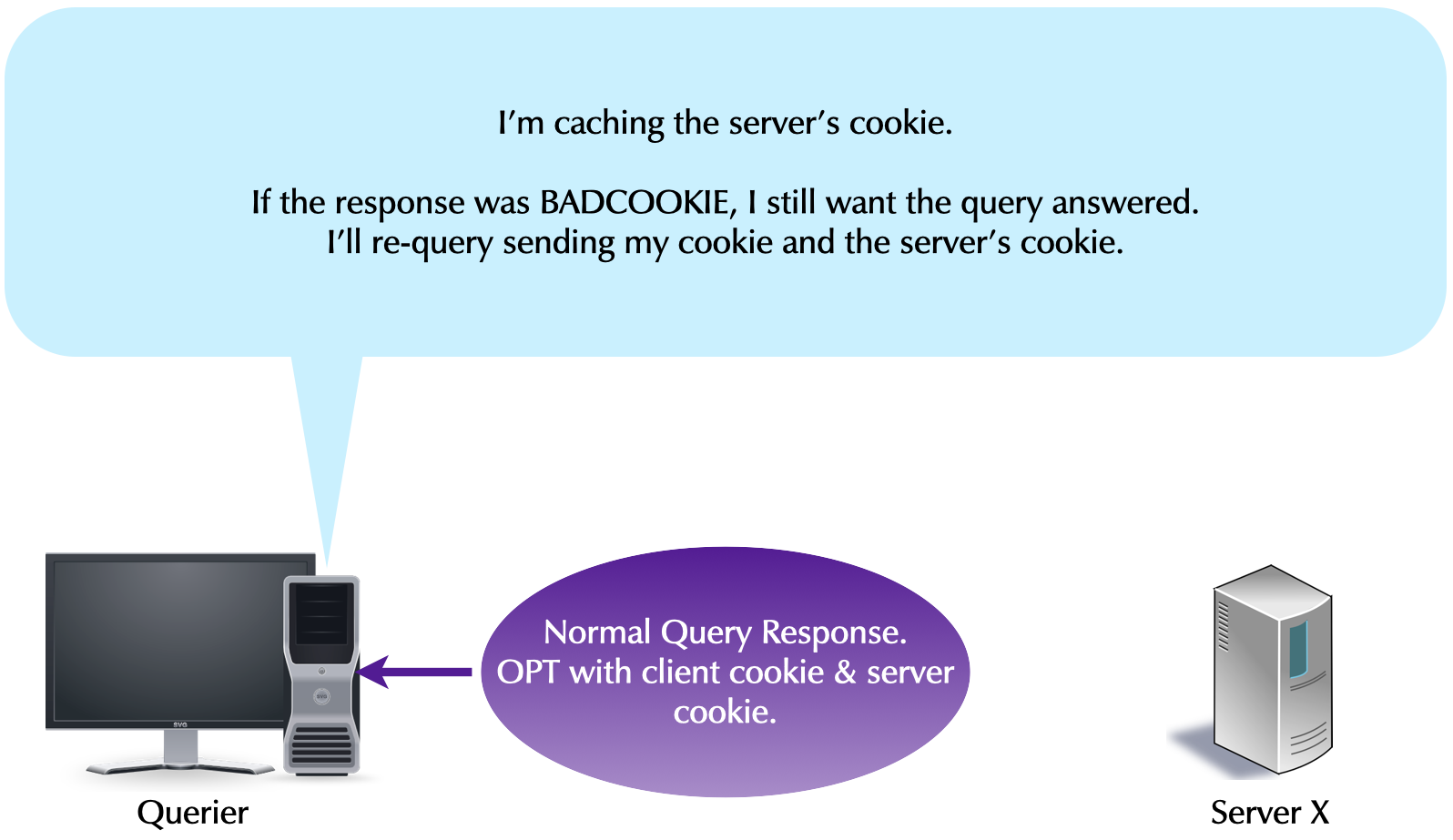
9.11.14 Cookies: Subsequent Queries
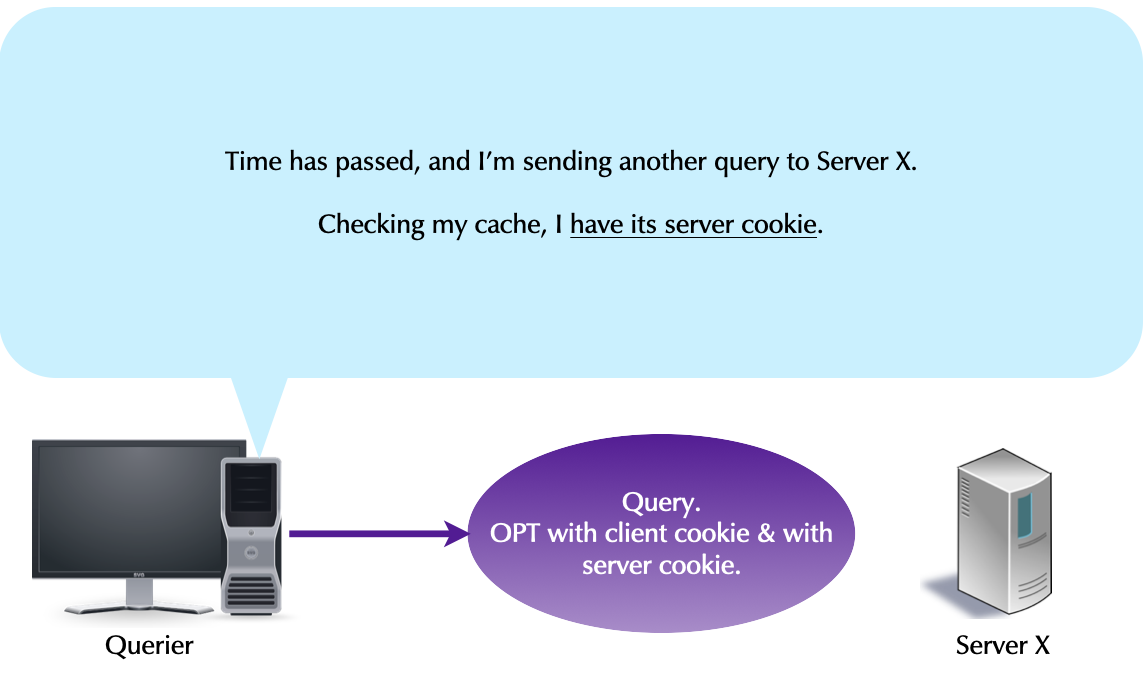
9.11.15 Cookies: Valid Server Cookie
- What happens if the server cookie is valid?
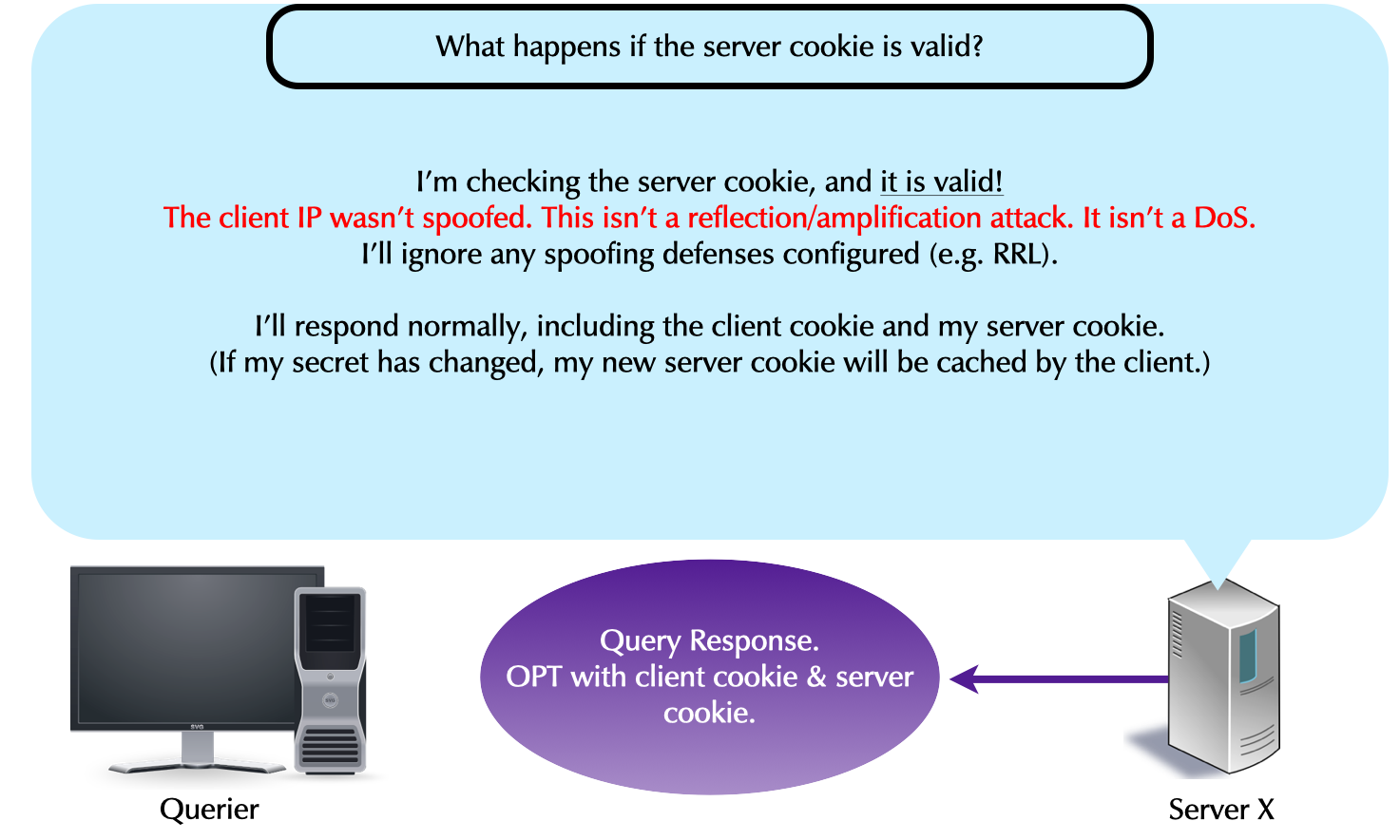
9.11.16 Cookies: Invalid Server Cookie
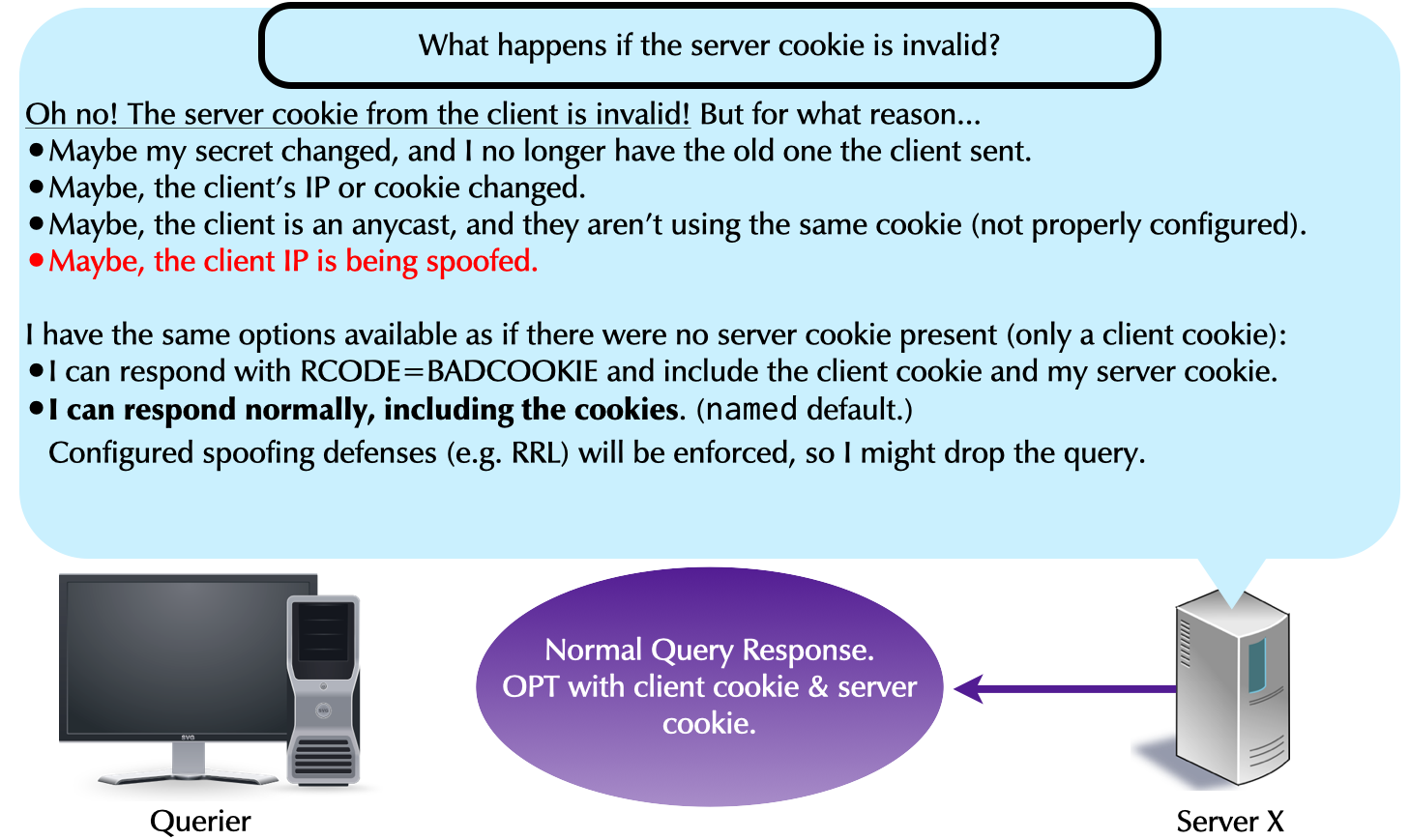
9.11.17 Cookies in dig: Server Cookie
- This server cookie is valid (good).
$ dig @ns12a.dnslab.org zone12.dnslab.org +nocmd +noqu +norec

; <<>> DiG 9.11.4-P2-RedHat-9.11.4-26.P2.el8 <<>> @ns12a.dnslab.org zone12.dnslab.org +nocmd +noqu +norec
; (1 server found)
;; global options: +cmd
;; Got answer:
;; ->>HEADER<<- opcode: QUERY, status: NOERROR, id: 15954
;; flags: qr aa; QUERY: 1, ANSWER: 1, AUTHORITY: 0, ADDITIONAL: 1

;; OPT PSEUDOSECTION:
; EDNS: version: 0, flags:; udp: 1232
; COOKIE: 77eb710a2d489ed5010000005ecdff33b816374a28e8fde5 (good)
;; ANSWER SECTION:
zone12.dnslab.org.	60	IN	A	161.35.224.95

;; Query time: 155 msec
;; SERVER: 161.35.224.95#53(161.35.224.95)
;; WHEN: Wed May 27 05:48:35 UTC 2020
;; MSG SIZE  rcvd: 88
- Identical queries, but dig doesn't save server cookies, or even its own client cookie. Each time dig queries it use a new client cookie, and thus get a new server cookie.
;; OPT PSEUDOSECTION:
; EDNS: version: 0, flags:; udp: 1232
; COOKIE: 41cb7f09d4942eb3010000005ecdff829ab46f795ab83c4c (good)
- and another
;; OPT PSEUDOSECTION:
; EDNS: version: 0, flags:; udp: 1232
; COOKIE: bf7e888966399c5b010000005ecdff985ecbdb747d5b7955 (good)
9.11.18 Cookies in dig: Client Cookie
- The command line switch
+qrmakesdigprint the outgoing query in addition to the received answer. We see the client cookie in the outgoing query.
$ dig @ns12a.dnslab.org zone12.dnslab.org +nocmd +qr +norec

; <<>> DiG 9.11.4-P2-RedHat-9.11.4-26.P2.el8 <<>> @ns12a.dnslab.org zone12.dnslab.org +nocmd +qr +norec
; (1 server found)
;; global options: +cmd
;; Sending:
;; ->>HEADER<<- opcode: QUERY, status: NOERROR, id: 10846
;; flags: ad; QUERY: 1, ANSWER: 0, AUTHORITY: 0, ADDITIONAL: 1

;; OPT PSEUDOSECTION:
; EDNS: version: 0, flags:; udp: 4096
; COOKIE: 919e4f49e09f6d5d
;; QUESTION SECTION:
;zone12.dnslab.org.		IN	A

;; QUERY SIZE: 56

;; Got answer:
;; ->>HEADER<<- opcode: QUERY, status: NOERROR, id: 10846
;; flags: qr aa; QUERY: 1, ANSWER: 1, AUTHORITY: 0, ADDITIONAL: 1

;; OPT PSEUDOSECTION:
; EDNS: version: 0, flags:; udp: 1232
; COOKIE: 919e4f49e09f6d5d010000005ecdffcd693be2fca534ac93 (good)
;; QUESTION SECTION:
;zone12.dnslab.org.		IN	A

;; ANSWER SECTION:
zone12.dnslab.org.	60	IN	A	161.35.224.95

;; Query time: 155 msec
;; SERVER: 161.35.224.95#53(161.35.224.95)
;; WHEN: Wed May 27 05:51:09 UTC 2020
;; MSG SIZE  rcvd: 88
9.11.19 DNS Cookies (PowerDNS 4.6.0+)
- DNS cookies can be enabled in PowerDNS:
This setting MUST be 32 hexadecimal characters, as the siphash algorithm’s key used to create the cookie requires a 128-bit key.
- Create a random Cookie using
openssl% openssl rand -hex 16 # 16 hex numbers are 32 hex digits
- Configure the cookie in
/etc/powerdns/pdns.conf, check the configuration and restart the PowerDNS serveredns-cookie-secret=<hex-string>
- Test with a recent version of
digthat will display the cookie.- On the first query, the
digcommand does not know the server cookie - The server responds with a
BADCOOKIEerror (EDNS-Error) and sends its configured cookie to the client (thedigcommand) - The
digcommand will read the cookie, will create a new cookie value out of the PowerDNS servers cookie and its own cookie value and send this to the PowerDNS server - Now the PowerDNS server will see the configured cookie, a session
is established, and the PowerDNS server will respond to the query
   $ dig @pdns009a.dnslab.org zone009.dnslab.org soa
;; BADCOOKIE, retrying.

; <<>> DiG 9.20.21-1~deb13u1-Debian <<>> @pdns009a.dnslab.org zone009.dnslab.org soa
; (2 servers found)
;; global options: +cmd
;; Got answer:
;; ->>HEADER<<- opcode: QUERY, status: NOERROR, id: 35681
;; flags: qr aa rd; QUERY: 1, ANSWER: 1, AUTHORITY: 0, ADDITIONAL: 1
;; WARNING: recursion requested but not available

;; OPT PSEUDOSECTION:
; EDNS: version: 0, flags:; udp: 1232
; COOKIE: 9ffd13e9513a9c0d0100000069fc242b234886251a41310e (good)
;; QUESTION SECTION:
;zone009.dnslab.org.            IN      SOA

;; ANSWER SECTION:
zone009.dnslab.org.     60      IN      SOA     pdns009a.dnslab.org. hostmaster.zone009.dnslab.org. 1002 3600 1800 3542400 60

;; Query time: 0 msec
;; SERVER: 2a03:b0c0:3:f0:0:2:5dce:8000#53(pdns009a.dnslab.org) (UDP)
;; WHEN: Thu May 07 05:33:31 UTC 2026
;; MSG SIZE  rcvd: 131
- On the first query, the
9.12 Secondary zones
- PowerDNS can be operated in multi-primary or native mode (default) where all instances are primary servers where the replication happens on the database level (or by other means than DNS zone transfer)
- Optional PowerDNS can also recieve secondary zone content via RFC
standard DNS zone transfer (TCP)
- To transfer a zone from a non-PowerDNS server
- PowerDNS secondary mode must be enabled on a global level in the PowerDNS configuration file
# Secondary operation
secondary=on
- A secondary (slave) zone can be created with
pdnsutil:
% pdnsutil create-secondary-zone <zonename> <ip-address-of-primary>
Creating secondary zone 'zone001.dnslab.org', with master(s) '138.68.87.93'
- Once created, the PowerDNS server will transfer the zone via DNS zone transfer from the primary and will store the content in the database. The secondary server is now authoritative for the zone
% dig @localhost zone001.dnslab.org soa +norec
; <<>> DiG 9.16.22-Debian <<>> @localhost zone001.dnslab.org soa +norec
; (1 server found)
;; global options: +cmd
;; Got answer:
;; ->>HEADER<<- opcode: QUERY, status: NOERROR, id: 26321
;; flags: qr aa; QUERY: 1, ANSWER: 1, AUTHORITY: 0, ADDITIONAL: 1
[...]
- On the primary server we should see the incoming zone transfer request from the secondary server
Oct 30 03:15:50 pdns01 pdns_server[29144]: Remote 165.22.233.102 wants 'zone001.dnslab.org|SOA', do = 0, bufsize = 512: packetcache MISS
Oct 30 03:15:50 pdns01 pdns_server[29144]: AXFR-out zone 'zone001.dnslab.org', client '165.22.233.102:44233', transfer initiated
Oct 30 03:15:50 pdns01 pdns_server[29144]: AXFR-out zone 'zone001.dnslab.org', client '165.22.233.102:44233', allowed: client IP is in allow-axfr-ips
Oct 30 03:15:50 pdns01 pdns_server[29144]: gmysql Connection successful. Connected to database 'powerdns' on '/run/mysqld/mysqld.sock'.
Oct 30 03:15:50 pdns01 pdns_server[29144]: AXFR-out zone 'zone001.dnslab.org', client '165.22.233.102:44233', AXFR finished
- The server hosting the secondary zone will check for new zone
content on the primary server based on the refresh timer of the
zone. As this can create a notable delay in zone content
propagation, PowerDNS also support sending DNS
NOTIFYmessages from the primary server towards all secondary servers whenever the zone content has been changed[sidebar]
image::./images/notify-00.png[scaledwidth=65%]
[sidebar] image::./images/notify-01.png[scaledwidth=65%]
[sidebar] image::./images/notify-02.png[scaledwidth=65%]
[sidebar] image::./images/notify-03.png[scaledwidth=65%]
[sidebar] image::./images/notify-04.png[scaledwidth=65%]
- For
NOTIFYmessages to be send on changes, the primary server must be operated in primary mode (default is native mode where noNOTIFYmessages are send)
# Operate in primary mode
primary=yes
- Also, the primary zone must be set into
primarystate
% pdnsutil set-kind <zone-name> primary
NOTIFYmessages will be send out 60 seconds after a change. To triggerNOTIFYmessages manually, usepdns_control:
% pdns_control notify <zone-name>
- Example Log Output on primary
Oct 30 03:36:12 pdns01 pdns_server[29637]: Notification request to host 165.22.233.102 for domain 'zone001.dnslab.org' received from operator
Oct 30 03:36:14 pdns01 pdns_server[29637]: Remote 165.22.233.102 wants 'zone001.dnslab.org|SOA', do = 0, bufsize = 512: packetcache MISS
Oct 30 03:36:14 pdns01 pdns_server[29637]: AXFR-out zone 'zone001.dnslab.org', client '165.22.233.102:45783', transfer initiated
Oct 30 03:36:14 pdns01 pdns_server[29637]: AXFR-out zone 'zone001.dnslab.org', client '165.22.233.102:45783', allowed: client IP is in allow-axfr-ips
Oct 30 03:36:14 pdns01 pdns_server[29637]: gmysql Connection successful. Connected to database 'powerdns' on '/run/mysqld/mysqld.sock'.
Oct 30 03:36:14 pdns01 pdns_server[29637]: AXFR-out zone 'zone001.dnslab.org', client '165.22.233.102:45783', AXFR finished
Oct 30 03:36:14 pdns01 pdns_server[29637]: Removed from notification list: 'zone001.dnslab.org' to 165.22.233.102:53 (was acknowledged)
- Incremental Zone-Transfer (IXFR) can speed up zone transfer for
large zones, as only the changes are transmitted. PowerDNS does not
serve IXFR, but other DNS server products do (BIND 9, NSD, MS
Windows DNS).
- Use IXFR when PowerDNS is hosting a secondary zone where the primary zone is on a DNS server that supports outgoing IXFR.
% pdnsutil set-meta example.com IXFR 1
Set 'example.com' meta IXFR = 1
- Log-output on a PowerDNS server hosing a primary zone and receiving a IXFR zone-transfer request
Oct 30 03:53:17 pdns01 pdns_server[29637]: Notification request for domain 'zone001.dnslab.org' received from operator
Oct 30 03:53:17 pdns01 pdns_server[29637]: Queued notification of domain 'zone001.dnslab.org' to 165.22.233.102:53
Oct 30 03:53:18 pdns01 pdns_server[29637]: Remote 165.22.233.102 wants 'zone001.dnslab.org|SOA', do = 0, bufsize = 512: packetcache MISS
Oct 30 03:53:18 pdns01 pdns_server[29637]: Removed from notification list: 'zone001.dnslab.org' to 165.22.233.102:53 (was acknowledged)
Oct 30 03:53:18 pdns01 pdns_server[29637]: IXFR-out zone 'zone001.dnslab.org', client '165.22.233.102:37241', transfer initiated with serial 1005
Oct 30 03:53:18 pdns01 pdns_server[29637]: IXFR-out zone 'zone001.dnslab.org', client '165.22.233.102:37241', allowed: client IP is in allow-axfr-ips
Oct 30 03:53:18 pdns01 pdns_server[29637]: IXFR-out zone 'zone001.dnslab.org', client '165.22.233.102:37241', IXFR fallback to AXFR
Oct 30 03:53:18 pdns01 pdns_server[29637]: AXFR-out zone 'zone001.dnslab.org', client '165.22.233.102:37241', transfer initiated
Oct 30 03:53:18 pdns01 pdns_server[29637]: AXFR-out zone 'zone001.dnslab.org', client '165.22.233.102:37241', allowed: client IP is in allow-axfr-ips
Oct 30 03:53:18 pdns01 pdns_server[29637]: gmysql Connection successful. Connected to database 'powerdns' on '/run/mysqld/mysqld.sock'.
Oct 30 03:53:18 pdns01 pdns_server[29637]: AXFR-out zone 'zone001.dnslab.org', client '165.22.233.102:37241', AXFR finished
- Log-output on the secondary server
Oct 30 03:53:23 pdns02 pdns_server[17960]: AXFR-in zone: 'zone001.dnslab.org', primary: '138.68.87.93', zone committed with serial 1006
- Exercise
- Work on the VM machine
pdnsNNNb.dnslab.org(this is the 2nd server!) - Install PowerDNS and MariaDB on the secondary machine, using the instructions from above
- Add the IP-Address(es) (IPv6 and IPv4) of the secondary server to the zone transfer access control on the primary PowerDNS server. Change the IP addresses in the example below to match the IP addresses of the secondary server
allow-axfr-ips=2001:db8::53,192.0.2.53
- Configure the primary server to be in
primarymode, configure the zonezoneNNN.dnslab.orgto be inprimarymode - On the secondary server, check that the primary is providing a regular zone transfer (AXFR)
% dig @pdnsNNNa.dnslab.org zone001.dnslab.org axfr
- Create the secondary zone on the secondary server
- Use the
edit-zonefunction ofpdnsutilon the primary server to add the required 2nd NS record for the new secondary machine
% export EDITOR=emacs
% pdnsutil edit-zone zone001.dnslab.org
[...]
- This is the NS record
zoneNNN.dnslab.org 60 IN NS pdnsNNNb.dnslab.org
- Check that
NOTIFYmessages are send and received and that the zone content propagates after the change. Both PowerDNS server should host the same zone (same SOA serial number)
$ dig zoneNNN.dnslab.org +nssearch
SOA pdnsNNNa.dnslab.org. hostmaster.zoneNNN.dnslab.org. 1003 3600 1800 3542400 60 from server 165.245.233.68 in 0 ms.
SOA pdnsNNNa.dnslab.org. hostmaster.zoneNNN.dnslab.org. 1004 3600 1800 3542400 60 from server 178.128.198.145 in 111 ms.
SOA pdnsNNNa.dnslab.org. hostmaster.zoneNNN.dnslab.org. 1004 3600 1800 3542400 60 from server 2a03:b0c0:3:f0:0:2:5dce:8000 in 111 ms.
- Work on the VM machine
- Solution
- PowerDNS configuration file (secondary)
# MySQL / MariaDB Database access configuration
launch=gmysql
gmysql-socket=/run/mysqld/mysqld.sock
gmysql-dbname=powerdns
gmysql-user=pdnsuser
gmysql-password=securepw

# Server for secondary zones
secondary=on
- PowerDNS configuration file (primary)
[...]
primary=yes
allow-axfr-ips=<ipv4-address>,<ipv6-address> # IP Addresses of secondary DNS
- Mark zone as
primaryzone on the primary server
[primary]% pdnsutil set-kind zoneNNN.dnslab.org primary
- Create the secondary zone on the secondary server
[secondary]% pdnsutil create-secondary-zone zoneNNN.dnslab.org 2a03:b0c0:3:d0::138d:3001
- On the primary-server, add the 2nd NS record to the zone
[primary]% pdnsutil edit-zone zoneNNN.dnslab.org
- Use
dig +nssearchto verify that both authoritative server have the same SOA serial
[primary]% dig zoneNNN.dnslab.org +nssearch
SOA pdns010a.dnslab.org. hostmaster.zoneNNN.dnslab.org. 1003 3600 1800 3542400 60 from server 142.93.145.28 in 4 ms.
SOA pdns010a.dnslab.org. hostmaster.zoneNNN.dnslab.org. 1003 3600 1800 3542400 60 from server 46.101.218.115 in 104 ms.
- Note: PowerDNS sends
NOTIFYmessages over IPv4 only. To change theprimaryIP addresses on a secondary zone to contain the IPv4 address of the primary, use
% pdnsutil change-secondary-zone-primary zoneNNN.dnslab.org 46.101.218.115
9.13 Dynamic DNS (DDNS), NOTIFY, & Incremental Zone Transfers
9.13.1 Dynamic Updates
- DNSIND is shorthand for a group of extensions to the original DNS
protocol.
Iis for Incremental Zone TransferNis for NOTIFYDis for Dynamic Update
- Together, the DNSIND extensions allow DNS to handle dynamic networks.
- A dynamic update allows a node to change the contents of a
zone. DNS dynamic update is the RFC standard API to change DNS
content over the network. As it is a RFC standard, it works across
different DNS server products. Use cases:
- DHCP servers, for example, can add
A,AAAAandPTRrecords to reflect the leases they give out. - Microsoft Active Directory can update the SRV records required for service discovery via dynamic updates
- DNS management systems such as VinylDNS (https://www.vinyldns.io), NetBox (https://netboxlabs.com) or Men & Mice Micetro (https://menandmice.com) can manage zone content through dynamic updates
- ACME compatible x509 certificate management systems (e.g. Let's encrypt, RFC 8555 https://datatracker.ietf.org/doc/html/rfc8555) can authenticate the domain owner with the help of dynamic DNS updates, allowing centralized automated certificate management
- DHCP servers, for example, can add
- A dynamic update can:
- Add resource records to a zone
- Delete records from a zone:
- One record
- All records of a certain type with one domain name (an RRSet)
- All records with one domain name
- A server can be configured to only accept updates from senders with the proper PSK (Pre-Shared TSIG Key).
- A sender can define update prerequisites, such as the
existence/non-existence of:
- A particular record
- Resource Records with a specific domain name and type
- A sender first tries to transmit an update to a zone's primary master.
- Most compare the SOA's
mnamefield to the NS RRSet. - If the
mnamematches an NS RR, the update is sent there. - Otherwise the update is sent to one of the domain names in the NS
RRSet (from the sender's perspective, a secondary).
[sidebar]
- Most compare the SOA's
image::./images/dynamic-update-00.png[scaledwidth=65%]
[sidebar] image::./images/dynamic-update-01.png[scaledwidth=65%]
[sidebar] image::./images/dynamic-update-02.png[scaledwidth=65%]
[sidebar] image::./images/dynamic-update-03.png[scaledwidth=65%]
[sidebar] image::./images/dynamic-update-04.png[scaledwidth=65%]
[sidebar] image::./images/dynamic-update-05.png[scaledwidth=65%]
[sidebar] image::./images/dynamic-update-06.png[scaledwidth=65%]
[sidebar] image::./images/dynamic-update-07.png[scaledwidth=65%]
9.13.2 Dynamic Updates and PowerDNS
- PowerDNS supports dynamic updates on a server that hosts primary
(
master) zones. Dynamic updates are disabled in the default configuration and can be enabled in the configuration file (global)
dnsupdate=yes
- In addition to the global configuration, dynamic updates need to be enabled on a zone
% pdnsutil set-meta example.org ALLOW-DNSUPDATE-FROM 127.0.0.0/8
Oct 30 08:03:57 gmysql Connection successful. Connected to database 'powerdns' on '/run/mysqld/mysqld.sock'.
Oct 30 08:03:57 gmysql Connection successful. Connected to database 'powerdns' on '/run/mysqld/mysqld.sock'.
Set 'example.org' meta ALLOW-DNSUPDATE-FROM = 127.0.0.0/8
- The tool
nsupdate(Debian packetdnsutils) is the standard tool to send dynamic update messages. Here an example on how to add a new record to a zone:
$ nsupdate
> server 127.0.0.1
> ttl 60
> add ddns.example.org in TXT "This is a dynamically added DNS record"
> send
> quit
- The dynamic update in the PowerDNS logfile
Oct 30 08:05:45 pdns01 pdns_server[30874]: Remote 127.0.0.1 wants 'ddns.example.org|SOA', do = 0, bufsize = 512: packetcache MISS
Oct 30 08:05:45 pdns01 pdns_server[30874]: Remote 127.0.0.1 wants 'example.org|SOA', do = 0, bufsize = 512: packetcache MISS
Oct 30 08:05:45 pdns01 pdns_server[30874]: UPDATE (9824) from 127.0.0.1 for example.org: Processing started.
Oct 30 08:05:45 pdns01 pdns_server[30874]: UPDATE (9824) from 127.0.0.1 for example.org: starting transaction.
Oct 30 08:05:45 pdns01 pdns_server[30874]: UPDATE (9824) from 127.0.0.1 for example.org: Adding record ddns.example.org|TXT
Oct 30 08:05:45 pdns01 pdns_server[30874]: UPDATE (9824) from 127.0.0.1 for example.org: Increasing SOA serial (1111 -> 2021103001)
Oct 30 08:05:45 pdns01 pdns_server[30874]: UPDATE (9824) from 127.0.0.1 for example.org: Update completed, 2 changed records committed.
Oct 30 08:06:26 pdns01 pdns_server[30874]: 1 domain for which we are master needs notifications
Oct 30 08:06:26 pdns01 pdns_server[30874]: Queued notification of domain 'example.org' to 165.22.233.102:53
- The record will be published immediately and can be queried over DNS:
% dig @localhost ddns.example.org txt

; <<>> DiG 9.16.22-Debian <<>> @localhost ddns.example.org txt
; (1 server found)
;; global options: +cmd
;; Got answer:
;; ->>HEADER<<- opcode: QUERY, status: NOERROR, id: 2483
;; flags: qr aa rd; QUERY: 1, ANSWER: 1, AUTHORITY: 0, ADDITIONAL: 1
;; WARNING: recursion requested but not available

;; OPT PSEUDOSECTION:
; EDNS: version: 0, flags:; udp: 1232
;; QUESTION SECTION:
;ddns.example.org.       IN      TXT

;; ANSWER SECTION:
ddns.example.org. 60     IN      TXT     "This is a dynamically added DNS record"

;; Query time: 3 msec
;; SERVER: 127.0.0.1#53(127.0.0.1)
;; WHEN: Sat Oct 30 08:06:28 UTC 2021
;; MSG SIZE  rcvd: 103
- In the default configuration PowerDNS will wait 60 seconds after a
dynamic update before sending out
NOTIFYmessages to the secondary. This configuration changes PowerDNS to send a notification to all secondary servers after every update. This will speed up the propagation of changes and is very useful for ACME TLS certificate verification
% pdnsutil set-meta example.org NOTIFY-DNSUPDATE 1
- Each dynamic update will increment the SOA serial number. PowerDNS
has a SOA serial number edit policy (
SOA-EDIT-DNSUPDATE) that defines how the SOA serial number should be incrementedDEFAULT: Generate a soa serial ofYYYYMMDDNN. If the current serial is lower than the generated serial, use the generated serial. If the current serial is higher or equal to the generated serial, increase the current serial by 1.INCREASE: Increase (increment) the current serial by 1.EPOCH: Change the serial to the number of seconds since the EPOCH (seconds since 1.1.1970, also known as unixtime)SOA-EDIT: Change the serial to whatever SOA-EDIT would provide. Used for DNSSEC zones to ensure freshness of signatures on secondary (slave) serverSOA-EDIT-INCREASE: Change the serial to whateverSOA-EDITwould provide. If whatSOA-EDITprovides is lower than the current serial, increase the current serial by 1. Exception: withSOA-EDIT=INCEPTION-EPOCH, the serial is bumped to at least the current EPOCH time.
% pdnsutil set-meta example.org SOA-EDIT-DNSUPDATE INCREASE
9.13.3 Using nsupdate
nsupdateis a BIND application for sending dynamic changes to a server.- It works both interactively and non-interactively.
- In both modes, commands are one-per-line.
- The three main commands are:
update addupdate deletesend
updateprepares RRs changes,sendexecutes them.- Note: ENTER by itself is the same as
send - Non-interactively, commands come from a file or STDIN.
$ nsupdate nsupdate.input.file

$ nsupdate < nsupdate.input.file
- Interactive mode:
$ nsupdate
>
- The interactive command show allows changes to be reviewed before being sent.
- Here no updates have been prepared.
$ nsupdate
> show
Outgoing update query:
;; ->>HEADER<<- opcode: UPDATE, status: NOERROR, id:      0
;; flags:; ZONE: 0, PREREQ: 0, UPDATE: 0, ADDITIONAL: 0
>
update addprepares a RR to be added to a zone.- All fields, except the Class must be provided.
- TTL can be provided in a separate statement.
> update add a.example.com IN A 192.0.2.1
ttl 'IN': not a valid number
> update add a.example.com 3600 IN A 192.0.2.1
> ttl 3600
> update add a.example.com AAAA 2001:db8:0:deaf::1
> show
Outgoing update query:
;; ->>HEADER<<- opcode: UPDATE, status: NOERROR, id:      0
;; flags:; ZONE: 0, PREREQ: 0, UPDATE: 0, ADDITIONAL: 0
;; UPDATE SECTION:
a.example.com.		3600	IN	A	192.0.2.1
a.example.com.		3600	IN	AAAA	2001:db8:0:deaf::1
> send
update deleteprepares RRs to be deleted.- Class is optional, and TTL, if provided, is ignored.
- Providing all fields except TTL and Class deletes one RR.
> update delete b.example.com. 1800 A 192.0.2.99
> update delete example.net. MX 15 mailserver.example.net.
> show
Outgoing update query:
;; ->>HEADER<<- opcode: UPDATE, status: NOERROR, id:      0
;; flags:; ZONE: 0, PREREQ: 0, UPDATE: 0, ADDITIONAL: 0
;; UPDATE SECTION:
b.example.com.		0	NONE	A	192.0.2.99
example.net.		    0	NONE	MX	15 mailserver.example.net.
update deleteProviding the RTYPE without RDATA, deletes a RRSet.
> update delete b.example.com. AAAA
> update delete c.example.com IN SRV
> show
Outgoing update query:
;; ->>HEADER<<- opcode: UPDATE, status: NOERROR, id:      0
;; flags:; ZONE: 0, PREREQ: 0, UPDATE: 0, ADDITIONAL: 0
;; UPDATE SECTION:
b.example.com.		0	NONE	A	192.0.2.99
example.net.		  0	NONE	MX	15 mailserver.example.net.
b.example.com.		0	ANY	AAAA
c.example.com.		0	ANY	SRV
>
update deleteOmitting RTYPE and RDATA deletes all RRSets.
> update delete d.example.com.
> show
Outgoing update query:
;; ->>HEADER<<- opcode: UPDATE, status: NOERROR, id:      0
;; flags:; ZONE: 0, PREREQ: 0, UPDATE: 0, ADDITIONAL: 0
;; UPDATE SECTION:
b.example.com.		0	NONE	A	192.0.2.99
example.net.	    0	NONE	MX	15 mailserver.example.net.
b.example.com.		0	ANY	AAAA
c.example.com.		0	ANY	SRV
d.example.com.		0	ANY	ANY
- Since BIND 9.9.0, the key word
updateis optional.
> delete  www.example.com. A
> add www.example.com. 600 A 192.0.2.80
> add www.example.com. 600 A 192.0.2.88
send- Transmit the prepared updates to the authoritative server.- WARNING - hitting ENTER is the same as send!
> send
answer- shows the results received from the server after asend.
> send
update failed: REFUSED
> answer
Answer:
;; ->>HEADER<<- opcode: UPDATE, status: REFUSED, id:  13117
;; flags: qr; ZONE: 0, PREREQ: 0, UPDATE: 0, ADDITIONAL: 0
>
prereq nxdomain <domain name>- requires that "domain name" doesn't exist (no RRs of any type).
> prereq nxdomain www.example.com
> update add www.example.com 3600 CNAME example.com.
> send
prereq yxdomain <domain name>- requires that "domain name" does exist.
> prereq yxdomain www.example.com
> update add web.example.com 3600 CNAME www.example.com.
> send
server <servername or IP> [port]- specifies the authoritative server that will receive the update.- If not set,
nsupdateusesMNAMEfrom the SOA RR and port 53. - Generally, updates should be sent to the primary authoritative server.
- If not set,
> server ns0.example.com
nsupdate -lsends all updates to localhost.- The
MNAMEis not checked, and server commands are ignored. - This is easy use, and is recommended if you are on the primary server
- The
local <IP address> [port]- specifies the outgoing IP address. This is useful for multi-homed machines, especially when IPv6 is used, and when the server limits updates to specific IPs.
> local 2001:db8:100:0:ff:aa01:42:12:feaa
zone <zonename>- specify the zone to be changed.- This is necessary when the update is an NS or glue RR to be made in the parent zone.
$ nsupdate
> zone example.com.
> update add ns1.subdomain.example.com. 3600 IN A 192.0.2.53
> update add ns2.subdomain.example.com. 3600 IN A 203.0.113.53
> send
9.13.4 Exercise
- Work on the primary server
pdnsNNNa.dnslab.org- Enable dynamic updates
- Create a new zone
dynamic.zoneNNN.dnslab.org(a delegated sub-domain of your existingzoneNNN.dnslab.org) - Make the new zone dynamic
- Work on the secondary server
pdnsNNNb.dnslab.org- Add a new secondary (
slave) zone - Make sure the new zone is being transferred
- Add a new secondary (
- Work on the primary server
pdnsNNNa.dnslab.org- use
nsupdateto- change the SOA record to be a functional SOA record for the zone
- add the two NS records to the zone
- add one TXT and one IPv4-Address (A) record to the zone
- Check that the dynamic updates are being accepted
- Check that
NOTIFYmessages are being send - Check that the zone is being synced with the secondary server
- use
nsupdateto remove the TXT record from the zone, checkNOTIFYand zone transfer
- use
9.14 Autoprimary operation
- PowerDNS as a secondary server can automatically create a new
secondary zone when receiving a
NOTIFYfrom a trusted primary server- The primary is trusted either by IP-address or by TSIG-key
- To use this function, the
autoprimaryfunction needs to be enabled on the secondary server
# Automatically fetch new zones from primary
autosecondary=yes
- Also on the secondary, the primary is configured as a new
autoprimary. This creates the trust based on the source IP address
% pdnsutil add-autoprimary 2a03:b0c0:3:d0::133d:1 ns001a.dnslab.org
% pdnsutil add-autoprimary 138.68.87.93 ns001a.dnslab.org
- Exercise
- Configure the secondary
pdnsNNNb.dnslab.orgto havepdnsNNNa.dnslab.orgas it's autoprimary - Create a new zone
example.comon the primary server, configure the zone as a primary zone, and populate the zone usingpdnsutilwith a correct SOA record and NS records - Check that the new zone is being created on the secondary and that all zone content is synchronized
- Configure the secondary
- Solution
- On the secondary server
pdnsNNNb.dnslab.org, set the PowerDNS server to be in autoprimary mode (in/etc/powerdns/pdns.conf)
autosecondary=yes
- Mark the IP-Addresses of the primary server as trusted autoprimary:
pdnsutil add-autoprimary <ip-v6-address-of-primary> nsNNNa.dnslab.org
pdnsutil add-autoprimary <ip-v4-address-of-primary> nsNNNa.dnslab.org
- On the (auto)primary, add a new zones with content
% pdnsutil create-zone example.com
Creating empty zone 'example.com'
Oct 30 08:34:10 No serial for 'example.com' found - zone is missing?

% pdnsutil replace-rrset example.com . SOA 3600 'pdnsNNNa.dnslab.org . 1001 3600 1800 3600000 3600'
Current records for example.com IN SOA will be replaced
New rrset:
example.com. 3600 IN SOA pdnsNNNa.dnslab.org . 1001 3600 1800 3600000 3600

% pdnsutil add-record example.com . NS 1800 "pdnsNNNa.dnslab.org"
New rrset:
example.com. 1800 IN NS pdnsNNNa.dnslab.org

% pdnsutil add-record example.com . NS 1800 "pdnsNNNb.dnslab.org"
New rrset:
example.com. 1800 IN NS pdnsNNNa.dnslab.org
example.com. 1800 IN NS pdnsNNNb.dnslab.org
- Configure the new zone to be a primary zone
% pdnsutil set-kind example.com primary
- Log on the primary server
Oct 30 08:41:29 pdns01 pdns_server[30874]: 1 domain for which we are master needs notifications
Oct 30 08:41:29 pdns01 pdns_server[30874]: Queued notification of domain 'example.com' to 165.22.233.102:53
Oct 30 08:41:30 pdns01 pdns_server[30874]: Removed from notification list: 'example.com' to 165.22.233.102:53 (was acknowledged)
Oct 30 08:41:30 pdns01 pdns_server[30874]: Remote 165.22.233.102 wants 'example.com|SOA', do = 0, bufsize = 512: packetcache MISS
Oct 30 08:41:30 pdns01 pdns_server[30874]: Remote 165.22.233.102 wants 'example.com|NS', do = 0, bufsize = 512: packetcache MISS
Oct 30 08:41:30 pdns01 pdns_server[30874]: Remote 165.22.233.102 wants 'example.com|SOA', do = 0, bufsize = 512: packetcache HIT
Oct 30 08:41:30 pdns01 pdns_server[30874]: AXFR-out zone 'example.com', client '165.22.233.102:53777', transfer initiated
Oct 30 08:41:30 pdns01 pdns_server[30874]: AXFR-out zone 'example.com', client '165.22.233.102:53777', allowed: client IP is in allow-axfr-ips
Oct 30 08:41:30 pdns01 pdns_server[30874]: gmysql Connection successful. Connected to database 'powerdns' on '/run/mysqld/mysqld.sock'.
Oct 30 08:41:30 pdns01 pdns_server[30874]: AXFR-out zone 'example.com', client '165.22.233.102:53777', AXFR finished
Oct 30 08:41:32 pdns01 pdns_server[30874]: No master domains need notifications
- Log on the secondary
Oct 30 08:41:29 pdns02 pdns_server[19475]: Received NOTIFY for example.com from 138.68.87.93:16522 for which we are not authoritative, trying supermaster
Oct 30 08:41:30 pdns02 pdns_server[19475]: Created new slave zone 'example.com' from supermaster 138.68.87.93
Oct 30 08:41:31 pdns02 pdns_server[19475]: AXFR-in zone: 'example.com', primary: '138.68.87.93', zone committed with serial 1001
- On the secondary server
10 Monitoring PowerDNS Recursor und PowerDNS Authoritative Server
10.1 why DNSSEC monitoring
- a DNS infrastructure with DNSSEC signed zones is more fragile
- more complex configuration
- most errors are fatal, the zone cannot be resolved anymore (this is a security feature of DNSSEC!)
- DNSSEC monitoring helps to detect issues before the DNS service is affected
10.2 Monitoring scripts
- Men & Mice has compiled 15 essential monitoring test scripts
- These scripts are simple (Bourne-) shell scripts that should work on any Unix/Linux system (and on Windows 10/11 with Linux-Sub-System or Windows with Cygwin)
- The scripts are available in the authors Github repo https://github.com/cstrotm/dns-monitoring-scripts
- Please send pull-requests for fixes and additions
- The scripts are deliberately simple
- Each script takes one input parameter
- the domain-name of a delegated zone
- The scripts can be used from a cron-job
- or embedded into an monitoring system.
10.3 DNS-Server tests
- Test 1 - UDPv4 reachability - test for each authoritative server of the DNS infrastructure
$ dig -4 test-domain +nssearch
- Test 2 - UDPv6 reachability - test for each authoritative server of
the DNS infrastructure that it is reachable over UDP IPv6
$ dig -6 test-domain +nssearch
- Test 3 - TCPv4 reachability - test for each authoritative server of the DNS infrastructure that it is reachable over TCP IPv4
$ dig -4 test-domain +tcp +nssearch
- Test 4 - TCPv6 reachability - test for each authoritative server of the DNS infrastructure that it is reachable over TCP IPv6
$ dig -6 test-domain +tcp +nssearch
- Test 5 - EDNS0 response size: tests that the server signals the correct EDNS0 response size. Size needs to be checked against the local policy. Usually 1220-1232 bytes.
echo " == #5 - EDNS0 response size == "

err=0
ednspolicy=1232

dig NS ${1} +short | while read server; do
  echo "Server: ${server} "
  ednsbuf=$(dig @${server} ${1} | grep "; EDNS:" | cut -d " " -f 7)

  if [ "${ednsbuf}" -eq "${ednspolicy}" ]; then
    echo " EDNS0-Bufsize is ${ednsbuf}, good "
  else
    err=1
    echo " EDNS0-Bufsize is ${ednsbuf}, out of policy range "
  fi
done

exit ${err}
10.4 DNS-Zone tests
- Test 6 - test that all authoritative server for a zone
respond. Count is tested against the number of delegation
authoritative servers for the zone.
echo " == #6 - IPv4 zone response tests == " err=0 # get TLD for the zone tld=$(echo ${1} | rev | cut -d'.' -f 1 | rev) # pick one TLD auth server tldns=$(dig NS ${1}. +short | tail -1) # query and count the delegation NS records for the zone parentnsnum=$(dig @${tldns} NS ${1} +short | wc -l) # query the authoritative DNS servers for the zone childnsnum=$(dig -4 ${1} +nssearch | wc -l) if [ "${parentnsnum}" -eq "${childnsnum}" ]; then echo "all authoritative DNS-Server answer" else err=1 echo "Error: Mismatch" echo "Auth DNS-Servers in Delegation: ${parentnsnum}" echo "Auth DNS-Servers in answering: ${childnsnum}" fi exit ${err} - Test 7 - test that all authoritative server for a zone respond via
TCP. Count should be tested against the known good number of
authoritative servers for the zone. The return code of the
digcommand should be checked for errors.echo " == #7 - IPv4 (TCP) zone response tests == " err=0 # get TLD for the zone tld=$(echo ${1} | rev | cut -d'.' -f 1 | rev) # pick one TLD auth server tldns=$(dig NS ${1}. +short | tail -1) # query and count the delegation NS records for the zone parentnsnum=$(dig @${tldns} NS ${1} +short | wc -l) # query the authoritative DNS servers for the zone childnsnum=$(dig -4 ${1} +nssearch +tcp | wc -l) if [ "${parentnsnum}" -eq "${childnsnum}" ]; then echo "all authoritative DNS-Server answer" else err=1 echo "Error: Mismatch" echo "Auth DNS-Servers in Delegation: ${parentnsnum}" echo "Auth DNS-Servers in answering: ${childnsnum}" fi exit ${err} - Test 8 - test that all authoritative server for a zone have the
same SOA serial. The return code of the dig command should be
checked for errors.
dig zone +nssearch
- the SOA serial can be different for short amount of times after an update on the primary (propagation delay during zone transfer)
- on a test interval of 5 minutes the test should issue a warning if the same SOA difference is seen in two successive tests
- is the same SOA difference seen after three or more tests, an event
of severity
ERRORshould be generated
- Test 8 - test that all authoritative server for a zone have the
same SOA serial. The return code of the dig command should be
checked for errors.
echo " == #8 - SOA serial == " err=0 oldsoaserial="0" dig ${1} +nssearch | while read serverres; do soaserial=$(echo ${serverres} | cut -d ' ' -f 4) if [ "${oldsoaserial}" -eq "0" ]; then oldsoaserial=${soaserial} else if [ "${oldsoaserial}" -eq "${soaserial}" ]; then echo "Match for ${soaserial}" else err=1 echo "Mismatch for ${soaserial} != ${oldsoaserial}" fi fi done exit ${err} - Test 9 - test for AA-Flag. Repeat this test for each authoritative
server for the zone. Each server must respond with an AA-Flag.
echo " == #9 - AA-Flag == " err=0 dig NS ${1} +short | while read server; do echo "Server: ${server} " aaflag=$(dig @${server} ${1} SOA +norec | grep ";; flags" | cut -d " " -f 4 | cut -b 1-2) if [ "${aaflag}" = "aa" ]; then echo " AA-Flag found, good " else err=1 echo " no AA-Flag, Server not authoritative " fi done exit ${err} - Test 10 - test for Parent-Child NS-RRset. Tests that the NS-RRset
in the parent zone (delegation) matches the NS-RRset in the zone
data.
echo " == #10 - test for Parent-Child NS-RRset == "

if [ "$1" = "" ]; then
  echo "This test fails without param. Exiting..."
  exit 1
fi

err=0
# get one authoritative server for the zone
child_dns=$(dig NS ${1} +short | tail -1)
# get TLD of Domain
tld=$(echo ${1} | rev | cut -d'.' -f 1 | rev)
# get one authoritative server for the TLD
tldns=$(dig NS ${tld}. +short | tail -1)
# query the delegation records
parns=$(dig @${tldns} NS ${1} +norec +noall +authority | grep "IN.*NS" | sort)

while read nsrec; do
  ns=$(echo ${nsrec} | cut -d ' ' -f 5)
  parentns="${parentns} ${ns}"
done <<EOF
${parns}
EOF

# query the zone records
childns=$(dig @${child_dns} NS ${1} +short +norec | sort)
parentns=$(echo ${parentns} | tr ' ' '\n' | sort)

echo "Parent delegation:"
echo ${parentns}
echo "Child zonedata:"
echo ${childns}

if [ "${childns}" = "${parentns}" ]; then
  echo "Parent/Child NS-RRSet matches"
else
  err=1
  echo "Parent/Child NS-RRSet mismatch"
fi

exit ${err}
10.5 DNSSEC tests
- Test 11 - test for DNSKEY RRset answer size. The full answer packet
of the DNSKEY rrset should be below the IPv6 fragmentation payload
limit (1232 byte)
echo " == #11 - test for DNSKEY RRset answer size == " err=0 maxsize=1232 replysize=$(dig ${1} DNSKEY +dnssec +cd | grep ";; MSG SIZE" | cut -d " " -f 6) if [ "${replysize}" -le "${maxsize}" ]; then echo "Good, DNSKEY RRSet size is ${replysize} which is below or equal to ${maxsize}" else err=1 echo "Bad, DNSKEY RRSet size is ${replysize} which is above ${maxsize}" fi exit ${err} - Test 12 - RRSIG validity: check for the lifetime timestamps of RRSIGs in the zone. This test should be done for every important RRset in the zone (SOA, DNSKEY, MX, A/AAAA)
dig zone soa +dnssec | egrep "RRSIG.*SOA" | cut -d " " -f 6
dig zone soa +dnssec | egrep "RRSIG.*SOA" | cut -d " " -f 5
- compare the output with the current system time
date "+%Y%m%d%H%M%S"- issue an ERROR event, if the inception time is in the future
- issue an ERROR event, if the expiry time is in the past
- issue an WARNING event, if the expiry time will be reached in less than 5 days
- issue an ERROR event, if the expiry time will be reached in less than 2 days
echo " == #12 - RRSIG validity == " if [ "$1" = "" ]; then echo "This test fails without param. Exiting..." exit 1 fi err=0 today=$(date "+%Y%m%d%H%M%S") inception=$(dig ${1} SOA +cd +dnssec | egrep "RRSIG.*SOA" | cut -d " " -f 6) expiry=$(dig ${1} SOA +cd +dnssec | egrep "RRSIG.*SOA" | cut -d " " -f 5) echo "Today : ${today}" echo "Inception: ${inception}" echo "Expiry : ${expiry}" if [ "${inception}" -gt "${today}" ]; then err=1 echo "ERROR: RRSIG validity (${inception}) is in the future" fi if [ "${expiry}" -lt "${today}" ]; then err=1 echo "ERROR: RRSIG validity (${expiry}) is in the past, DNSSEC signature has expired" fi twodaysahead=$(date +%s) twodaysahead=$((${twodaysahead}+172800)) twodaysahead=$(date -u --date="@${twodaysahead}" "+%Y%m%d%H%M%S") if [ "${expiry}" -lt "${twodaysahead}" ]; then err=1 echo "ERROR: RRSIG validity (${expiry}) will end in less than two days" fi fivedaysahead=$(date +%s) fivedaysahead=$((${fivedaysahead}+432000)) fivedaysahead=$(date -u --date="@${fivedaysahead}" "+%Y%m%d%H%M%S") if [ "${expiry}" -lt "${fivedaysahead}" ]; then err=1 echo "WARNING: RRSIG validity (${expiry}) will end in less than five days" fi exit ${err} - Test 13 - DS Records - test the number and the content of the DS
records in the parent zone. Issue a warning when the count or the
content changes
echo " == #13 - DS Records == " err=0 if [ -f "$0.$1.saved.dscontent" ]; then oldds=$(cat $0.$1.saved.dscontent) olddscount=$(cat $0.$1.saved.dscount) else echo "First run. This result won't be meaningful until the next run."; fi ds=$(dig ${1} DS +short) echo "${ds}" > $0.$1.saved.dscontent dscount=$(dig ${1} DS +short | wc -l) echo "${dscount}" > $0.$1.saved.dscount if [ "${ds}" != "${oldds}" ]; then err=1 echo "Warning: DS-Record has changed!" else echo "OK: DS-Record is the same as last time tested!" fi if [ "${dscount}" != "${olddscount}" ]; then err=1 echo "Warning: number of DS-Record has changed!" else echo "OK: number of DS-Record is the same as last time tested!" fi exit ${err} - Test 14 - DS Records and KSK - test that the DS-Record matches the
KSK in the zone. The two values (Key-ID) must match.
echo " == #14 - DS Records and KSK == " if [ "$1" = "" ]; then echo "This test fails without param. Exiting..." exit 1 fi err=0 dskeyid=$(dig ${1} DS +short +cd | cut -d " " -f 1 | tail -1) rrsigkeyid=$(dig ${1} DNSKEY +dnssec +short +cd | egrep "^DNSKEY" | grep "${dskeyid}" | cut -d ' ' -f 7) if [ "${dskeyid}" != "${rrsigkeyid}" ]; then err=1 echo "Error: Key-Tag of DS-Records does not match the Key-Tag of RRSIG on DNSKEY" else echo "OK: Key-Tag of DS-Records does match the Key-Tag of RRSIG on DNSKEY" fi exit ${err} - Test 15 - Count of DNSKEY records in the zone. The number can
change during a key-rollover. Any change should create an WARNING
event
echo " == #15 - DNSKEY record count == "

if [ -f "$0.$1.saved.dnskeycount" ]; then
  olddnskeycount=$(cat $0.$1.saved.dnskeycount)
else
  echo "First run. This result won't be meaningful until the next run.";
fi

err=0
dnskeycount=$(dig ${1} DNSKEY +cd +dnssec | egrep "DNSKEY.*2" | grep -v "RRSIG" | wc -l)

echo "${dnskeycount}" > $0.$1.saved.dnskeycount

if [ "${dnskeycount}" != "${olddnskeycount}" ]; then
  err=1
  echo "Warning: Number of DNSKEY-Record has changed!"
else
  echo "OK: Number of DNSKEY-Record is the same as with last test!"
fi

exit ${err}
10.6 DNSSEC Monitoring tips
- the DNSSEC monitoring system should write an audit trail of DNSSEC zone changes:
- changes to the DNSKEY records (KEY-ID and SOA Serial of the change)
- changes to the DS-Record (KEY-ID and SOA serial of the parent zone)
10.7 DNSSEC Monitoring - tools
- DNSSEC tools from .SE TLD: https://github.com/dotse/dnssec-monitor
- Verisign jdnssec-tools http://www.verisignlabs.com/dnssec-tools/
- YAZVS - Yet Another Zone Validation Script http://yazvs.verisignlabs.com/
- ldns-verify from the LDNS package http://www.nlnetlabs.nl/projects/ldns/
- Nagval - Nagios Plugin by JP Mens https://github.com/jpmens/nagval
- Key-Checker - Monitors Key-Rollover https://github.com/bortzmeyer/key-checker
11 DNSSEC
11.1 A quick look at DNSSEC
11.1.1 DNS Security (or lack of)
- the classic DNS from 1983 has not been designed with security in mind
- Attack vector: DNS cache poisoning
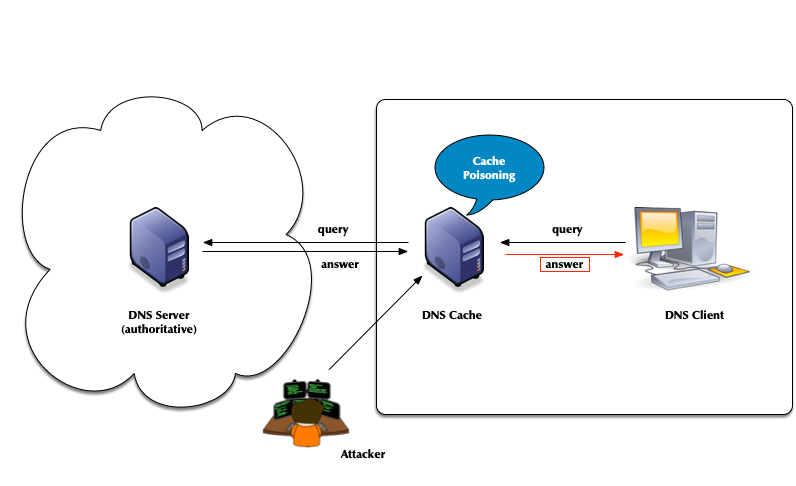
- Attack vector: Men-in-the-Middle data spoofing
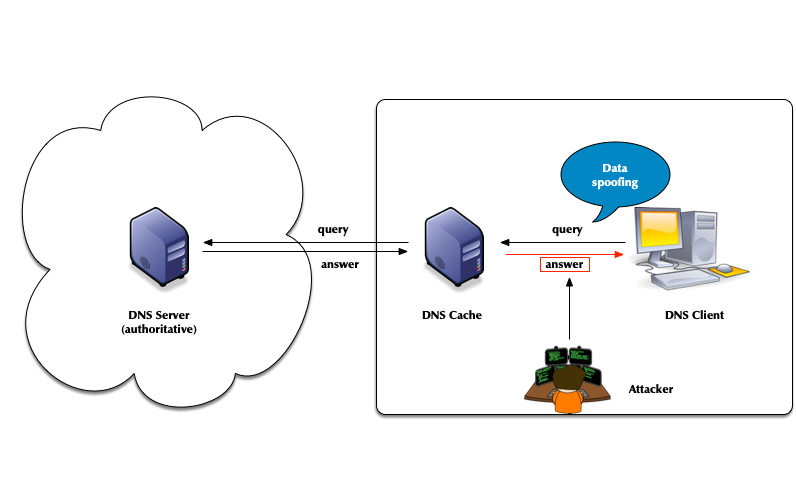
- Attack vector: changes to the client DNS resolver configuration
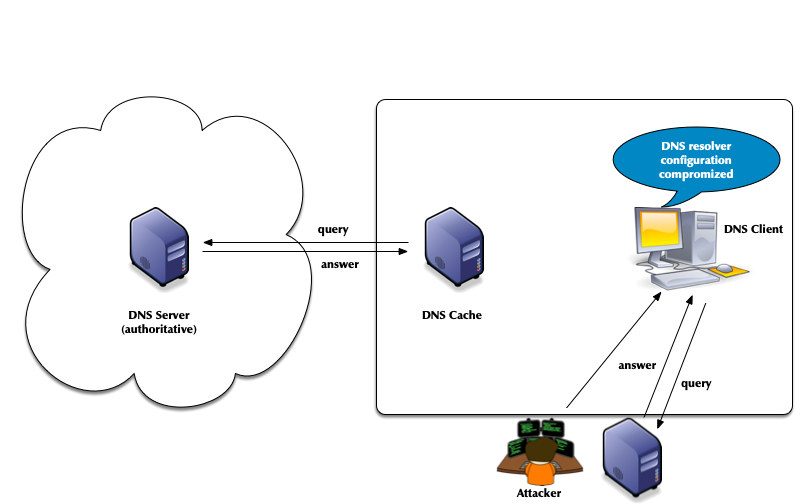
- Attacks of authoritative DNS servers
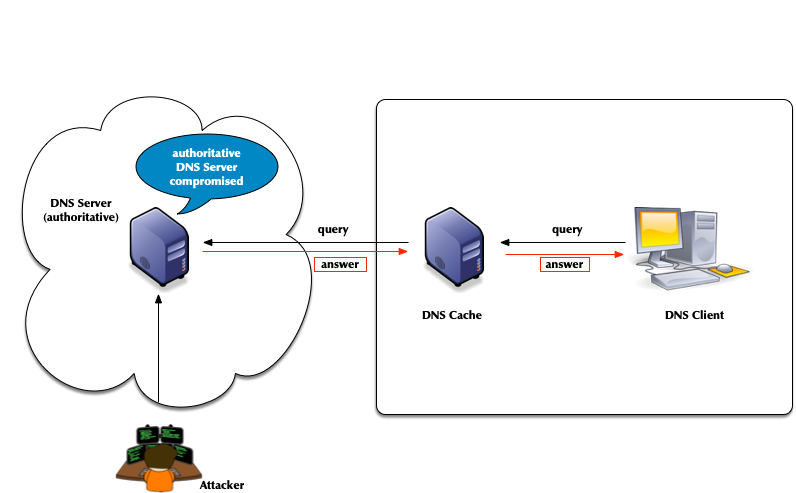
- DNSSEC can help
11.1.2 DNSSEC
- The DNS security extension DNSSEC secures DNS data by augmenting
the data with cryptographic signatures
- The owner (administrator) creates a pair of private and public keys for each DNS zone (asymmetric crypto)
- The owner/administrator signs all DNS data with the private/secret key
- The recipient of the data (DNS resolver or client operating
system or application) will verify (validate) the data
- That the data has not been changed on the server nor during transit
- That the data comes from the owner (the owner of the private key)
11.1.3 The chain of trust in DNS
- DNSSEC creates a chain of trust between the parent zone and the child zone
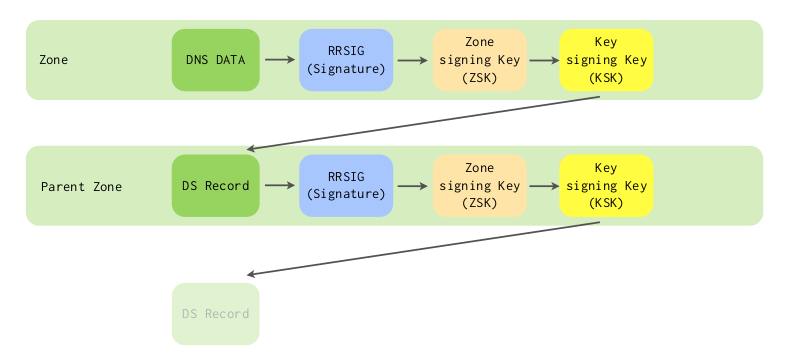
- Applications and DNS resolvers can follow the chain of trust to a configured trust anchor to validate the DNS data
- We will look into DNSSEC in more details later in this course
11.2 DNSSEC signing and validation
[sidebar] image::./images/dnssec-complete-00.png[scaledwidth=65%]
[sidebar] image::./images/dnssec-complete-01.png[scaledwidth=65%]
[sidebar] image::./images/dnssec-complete-02.png[scaledwidth=65%]
[sidebar] image::./images/dnssec-complete-03.png[scaledwidth=65%]
[sidebar] image::./images/dnssec-complete-04.png[scaledwidth=65%]
[sidebar] image::./images/dnssec-complete-05.png[scaledwidth=65%]
[sidebar] image::./images/dnssec-complete-06.png[scaledwidth=65%]
[sidebar] image::./images/dnssec-complete-07.png[scaledwidth=65%]
[sidebar] image::./images/dnssec-complete-08.png[scaledwidth=65%]
[sidebar] image::./images/dnssec-complete-09.png[scaledwidth=65%]
11.3 DNSSEC in a nutshell
- In DNSSEC, each zone has one or more key pairs.
- The private key of each pair
- Is stored securely (probably on a hidden primary)
- Is used to sign zone data
- Should never be stored in a RR
- The public key of each pair
- Is stored in the zone data, as a DNSKEY record
- Is used to verify zone data
- The private key of each pair
- A private key signs the hashes of each RRSet in a zone.
- The public key is accessible through a standard RR.
- Recursive servers or clients query for the public key RR in order to decrypt a hash.
- The RR is known as the DNSKEY and covered below.
11.4 DNSSEC Keys
11.4.1 Algorithms for DNSSEC
DNSSEC keys can be generated with different crypto algorithms. Some of these algorithms are obsolete and deprecated, others are not (yet) widely supported by deployed DNS software to be useful
| Algorithm | No. | Note |
|---|---|---|
| 1 | deprecated, not implemented | |
| 5 | not recommend, deprecated for DNSSEC signing, not supported in Red Hat Enterprise Linux 9 (and up) | |
| RSASHA256 | 8 | recommended |
| RSASHA512 | 10 | large keys, large signatures, risk of UDP fragmentation or TCP fallback |
| 3 | deprecated, slow validation, no extra security | |
| 12 | deprecated | |
| ECDSA | 13/14 | small signatures, read RSA vs ECDSA for DNSSEC |
| ED448/ED25519 | 16/15 | not supported by legacy resolver RFC 8080 / RFC 8032 Edwards-Curve Digital Signature Algorithm (EdDSA) / Assessing DNSSEC with EdDSA |
| SM2SM3 | 17 | SM2 and SM3 are cryptographic algorithms that are national standards for China, as well as ISO/IEC standards RFC 9563 |
| GOST-2012 | 23 | GOST R 34.10-2012 and GOST R 34.11-2012 are Russian national standards. Their cryptographic properties haven't been independently verified. RFC 9558 |
11.4.2 DNSSEC key sizes for RSA algorithm
- Every additional bit increases the strength of a DNSSEC against brute-force attacks to break the key
- Double the RSA key size results in
- Generating signatures is up to eight times more work
- Validation of DNSSEC signatures inside an DNS resolver up to 4 times more work
- Size of key and signature records increases and can create operational issues
- Problems with large DNS response messages
- Fragmentation of IPv4 and IPv6 UDP messages
- Hurts performance
- Fragmented IPv6 packets (containing a fragment header) could be blocked on the Internet backbone
- Enables UDP fragmentation attacks against non-validating DNS resolver
- DNS amplification attacks
The goal should be that the DNSKEY RRSet during an KSK rollover (including perhaps an emergency KSK) stays below 1232 byte
- Fragmentation of IPv4 and IPv6 UDP messages
11.4.3 KSK and ZSK
- For organizational reasons, DNSSEC splits the chain of trust inside a DNS zone onto two different keys: the Key-Signing-Key (KSK) and the Zone-Signing-Key (ZSK)
- KSK:
- The KSK generates only one signature: the signature over the DNSKEY record (RRset)
- The hash of the KSK is stored in the parent zone as the DS record. This hash is used to close the chain of trust from the parent zone to the DNSSEC signed zone. Each time the KSK in the DNSSEC signed zone is changed, the DS record in the parent zone must be replaced. The KSK has therefore a dependency on the parent zone.
- Because of this dependency with the parent zone, the KSK is usually a stable and strong key and not rolled often
- ZSK:
- The Zone-Signing-Key does not have dependencies to external resources and can be rolled at any time
- Usually the ZSK is rolled often (and automatically), so the key does not need to be particularly strong
11.4.4 Lifetimes of DNSSEC keys
- DNSSEC keys have an organisational lifetime (there is no technical
limit on the lifetime, unlike with X.509 TLS certificates)
- the administrator responsible for a DNSSEC-signed zone can decide when to change the DNSSEC keys
- Renewing the DNSSEC key material of a zone is called a key rollover
- Keys with weak algorithms or short key lengths should be changed
(rolled) in shorter intervals
- 1024bit RSASHA256 -> 30 days (ZSK)
- 1536bit RSASHA256 -> 120 days (ZSK)
- 2048bit RSASHA256 -> 360 days (KSK)
- 2560bit RSASHA256 -> 720 days+ / 2 years+ (KSK)
11.4.5 DNSSEC Signer "Best-Practices"
- Zones with high security requirements should keep the DNSSEC keys
"offline"
- this requires manual DNSSEC signing
- Keys can be stored securely in Hardware Security Modules (HSM)
- HSM selection criteria for DNSSEC signing
- Number of key storage slots
- Timely support for new operating system releases (Linux distribution)
- Timely support for new OpenSSL releases
- Stability of the HSM-Driver
- Zones with medium to low security requirements should use a
hidden-primary DNSSEC signer configuration
- The DNSSEC signing authoritative server is not exposed to the Internet, it will not receive DNS queries
- DNS secondary authoritative servers in the Internet will receive the DNSSEC signed zone from the hidden DNSSEC signer through DNS zone transfer
- The DNSSEC key material is secured with operating system level permissions
- With full automation of DNSSEC key-rollovers, the DNS server administrators don't need access to the DNSSEC keys
- Login and access to the DNSSEC key files should be audited (Logging online and towards a remote log server)
- Zone content can be split across multiple zones or DNS server
with DNS delegation
- Every zone can have a different DNSSEC security level
- Example: main zone
example.comsigned via a hidden-signer (keys not exposed to the Internet) has a sub-zone with e-mail address hashes (OPENPGPKEY and SMIMEA) in the zonesecuremail.example.com) which is secured with NSEC3-NARROW scheme and keys that are online on every authoritative server
11.5 NSEC vs. NSEC3
11.5.1 Authenticated Denial of existence - NSEC vs. NSEC3
- The RRSIG records in DNSSEC secure the positive answers from DNS (answers to queries where DNS records exist)
- But also negative answers need to be protected
- without protection for negative answers, attackers could spoof negative answers to launch denial-of-service attacks. The attacker can make DNS clients believe that a DNS resource does not exist
- DNS knows two kinds of negative answers: NXDOMAIN and NODATA/NXRRSET
- NXDOMAIN = the requested domain name does not exist
- NODATA/NXRRSET = the requested domain name does exist, but the requested record type does not exist for this name
- DNS error messages such as SERVFAIL, FORMERR or REFUSED cannot be secured with DNSSEC (these errors indicate errors in the protocol or in the DNS server infrastructure). If the protocol is broken, DNSSEC can't work either.
- The solution: the NSEC records in the DNSSEC signed zone create a
list of all existing data in the zone (domain names and records
types for the domain names)
- When returning a negative answer, the DNS server returns the negative answer containing the NSEC record (plus a signature for the NSEC record) which proves that the requested data does not exist in DNS
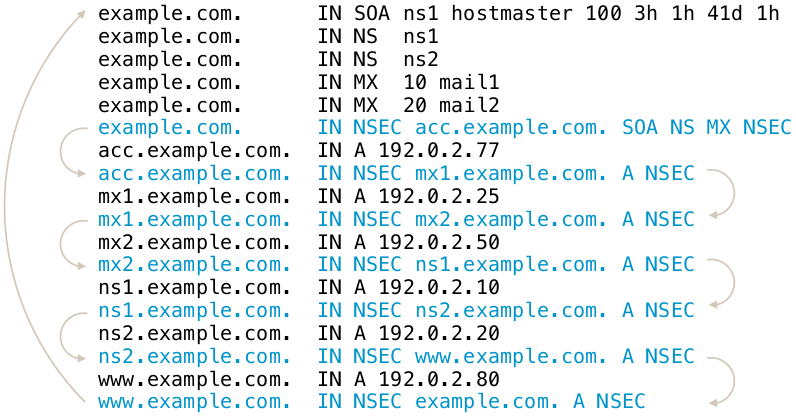
11.5.2 Issues with NSEC
- The NSEC record is an elegant solution to the problem, but it has
drawbacks:
- It is now possible for outsiders to list the complete zone contents by following the NSEC record chain. This is called zone walking.
- For most zones this is not a big problem, as the DNS zone content is public anyway (SOA, NS records, WWW-A, MX records)
- But it can be an issue for zones with sensitive content (email addresses, hostnames of critical infrastructure, new product names that should no go public yet)
- Operators of TLDs zones stay away from DNSSEC with NSEC, as it allows outsiders to record all changes to the TLD zone (new delegations and delegation removals)
- The new compact authenticated denial of existance standard (RFC 9824) solves this issue.
- Example of zone walking:
$ ldns-walk paypal.com
11.5.3 The NSEC3 record
- RFC 5155 (2008) defines the NSEC3 record as an alternative to NSEC
- All modern DNS servers support NSEC3
- The NSEC3 record works similarly to NSEC, with the difference that the link between the owner names is done using SHA1 hashes of the domain names instead of the clear text names
- NSEC3 makes it harder, but not impossible, to list the zone content
11.5.4 NSEC3 Chain
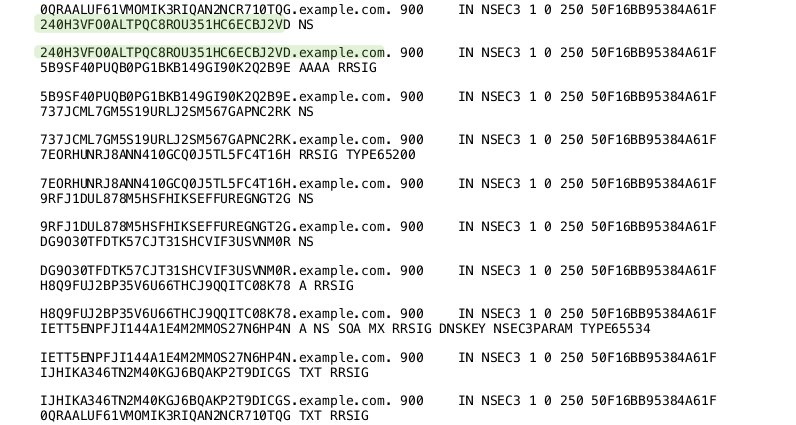
11.5.5 NSEC3-Parameter
- The NSEC3 record contains a number of parameters used for the
NSEC3 operation
- The hashing algorithm used (currently only SHA1 is defined)
- Flags: allows for DNSSEC opt-out in delegations.
- Number of hash iterations
- A salt value
11.5.6 NSEC3-Parameter Record
- Every zone with NSEC3 records contains an
NSEC3PARAMrecord. This record holds information needed by authoritative DNS servers to generate NSEC3 records for negative answers - Example: (SHA1, no flags, 20 iterations, salt value "ABBACAFE")
nsec3.dnslab.org. 0 IN NSEC3PARAM 1 0 20 ABBACAFE
11.5.7 NSEC3 iterations and salt
- The idea of the hash iterations in the NSEC3PARAM record was to
allow the operator of the zone to fine tune the work required for
calculating the hash
- A higher number of iterations should make it harder for attackers to brute force break an NSEC3 domain name
- A higher number also creates more CPU load for DNS resolvers that validate the NSEC3 records, making DNS name resolution slower
- The iteration parameter of an NSEC3 signed zone should be re-evaluated from time to time (yearly) to adjust the value for the technical progress
- The salt should make it impossible for an attacker to pre-calculate rainbow tables for the zone
- The salt is a hexadecimal number, every hex digit contains 4 bit of information
11.5.8 Problems with NSEC3
- The iterations had more an negative impact on the CPU load of the authoritative DNS servers than preventing attacks
- The salt is not really needed, as each zone naturally has unique hashes so that a rainbow table for multiple zones is not possible
11.5.9 RFC 9276 - Guidance for NSEC3 Parameter Settings
- RFC 9276 - Guidance for NSEC3 Parameter Settings (Best current practice) gives updates guidelines for NSEC and NSEC3 deployments
- The iterations value should be set to
0(meaning 1 iteration of SHA1 hashing)- DNSSEC responses containing NSEC3 records with iteration counts greater than 150 are now treated as insecure by major DNS resolvers!
- As NSEC3 zones are inherently salted, the salt parameter should be
set to
- - The current recommendation for NSEC3PARAM is
1 0 0 -(SHA1 Hash, no flags, 1 iteration, no salt)
11.5.10 NSEC3 needed?
- Most DNS zone can work with NSEC instead of NSEC3
- Don't store names in DNS that should be secret (internal names, product names etc)
- DNS is a service to publish data, not for hiding data
11.5.11 NSEC3 Narrow-Mode
- RFC 7129 (also RFC 4470 and RFC 4471) describe a special variant of
NSEC3 usage, called the narrow mode
- With narrow mode, the NSEC3 records are not pre-calculated when
the zone is signed, but they are created on the fly whenever a
negative response is needed
- To be able to calculate the signatures for such answers, every authoritative DNS server for the zone must have access to the private DNSSEC keys (at least the ZSK)!
- With narrow mode, the NSEC3 records are not pre-calculated when
the zone is signed, but they are created on the fly whenever a
negative response is needed
- With NSEC3 narrow mode, the DNS server does not return an NSEC3
chain of existing records, but a synthetic NSEC3 record that proves
that the requested name does not exist
- This prevents zone walking, as the number of possible NSEC3 records returned is near infinite. It will exhaust the memory of the attacker that will try to store this NSEC3 chain
- Known implementations:
- Phreebird (Dan Kaminski, Proof-of-Concept, not maintained)
- PowerDNS Authoritative
- Cloudflare CDN NSEC3 Narrow-Mode (closed source implementation)
11.6 DNSSEC signing with PowerDNS
11.6.1 Add DNSSEC to an existing zone
- To sign DNS zone inside PowerDNS, a basic DNSSEC configuration must
be added to the configuration
- For the MySQL/MariaDB backend, the backend needs to have DNSSEC
enabled with
gmysql-dnssec - It is a good idea to have a basic DNSSEC signing policy (default key algorithms and sizes, NSEC3 iterations and how the SOA serial is incremented) in the PowerDNS configuration file. Increment the SOA serial is important in a primary/secondary setup with classic DNS zone transfer.
- For the MySQL/MariaDB backend, the backend needs to have DNSSEC
enabled with
# DNSSEC
gmysql-dnssec
default-ksk-algorithm=rsasha256
default-ksk-size=2048
default-zsk-algorithm=rsasha256
default-zsk-size=1024
max-nsec3-iterations=1
default-soa-edit-signed=INCREMENT-WEEKS
- First step of signing a zone is to create a zone signing key (ZSK). For RSA keys, the ZSK usually is smaller than the KSK.
% pdnsutil add-zone-key zoneNNN.dnslab.org ZSK active published 1536 rsasha256
Added a ZSK with algorithm = 8, active=1
Requested specific key size of 1536 bits
1
- Next step is the creation of the key signing key (KSK)
% pdnsutil add-zone-key zoneNNN.dnslab.org KSK active published 2048 rsasha256
Added a KSK with algorithm = 8, active=1
Requested specific key size of 2048 bits
2
- The command
pdnsutil show-zone <zone-name>will show the zone keys, including the delegation signer (DS) record that need to go into the parent zone
% pdnsutil show-zone zoneNNN.dnslab.org
This is a Master zone
Last SOA serial number we notified: 1012 == 1012 (serial in the database)
Metadata items: None
Zone has NSEC semantics
keys:
ID = 1 (ZSK), flags = 256, tag = 37441, algo = 8, bits = 1536     Active         Published  ( RSASHA256 )
ID = 2 (KSK), flags = 257, tag = 26177, algo = 8, bits = 2048     Active         Published  ( RSASHA256 )
KSK DNSKEY = zoneNNN.dnslab.org. IN DNSKEY 257 3 8 AwEAAdmaHnizfuBb89XXhYBoQBnsJ/d+K7zkelu8rAvbsk3pzgwWMEufNXEqBxyQxxKYmqk/m+Wcq2UtuGnRugMfk2iaCod9DHp2iJj9qZ6C2Gqv9jVzwK1OE3yHq9xTuzq408ibgrxQvhZwYcH4mbqTlopFz/qACNKYdr52zCFnmK3cjHSphNqo3pGlBBGFLrXdLS8oHW6Ec+G7DObTqk+rGUuKHCStG0qPKoKj20L0j2frmcG5h5X0aH+7vHyBeikwuJoyqiwmEg0PYmknAnicuh3ubcPB5P+5ZcItpe6xY52eKqWIjsjcZI0aUmlOqI/ISuwP5b7UhYPgEc8JWlu6T9E= ; ( RSASHA256 )
DS = zoneNNN.dnslab.org. IN DS 26177 8 1 2416dc421e6debc0c0fd75b8742086df862f054f ; ( SHA1 digest )
DS = zoneNNN.dnslab.org. IN DS 26177 8 2 5993bff9c0f53af0162495f9b5c72a8fc5d05b24602e3905d3f4641da55a6f2c ; ( SHA256 digest )
DS = zoneNNN.dnslab.org. IN DS 26177 8 4 2810a931cf90eb4977eafdaaa3cfc8d90bb439ab836b3e05b23aef88ea0368f200a1b145472d36efc1b40c3567af3e71 ; ( SHA-384 digest )
- As the keys are active, PowerDNS will start signing the responses with RRSIG records
# dig @localhost zoneNNN.dnslab.org soa +dnssec +multi

; <<>> DiG 9.16.22-Debian <<>> @localhost zoneNNN.dnslab.org soa +dnssec +multi
; (1 server found)
;; global options: +cmd
;; Got answer:
;; ->>HEADER<<- opcode: QUERY, status: NOERROR, id: 44805
;; flags: qr aa rd; QUERY: 1, ANSWER: 2, AUTHORITY: 0, ADDITIONAL: 1
;; WARNING: recursion requested but not available

;; OPT PSEUDOSECTION:
; EDNS: version: 0, flags: do; udp: 1232
;; QUESTION SECTION:
;zoneNNN.dnslab.org.    IN SOA

;; ANSWER SECTION:
zoneNNN.dnslab.org.     60 IN SOA pdns010a.dnslab.org. hostmaster.zoneNNN.dnslab.org. (
                                1012       ; serial
                                3600       ; refresh (1 hour)
                                1800       ; retry (30 minutes)
                                3542400    ; expire (5 weeks 6 days)
                                60         ; minimum (1 minute)
                                )
zoneNNN.dnslab.org.     60 IN RRSIG SOA 8 3 60 (
                                20211111000000 20211021000000 37441 zoneNNN.dnslab.org.
                                InqX6esX3pl2GdGratuae544DO41egiVRLaLIPa41c9H
                                JqJjr2uMH5IcUtRtfDX4q296SSq5nNL9aouDtrvw+zNN
                                xGc/0qJ/aVr/uTqEXJBLGVbdZnCjpfvYNrDh3IIMBcSm
                                2TVifrT6JuGvIRUB/GskXvTYIDZW5DQ3YVP131sp4u9t
                                SgKWDvdt93N43maqy0imqJKwU7mV+t9Rx+El37c/CQZD
                                V+ERB5enFiqUr8e08wjc7rvDLAMFzBYbnc+3 )

;; Query time: 0 msec
;; SERVER: 127.0.0.1#53(127.0.0.1)
;; WHEN: Wed Nov 03 19:48:02 UTC 2021
;; MSG SIZE  rcvd: 345
- The default authenticated denial of existence is NSEC, so there are NSEC records
% dig @localhost zoneNNN.dnslab.org srv +dnssec +multi

; <<>> DiG 9.16.22-Debian <<>> @localhost zoneNNN.dnslab.org srv +dnssec +multi
; (1 server found)
;; global options: +cmd
;; Got answer:
;; ->>HEADER<<- opcode: QUERY, status: NOERROR, id: 39295
;; flags: qr aa rd; QUERY: 1, ANSWER: 0, AUTHORITY: 4, ADDITIONAL: 1
;; WARNING: recursion requested but not available

;; OPT PSEUDOSECTION:
; EDNS: version: 0, flags: do; udp: 1232
;; QUESTION SECTION:
;zoneNNN.dnslab.org.    IN SRV

;; AUTHORITY SECTION:
zoneNNN.dnslab.org.     60 IN SOA pdns010a.dnslab.org. hostmaster.zoneNNN.dnslab.org. (
                                1012       ; serial
                                3600       ; refresh (1 hour)
                                1800       ; retry (30 minutes)
                                3542400    ; expire (5 weeks 6 days)
                                60         ; minimum (1 minute)
                                )
zoneNNN.dnslab.org.     60 IN RRSIG SOA 8 3 60 (
                                20211111000000 20211021000000 37441 zoneNNN.dnslab.org.
                                InqX6esX3pl2GdGratuae544DO41egiVRLaLIPa41c9H
                                JqJjr2uMH5IcUtRtfDX4q296SSq5nNL9aouDtrvw+zNN
                                xGc/0qJ/aVr/uTqEXJBLGVbdZnCjpfvYNrDh3IIMBcSm
                                2TVifrT6JuGvIRUB/GskXvTYIDZW5DQ3YVP131sp4u9t
                                SgKWDvdt93N43maqy0imqJKwU7mV+t9Rx+El37c/CQZD
                                V+ERB5enFiqUr8e08wjc7rvDLAMFzBYbnc+3 )
zoneNNN.dnslab.org.     60 IN NSEC zoneNNN.dnslab.org. A NS SOA RRSIG NSEC DNSKEY
zoneNNN.dnslab.org.     60 IN RRSIG NSEC 8 3 60 (
                                20211111000000 20211021000000 37441 zoneNNN.dnslab.org.
                                QYedsQarfZicH7Pbawra6TAUH2XPK6zuH+jaVjKVffOe
                                GFyCDNwTxIx8U8MT7ntR1mJxUjuFf+byftkS3WkNxxNa
                                Fs+73xLeWgro+J3zY2t+M4rozZBdHKX0zsU0b/XMDYl+
                                PW5w+0zgcIoTs7aTexwsHg587TwaluBZI6sQhxLJ0tsB
                                wPOEu7BoIBhCaTqrgI4aQiK6uO3R9k2f5pieXrxtDHNC
                                lDf/3cdgIhMPQkpIeB7Pph1f+5bHfZ01JBPd )

;; Query time: 7 msec
;; SERVER: 127.0.0.1#53(127.0.0.1)
;; WHEN: Wed Nov 03 19:48:52 UTC 2021
;; MSG SIZE  rcvd: 628
- After making changes to a DNSSEC signed zone, it is always advised
to execute
pdnsutil rectify-zone <zone-name>.rectify-zonewill recreate missing signatures and NSEC/NSEC3 records.rectify-zoneis important when making changes to the zone on the database level or through the API. For zones that are managed through the API, set theAPI-RECTIFYmeta-data on the zone, or make sure thatdefault-api-rectifyis set toyesin the configuration
% pdnsutil rectify-zone zoneNNN.dnslab.org
Adding NSEC ordering information
- Send the DS-Record or the DNSKEY record of the KSK to the operator
of the parent zone. The DS-Record(s) and the DNSKEY-Record can be
listed with
pdnsutil show-zone <zonename> - Add a new record
% pdnsutil add-record zoneNNN.dnslab.org test TXT 60 '"Hello PowerDNS"'
New rrset:
test.zoneNNN.dnslab.org. 60 IN TXT "Hello PowerDNS"
test.zoneNNN.dnslab.org. 60 IN TXT "Hello DNSSEC"
- The new record (set) is immediately signed
% dig @localhost test.zoneNNN.dnslab.org.  txt +dnssec

; <<>> DiG 9.16.22-Debian <<>> @localhost test.zoneNNN.dnslab.org. txt +dnssec
; (1 server found)
;; global options: +cmd
;; Got answer:
;; ->>HEADER<<- opcode: QUERY, status: NOERROR, id: 10652
;; flags: qr aa rd; QUERY: 1, ANSWER: 3, AUTHORITY: 0, ADDITIONAL: 1
;; WARNING: recursion requested but not available

;; OPT PSEUDOSECTION:
; EDNS: version: 0, flags: do; udp: 1232
;; QUESTION SECTION:
;test.zoneNNN.dnslab.org.       IN      TXT

;; ANSWER SECTION:
test.zoneNNN.dnslab.org. 60     IN      RRSIG   TXT 8 4 60 20211111000000 20211021000000 37441 zoneNNN.dnslab.org. H0MNWJ/xP9xfLYxaTaqEyhe+jLszDxZ4MP6AR6pz1S3GsHhMktR3/P6u DrBihkZlNMi+7ZhTWHFmndCwd9vK/nnaHZXNV2JL72oMPS4vhXWgw6AP T+mUsOkRyHudJRoASpyOOPhqGxjDVUXanDdpbVAfoEjhWnZ6a+NWC47C 04zT/4NSaIpZPtCIYKftbiPB0CjEFPsViloRNAUFwbYHZ4o9TZYdDekQ nOXAapLooAh0DFk21ijjrVV1jbigS6oV
test.zoneNNN.dnslab.org. 60     IN      TXT     "Hello PowerDNS"
test.zoneNNN.dnslab.org. 60     IN      TXT     "Hello DNSSEC"

;; Query time: 3 msec
;; SERVER: 127.0.0.1#53(127.0.0.1)
;; WHEN: Wed Nov 03 20:03:34 UTC 2021
;; MSG SIZE  rcvd: 346
- After making changes to a DNSSEC signed zone, it is a good idea to
increment the SOA serial a last time and fix the DNSSEC NSEC(3)
chain in the zone with
rectify-zone
% pdnsutil increase-serial zoneNNN.dnslab.org
% pdnsutil rectify-zone zoneNNN.dnslab.org
- Check for a successful zone transfer to all secondary DNS server of the zone
11.6.2 Exercise
- Add the required DNSSEC configuration statements to the PowerDNS configuration, check and reload the PowerDNS service
- Add a ZSK and KSK with the ECDSA algorithm (algorithm 13) to the zone
zoneNNN.dnslab.org. Find the name of the ECDSA(13) algorithm withpdnsutil list-algorithms - Rectify the zone and increment the SOA serial number
- Show the DS-Record for the zone, copy the DS-Record in a file
called
ds-record-zoneNNN.txtto the serverpdnsr009.dnslab.org(DNS Resolver des Trainers).$ scp ds-record-zoneNNN.txt user@pdnsr009.dnslab.org:.
- Wait for the DS-Record to arrive in the parent zone (
dnslab.org) - Query a record from this zone on the PowerDNS recursor machine, check for the AD-Flag that indicates successful DNSSEC validation
11.7 DNSSEC Key-Rollover
11.7.1 ZSK rollover with pre-publication
- To start a ZSK key rollover for a zone on PowerDNS, create and publish (but don't activate) a new ZSK. The new key should have the same algorithm then the previous key. The size can be different.
% pdnsutil add-zone-key zoneNNN.dnslab.org ZSK inactive published 1536 rsasha256
Added a ZSK with algorithm = 8, active=1
Requested specific key size of 1536 bits
3
- The zone should now have 2 ZSK DNSKEY records published
% pdnsutil show-zone zoneNNN.dnslab.org
This is a Master zone
Last SOA serial number we notified: 1635970166 == 1635970166 (serial in the database)
Metadata items: None
Zone has NSEC semantics
keys:
ID = 1 (ZSK), flags = 256, tag = 37441, algo = 8, bits = 1536     Active         Published  ( RSASHA256 )
ID = 4 (ZSK), flags = 256, tag = 14634, algo = 8, bits = 1536   Inactive         Published  ( RSASHA256 )
ID = 2 (KSK), flags = 257, tag = 26177, algo = 8, bits = 2048     Active         Published  ( RSASHA256 )
KSK DNSKEY = zoneNNN.dnslab.org. IN DNSKEY 257 3 8 AwEAAdmaHnizfuBb89XXhYBoQBnsJ/d+K7zkelu8rAvbsk3pzgwWMEufNXEqBxyQxxKYmqk/m+Wcq2UtuGnRugMfk2iaCod9DHp2iJj9qZ6C2Gqv9jVzwK1OE3yHq9xTuzq408ibgrxQvhZwYcH4mbqTlopFz/qACNKYdr52zCFnmK3cjHSphNqo3pGlBBGFLrXdLS8oHW6Ec+G7DObTqk+rGUuKHCStG0qPKoKj20L0j2frmcG5h5X0aH+7vHyBeikwuJoyqiwmEg0PYmknAnicuh3ubcPB5P+5ZcItpe6xY52eKqWIjsjcZI0aUmlOqI/ISuwP5b7UhYPgEc8JWlu6T9E= ; ( RSASHA256 )
DS = zoneNNN.dnslab.org. IN DS 26177 8 1 2416dc421e6debc0c0fd75b8742086df862f054f ; ( SHA1 digest )
DS = zoneNNN.dnslab.org. IN DS 26177 8 2 5993bff9c0f53af0162495f9b5c72a8fc5d05b24602e3905d3f4641da55a6f2c ; ( SHA256 digest )
DS = zoneNNN.dnslab.org. IN DS 26177 8 4 2810a931cf90eb4977eafdaaa3cfc8d90bb439ab836b3e05b23aef88ea0368f200a1b145472d36efc1b40c3567af3e71 ; ( SHA-384 digest )
- Rectify the zone so that all signatures and NSEC/NSEC3 records are present
% pdnsutil rectify-zone zoneNNN.dnslab.org
- Increment the SOA serial number to trigger
NOTIFYfor zone-transfer
% pdnsutil increase-serial zoneNNN.dnslab.org
- The new ZSK is now visible in the DNS zone
% dig dnskey zoneNNN.dnslab.org +multi

; <<>> DiG 9.16.22-Debian <<>> dnskey zoneNNN.dnslab.org +multi
;; global options: +cmd
;; Got answer:
;; ->>HEADER<<- opcode: QUERY, status: NOERROR, id: 59184
;; flags: qr rd ra; QUERY: 1, ANSWER: 3, AUTHORITY: 0, ADDITIONAL: 1

;; OPT PSEUDOSECTION:
; EDNS: version: 0, flags:; udp: 512
;; QUESTION SECTION:
;zoneNNN.dnslab.org.    IN DNSKEY

;; ANSWER SECTION:
zoneNNN.dnslab.org.     38 IN DNSKEY 256 3 8 (
                                AwEAAa56Jv3sjwd2yKNbbdcoTNMViBFDv3StAD1Kif7+
                                G/X993ac8cwevgp77dgGx/gmdLTu9/sV3df5/Y31l9j/
                                55QzquNU4Svxnkbf+4onN9dB0Vzh+ASUzrCTfu592tso
                                xpM6YxQUbjgYDI8308u/dgcBSsl5uaJjIcxUNUaP/oC0
                                qn2l4x7TtmHsoMXlrjJB5/oChdvyuU10i0ts3GOpJmka
                                vuynXawWuE5LQAXxNS+POXbKCHf7dzbtUzAQjFBXAw==
                                ) ; ZSK; alg = RSASHA256 ; key id = 14634
zoneNNN.dnslab.org.     38 IN DNSKEY 256 3 8 (
                                AwEAAdSEeKfBK/EXKfKtwB1rpSForHhwVBekz2ZyOd+F
                                uHdNXlCRyhRlok3zUq9BOQLPpqPFm+GGdFttACu3sAeO
                                aq7NIrpFHVijWwXMX0zBeak7ujwFKlC4cKszfEVB6kaq
                                m62JyAGQF6Z6mzDz4q/iW8gq1LmtdMwG+ked3lp5zQk/
                                0MZUBfJcqrya1biDnfOteCv/InoTrydYbFvUNVBe2VlA
                                FZG7pUhQcZs+CQn8y71GU+pepogCM8IJOiE7Fw+7zQ==
                                ) ; ZSK; alg = RSASHA256 ; key id = 37441
zoneNNN.dnslab.org.     38 IN DNSKEY 257 3 8 (
                                AwEAAdmaHnizfuBb89XXhYBoQBnsJ/d+K7zkelu8rAvb
                                sk3pzgwWMEufNXEqBxyQxxKYmqk/m+Wcq2UtuGnRugMf
                                k2iaCod9DHp2iJj9qZ6C2Gqv9jVzwK1OE3yHq9xTuzq4
                                08ibgrxQvhZwYcH4mbqTlopFz/qACNKYdr52zCFnmK3c
                                jHSphNqo3pGlBBGFLrXdLS8oHW6Ec+G7DObTqk+rGUuK
                                HCStG0qPKoKj20L0j2frmcG5h5X0aH+7vHyBeikwuJoy
                                qiwmEg0PYmknAnicuh3ubcPB5P+5ZcItpe6xY52eKqWI
                                jsjcZI0aUmlOqI/ISuwP5b7UhYPgEc8JWlu6T9E=
                                ) ; KSK; alg = RSASHA256 ; key id = 26177

;; Query time: 3 msec
;; SERVER: 67.207.67.3#53(67.207.67.3)
;; WHEN: Wed Nov 03 20:28:06 UTC 2021
;; MSG SIZE  rcvd: 747
- Wait for the TTL of the DNSKEY record set (60 seconds in our example)
- Activate the new key, deactivate the old key, rectify zone and increment the SOA serial. The new ZSK is now active
% pdnsutil activate-zone-key zoneNNN.dnslab.org 4
% pdnsutil deactivate-zone-key zoneNNN.dnslab.org 1
% pdnsutil rectify-zone zoneNNN.dnslab.org
Adding NSEC ordering information
% pdnsutil increase-serial zoneNNN.dnslab.org
SOA serial for zone zoneNNN.dnslab.org set to 1635971832
- Check that the signatures on the SOA record are now created by the new ZSK (Keytag 14634 in this example)
% dig soa zoneNNN.dnslab.org +multi +dnssec

; <<>> DiG 9.16.22-Debian <<>> soa zoneNNN.dnslab.org +multi +dnssec
;; global options: +cmd
;; Got answer:
;; ->>HEADER<<- opcode: QUERY, status: NOERROR, id: 27737
;; flags: qr rd ra; QUERY: 1, ANSWER: 2, AUTHORITY: 0, ADDITIONAL: 1

;; OPT PSEUDOSECTION:
; EDNS: version: 0, flags: do; udp: 512
;; QUESTION SECTION:
;zoneNNN.dnslab.org.    IN SOA

;; ANSWER SECTION:
zoneNNN.dnslab.org.     60 IN SOA pdns010a.dnslab.org. hostmaster.zoneNNN.dnslab.org. (
                                1635971879 ; serial
                                3600       ; refresh (1 hour)
                                1800       ; retry (30 minutes)
                                3542400    ; expire (5 weeks 6 days)
                                60         ; minimum (1 minute)
                                )
zoneNNN.dnslab.org.     60 IN RRSIG SOA 8 3 60 (
                                20211111000000 20211021000000 14634 zoneNNN.dnslab.org.
                                NwewpF4JnrwWOj6TInXN4mcczGySQ21uVZJXkCzQcLnH
                                GrA8sZwG16yM97YjYSIUf2HqRSlAs1e7sxWwI+QACLg5
                                BG9W3qelTjeczV3aQex5r2dsjOofPuAPTth8FmOJslPB
                                9klh3RDUtWLTmeDzr82lucc4NtvU0zFUpvL1UOwLWg0x
                                J/N/EshkZBwN9odpGcZU+FIyaci7hs/FYXSnJS0FD3Tp
                                MJcsSjt9u4aNtwQbBzWe/jIteyDlZxcmk0lH )

;; Query time: 27 msec
;; SERVER: 67.207.67.3#53(67.207.67.3)
;; WHEN: Wed Nov 03 20:37:59 UTC 2021
;; MSG SIZE  rcvd: 345
- Wait for the maximum TTL in the zone
- Remove the old ZSK from the zone
% pdnsutil remove-zone-key zoneNNN.dnslab.org 1
% pdnsutil rectify-zone zoneNNN.dnslab.org
Adding NSEC ordering information
% pdnsutil increase-serial zoneNNN.dnslab.org
SOA serial for zone zoneNNN.dnslab.org set to 1635972173
- The zone should now only have one ZSK left in the DNSKEY record set
% pdnsutil show-zone zoneNNN.dnslab.org
Nov 03 20:41:31 gmysql Connection successful. Connected to database 'powerdns' on '/run/mysqld/mysqld.sock'.
Nov 03 20:41:31 gmysql Connection successful. Connected to database 'powerdns' on '/run/mysqld/mysqld.sock'.
This is a Master zone
Last SOA serial number we notified: 1635971832 == 1635971832 (serial in the database)
Metadata items: None
Zone has NSEC semantics
keys:
ID = 4 (ZSK), flags = 256, tag = 14634, algo = 8, bits = 1536     Active         Published  ( RSASHA256 )
ID = 2 (KSK), flags = 257, tag = 26177, algo = 8, bits = 2048     Active         Published  ( RSASHA256 )
KSK DNSKEY = zoneNNN.dnslab.org. IN DNSKEY 257 3 8 AwEAAdmaHnizfuBb89XXhYBoQBnsJ/d+K7zkelu8rAvbsk3pzgwWMEufNXEqBxyQxxKYmqk/m+Wcq2UtuGnRugMfk2iaCod9DHp2iJj9qZ6C2Gqv9jVzwK1OE3yHq9xTuzq408ibgrxQvhZwYcH4mbqTlopFz/qACNKYdr52zCFnmK3cjHSphNqo3pGlBBGFLrXdLS8oHW6Ec+G7DObTqk+rGUuKHCStG0qPKoKj20L0j2frmcG5h5X0aH+7vHyBeikwuJoyqiwmEg0PYmknAnicuh3ubcPB5P+5ZcItpe6xY52eKqWIjsjcZI0aUmlOqI/ISuwP5b7UhYPgEc8JWlu6T9E= ; ( RSASHA256 )
DS = zoneNNN.dnslab.org. IN DS 26177 8 1 2416dc421e6debc0c0fd75b8742086df862f054f ; ( SHA1 digest )
DS = zoneNNN.dnslab.org. IN DS 26177 8 2 5993bff9c0f53af0162495f9b5c72a8fc5d05b24602e3905d3f4641da55a6f2c ; ( SHA256 digest )
DS = zoneNNN.dnslab.org. IN DS 26177 8 4 2810a931cf90eb4977eafdaaa3cfc8d90bb439ab836b3e05b23aef88ea0368f200a1b145472d36efc1b40c3567af3e71 ; ( SHA-384 digest )
- The new DNSKEY record set should also be seen in the DNS zone
% dig dnskey zoneNNN.dnslab.org +multi

; <<>> DiG 9.16.22-Debian <<>> dnskey zoneNNN.dnslab.org +multi
;; global options: +cmd
;; Got answer:
;; ->>HEADER<<- opcode: QUERY, status: NOERROR, id: 16831
;; flags: qr rd ra; QUERY: 1, ANSWER: 2, AUTHORITY: 0, ADDITIONAL: 1

;; OPT PSEUDOSECTION:
; EDNS: version: 0, flags:; udp: 512
;; QUESTION SECTION:
;zoneNNN.dnslab.org.    IN DNSKEY

;; ANSWER SECTION:
zoneNNN.dnslab.org.     60 IN DNSKEY 256 3 8 (
                                AwEAAa56Jv3sjwd2yKNbbdcoTNMViBFDv3StAD1Kif7+
                                G/X993ac8cwevgp77dgGx/gmdLTu9/sV3df5/Y31l9j/
                                55QzquNU4Svxnkbf+4onN9dB0Vzh+ASUzrCTfu592tso
                                xpM6YxQUbjgYDI8308u/dgcBSsl5uaJjIcxUNUaP/oC0
                                qn2l4x7TtmHsoMXlrjJB5/oChdvyuU10i0ts3GOpJmka
                                vuynXawWuE5LQAXxNS+POXbKCHf7dzbtUzAQjFBXAw==
                                ) ; ZSK; alg = RSASHA256 ; key id = 14634
zoneNNN.dnslab.org.     60 IN DNSKEY 257 3 8 (
                                AwEAAdmaHnizfuBb89XXhYBoQBnsJ/d+K7zkelu8rAvb
                                sk3pzgwWMEufNXEqBxyQxxKYmqk/m+Wcq2UtuGnRugMf
                                k2iaCod9DHp2iJj9qZ6C2Gqv9jVzwK1OE3yHq9xTuzq4
                                08ibgrxQvhZwYcH4mbqTlopFz/qACNKYdr52zCFnmK3c
                                jHSphNqo3pGlBBGFLrXdLS8oHW6Ec+G7DObTqk+rGUuK
                                HCStG0qPKoKj20L0j2frmcG5h5X0aH+7vHyBeikwuJoy
                                qiwmEg0PYmknAnicuh3ubcPB5P+5ZcItpe6xY52eKqWI
                                jsjcZI0aUmlOqI/ISuwP5b7UhYPgEc8JWlu6T9E=
                                ) ; KSK; alg = RSASHA256 ; key id = 26177

;; Query time: 135 msec
;; SERVER: 67.207.67.3#53(67.207.67.3)
;; WHEN: Wed Nov 03 20:43:36 UTC 2021
;; MSG SIZE  rcvd: 535
11.7.2 KSK rollover with double-signing
- To start a KSK rollover with PowerDNS, create, publish and activate a new KSK (same algorithm as existing KSK, size can differ)
% pdnsutil add-zone-key zoneNNN.dnslab.org KSK active published 2048 rsasha256
Added a KSK with algorithm = 8, active=1
Requested specific key size of 2048 bits
5
% pdnsutil rectify-zone zoneNNN.dnslab.org
% pdnsutil increase-serial zoneNNN.dnslab.org
- The zone should now have 2 KSK DNSKEY records
% pdnsutil show-zone zoneNNN.dnslab.org
This is a Master zone
Last SOA serial number we notified: 1635972173 != 1635972638 (serial in the database)
Metadata items: None
Zone has NSEC semantics
keys:
ID = 4 (ZSK), flags = 256, tag = 14634, algo = 8, bits = 1536     Active         Published  ( RSASHA256 )
ID = 2 (KSK), flags = 257, tag = 26177, algo = 8, bits = 2048     Active         Published  ( RSASHA256 )
KSK DNSKEY = zoneNNN.dnslab.org. IN DNSKEY 257 3 8 AwEAAdmaHnizfuBb89XXhYBoQBnsJ/d+K7zkelu8rAvbsk3pzgwWMEufNXEqBxyQxxKYmqk/m+Wcq2UtuGnRugMfk2iaCod9DHp2iJj9qZ6C2Gqv9jVzwK1OE3yHq9xTuzq408ibgrxQvhZwYcH4mbqTlopFz/qACNKYdr52zCFnmK3cjHSphNqo3pGlBBGFLrXdLS8oHW6Ec+G7DObTqk+rGUuKHCStG0qPKoKj20L0j2frmcG5h5X0aH+7vHyBeikwuJoyqiwmEg0PYmknAnicuh3ubcPB5P+5ZcItpe6xY52eKqWIjsjcZI0aUmlOqI/ISuwP5b7UhYPgEc8JWlu6T9E= ; ( RSASHA256 )
DS = zoneNNN.dnslab.org. IN DS 26177 8 1 2416dc421e6debc0c0fd75b8742086df862f054f ; ( SHA1 digest )
DS = zoneNNN.dnslab.org. IN DS 26177 8 2 5993bff9c0f53af0162495f9b5c72a8fc5d05b24602e3905d3f4641da55a6f2c ; ( SHA256 digest )
DS = zoneNNN.dnslab.org. IN DS 26177 8 4 2810a931cf90eb4977eafdaaa3cfc8d90bb439ab836b3e05b23aef88ea0368f200a1b145472d36efc1b40c3567af3e71 ; ( SHA-384 digest )
ID = 5 (KSK), flags = 257, tag = 45824, algo = 8, bits = 2048     Active         Published  ( RSASHA256 )
KSK DNSKEY = zoneNNN.dnslab.org. IN DNSKEY 257 3 8 AwEAAaicwPSEdFMZAfofnKAVbAb6nzZyRqYW+1GLNIMKFRw/YZ97Gi+ZfAjkJWOkeVLbNmeKgZSMz185NkoSwlWFdrJv8hR43Hu1UJgMdKr3EzKti7W8U3YwEnBl7W1yv518LhOPFata3H5i082/qiP2c9j4JXmH1fC1TqtwTDGDpS9myPgidRgMPqeqtZ+5aQYfcEo+Kw0EJT0xD1lUURGwUztEdM4nfjIcaMf6o3//Te5KJZEhhesBgUvpbYN13ZQjA3EmzcQqoFj8HW9QZ8lC7JlYxHucA+SluGgg4BmkefAlUhuPAuF9cLvri720DVATqSQwezTIgJNromdhfjnpvec= ; ( RSASHA256 )
DS = zoneNNN.dnslab.org. IN DS 45824 8 1 c2eff1df58bf152036fd8d556553c1096136f0d0 ; ( SHA1 digest )
DS = zoneNNN.dnslab.org. IN DS 45824 8 2 33509b6659026377b337b7009442f45ae0d2a08b21e3ba726094bbac0f121635 ; ( SHA256 digest )
DS = zoneNNN.dnslab.org. IN DS 45824 8 4 213c2eba14d47e7418feea186ff0c565accd81cc65353524bff2c9894fb203995fea8b868046932a7d3bedb20351ee99 ; ( SHA-384 digest )
- Two KSK DNSKEY records are in the zone
% dig dnskey zoneNNN.dnslab.org +multi

; <<>> DiG 9.16.22-Debian <<>> dnskey zoneNNN.dnslab.org +multi
;; global options: +cmd
;; Got answer:
;; ->>HEADER<<- opcode: QUERY, status: NOERROR, id: 3417
;; flags: qr rd ra ad; QUERY: 1, ANSWER: 3, AUTHORITY: 0, ADDITIONAL: 1

;; OPT PSEUDOSECTION:
; EDNS: version: 0, flags:; udp: 1232
;; QUESTION SECTION:
;zoneNNN.dnslab.org.    IN DNSKEY

;; ANSWER SECTION:
zoneNNN.dnslab.org.     60 IN DNSKEY 256 3 8 (
                                AwEAAa56Jv3sjwd2yKNbbdcoTNMViBFDv3StAD1Kif7+
                                G/X993ac8cwevgp77dgGx/gmdLTu9/sV3df5/Y31l9j/
                                55QzquNU4Svxnkbf+4onN9dB0Vzh+ASUzrCTfu592tso
                                xpM6YxQUbjgYDI8308u/dgcBSsl5uaJjIcxUNUaP/oC0
                                qn2l4x7TtmHsoMXlrjJB5/oChdvyuU10i0ts3GOpJmka
                                vuynXawWuE5LQAXxNS+POXbKCHf7dzbtUzAQjFBXAw==
                                ) ; ZSK; alg = RSASHA256 ; key id = 14634
zoneNNN.dnslab.org.     60 IN DNSKEY 257 3 8 (
                                AwEAAaicwPSEdFMZAfofnKAVbAb6nzZyRqYW+1GLNIMK
                                FRw/YZ97Gi+ZfAjkJWOkeVLbNmeKgZSMz185NkoSwlWF
                                drJv8hR43Hu1UJgMdKr3EzKti7W8U3YwEnBl7W1yv518
                                LhOPFata3H5i082/qiP2c9j4JXmH1fC1TqtwTDGDpS9m
                                yPgidRgMPqeqtZ+5aQYfcEo+Kw0EJT0xD1lUURGwUztE
                                dM4nfjIcaMf6o3//Te5KJZEhhesBgUvpbYN13ZQjA3Em
                                zcQqoFj8HW9QZ8lC7JlYxHucA+SluGgg4BmkefAlUhuP
                                AuF9cLvri720DVATqSQwezTIgJNromdhfjnpvec=
                                ) ; KSK; alg = RSASHA256 ; key id = 45824
zoneNNN.dnslab.org.     60 IN DNSKEY 257 3 8 (
                                AwEAAdmaHnizfuBb89XXhYBoQBnsJ/d+K7zkelu8rAvb
                                sk3pzgwWMEufNXEqBxyQxxKYmqk/m+Wcq2UtuGnRugMf
                                k2iaCod9DHp2iJj9qZ6C2Gqv9jVzwK1OE3yHq9xTuzq4
                                08ibgrxQvhZwYcH4mbqTlopFz/qACNKYdr52zCFnmK3c
                                jHSphNqo3pGlBBGFLrXdLS8oHW6Ec+G7DObTqk+rGUuK
                                HCStG0qPKoKj20L0j2frmcG5h5X0aH+7vHyBeikwuJoy
                                qiwmEg0PYmknAnicuh3ubcPB5P+5ZcItpe6xY52eKqWI
                                jsjcZI0aUmlOqI/ISuwP5b7UhYPgEc8JWlu6T9E=
                                ) ; KSK; alg = RSASHA256 ; key id = 26177

;; Query time: 215 msec
;; SERVER: 1.1.1.1#53(1.1.1.1)
;; WHEN: Wed Nov 03 20:54:11 UTC 2021
;; MSG SIZE  rcvd: 811
- Send the DS-Record or the DNSKEY record of the new KSK to the operator of the parent zone
- Wait for the new DS record to appear in the parent zone
- Remove the old KSK from the zone
% pdnsutil remove-zone-key zoneNNN.dnslab.org 2
% pdnsutil rectify-zone zoneNNN.dnslab.org
Adding NSEC ordering information
% pdnsutil increase-serial zoneNNN.dnslab.org
SOA serial for zone zoneNNN.dnslab.org set to 1635973094
- KSK rollover completed
12 KSK-2024 Root Zone KSK-Rollover
- The Key-Signing-Key of the Internet Root Zone will be rolled in
October 2026 (for the 2nd time in since the root has been DNSSEC
signed).
- Because this key is the trust-anchor for all of DNSSEC, and the public part or hash of that key has to be present in all DNS-resolver before the roll, special care must be taken by DNS resolver operators.
- The new KSK2024 key (Key-ID 38696) has been created in April 2024
and has been published in January 2025 inside the root DNS zone:
$ dig dnskey . +multi

; <<>> DiG 9.18.41 <<>> dnskey . +multi
;; global options: +cmd
;; Got answer:
;; ->>HEADER<<- opcode: QUERY, status: NOERROR, id: 33764
;; flags: qr rd ra ad; QUERY: 1, ANSWER: 3, AUTHORITY: 0, ADDITIONAL: 1

;; OPT PSEUDOSECTION:
; EDNS: version: 0, flags:; udp: 1232
;; QUESTION SECTION:
;.			IN DNSKEY

;; ANSWER SECTION:
.			77796 IN DNSKEY	257 3 8 (
				AwEAAaz/tAm8yTn4Mfeh5eyI96WSVexTBAvkMgJzkKTO
				iW1vkIbzxeF3+/4RgWOq7HrxRixHlFlExOLAJr5emLvN
				7SWXgnLh4+B5xQlNVz8Og8kvArMtNROxVQuCaSnIDdD5
				LKyWbRd2n9WGe2R8PzgCmr3EgVLrjyBxWezF0jLHwVN8
				efS3rCj/EWgvIWgb9tarpVUDK/b58Da+sqqls3eNbuv7
				pr+eoZG+SrDK6nWeL3c6H5Apxz7LjVc1uTIdsIXxuOLY
				A4/ilBmSVIzuDWfdRUfhHdY6+cn8HFRm+2hM8AnXGXws
				9555KrUB5qihylGa8subX2Nn6UwNR1AkUTV74bU=
				) ; KSK; alg = RSASHA256 ; key id = 20326
.			77796 IN DNSKEY	257 3 8 (
				AwEAAa96jeuknZlaeSrvyAJj6ZHv28hhOKkx3rLGXVaC
				6rXTsDc449/cidltpkyGwCJNnOAlFNKF2jBosZBU5eeH
				spaQWOmOElZsjICMQMC3aeHbGiShvZsx4wMYSjH8e7Vr
				hbu6irwCzVBApESjbUdpWWmEnhathWu1jo+siFUiRAAx
				m9qyJNg/wOZqqzL/dL/q8PkcRU5oUKEpUge71M3ej2/7
				CPqpdVwuMoTvoB+ZOT4YeGyxMvHmbrxlFzGOHOijtzN+
				u1TQNatX2XBuzZNQ1K+s2CXkPIZo7s6JgZyvaBevYtxP
				vYLw4z9mR7K2vaF18UYH9Z9GNUUeayffKC73PYc=
				) ; KSK; alg = RSASHA256 ; key id = 38696
.			77796 IN DNSKEY	256 3 8 (
				AwEAAeuS7hMRZ7muj1c/ew2DoavxkBw3jUG5R79pKVDI
				39fxvlD1HfJYGJERnXuV4SrQfUPzWw/lt5Axb0EqXL/s
				Q2ZyntVmwQwoSXi2l9smlIKh2UrkTmmozRCPe7GS4fZT
				E4Ew7AV4YprTLgVmxiGP4unRuXkYOgQJXCIBpVCmEdUl
				i6X2sm0i5ZilU/Q+rX3RDw+eYPP7K0cJnJ+ZnvQDy14+
				BFtreWl9enNQljgGpBp26lEp1z7AbvUfzkQNVCVGaM8j
				EaCSALXiROlwCQMOdj+tpLXFf99kdJnTQw2cpEr1uGs/
				yENAJpoGhbjZAoIkXzDUBSlfFeYz7FWzH6gIe7M=
				) ; ZSK; alg = RSASHA256 ; key id = 61809

;; Query time: 1 msec
;; SERVER: 127.0.0.1#53(127.0.0.1) (UDP)
;; WHEN: Mon Nov 03 13:57:31 CET 2025
;; MSG SIZE  rcvd: 853
- Blog-Post: The 2024-2026 Root Zone KSK Rollover: Initial Observations and Early Trends
- ICANN KSK Rollover Files https://www.iana.org/dnssec/files
- RFC 9718 - DNSSEC Trust Anchor Publication for the Root Zone
| Event | Date | Description |
| Publication | 11 January 2025 | The successor key was introduced in the DNS root zone. |
| - | 10 February 2025 | The successor key should begin to be trusted by resolvers that follow the mechanisms described in RFC5011. |
| Rollover | 11 October 2026 | The successor key is scheduled to sign the zone; the current key will not sign the zone. Validating resolvers must have updated trust anchors to continue validating the root zone. |
12.1 PowerDNS and NSEC3 signing
- Zones can switch from NSEC to NSEC3 and back at any time
- Use
pdnsutil set-nsec3 <zone-name> <nsec3-parameter>to switch to NSEC3 - Use
pdnsutil unset-nsec3 <zone-name>to switch back to NSEC
% pdnsutil set-nsec3 zoneNNN.dnslab.org "1 0 10 -"
NSEC3 set, please rectify your zone if your backend needs it
% pdnsutil rectify-zone zoneNNN.dnslab.org
Adding NSEC3 hashed ordering information for 'zoneNNN.dnslab.org'
% pdnsutil increase-serial zoneNNN.dnslab.org
SOA serial for zone zoneNNN.dnslab.org set to 1635973224
- The zone is now secured with NSEC3
# dig @localhost xyz.zoneNNN.dnslab.org +dnssec +multi +norec

; <<>> DiG 9.16.22-Debian <<>> @localhost xyz.zoneNNN.dnslab.org +dnssec +multi +norec
; (1 server found)
;; global options: +cmd
;; Got answer:
;; ->>HEADER<<- opcode: QUERY, status: NXDOMAIN, id: 33387
;; flags: qr aa; QUERY: 1, ANSWER: 0, AUTHORITY: 6, ADDITIONAL: 1

;; OPT PSEUDOSECTION:
; EDNS: version: 0, flags: do; udp: 1232
;; QUESTION SECTION:
;xyz.zoneNNN.dnslab.org.        IN A

;; AUTHORITY SECTION:
zoneNNN.dnslab.org.     60 IN SOA pdns010a.dnslab.org. hostmaster.zoneNNN.dnslab.org. (
                                1636009907 ; serial
                                3600       ; refresh (1 hour)
                                1800       ; retry (30 minutes)
                                3542400    ; expire (5 weeks 6 days)
                                60         ; minimum (1 minute)
                                )
zoneNNN.dnslab.org.     60 IN RRSIG SOA 8 3 60 (
                                20211118000000 20211028000000 14634 zoneNNN.dnslab.org.
                                QOtJT7bfN6OvuVbWBTn326PwCuqJ717jQ+kTo61Nymhe
                                ReOKa6IvIyiUBCKXxyrvzhASxR3CAw0x3CukL3Gwdm4F
                                kS3nILwsyKIv/IeREpXLcU1KrUK4fxAXQ81IJh1R96IH
                                s0xAeurl4hdzGgYeydLqGlRdhAics8vGpuqPtnzBybDp
                                5SImpw7KGI50229jpdbgA67c89E4nAkBszLYI8IfhJKM
                                rN0zj7JXNJPHGmA+oeCQnBy5yh+E/6IeTlA2 )
6egermavujrtij09ssmf3r4kg1bhbihl.zoneNNN.dnslab.org. 60 IN NSEC3 1 0 10 - (
                                6TNSMUD7JF5CKL4QMPHMSJ1VCVNIGP2I
                                A NS SOA RRSIG DNSKEY NSEC3PARAM )
6egermavujrtij09ssmf3r4kg1bhbihl.zoneNNN.dnslab.org. 60 IN RRSIG NSEC3 8 4 60 (
                                20211118000000 20211028000000 14634 zoneNNN.dnslab.org.
                                VXf8bF+/EqVndIzWhbUlsuJJ1lNHaF7bYnOpZ3bm9Ij9
                                XOFtG8Oa+YBg4bAr82B2Ra565jVK4uAZ5tL1/69H7xlj
                                BIkZ74KSRgoeI69yjT1fzN04l7V1RHDEjZtz6/NFy1qG
                                9R+J9/vVZXdhJBPhlia6+A5x5+RDdLlZcB2wrWjdvjpR
                                z4hfoy5T4p3MHx4rXRDp3zNQrRMkcdW3Kg/mK1+a5rYA
                                1/WJl+pCVaWLTspwY6wnybNnmx/eBf6H0bO5 )
6tnsmud7jf5ckl4qmphmsj1vcvnigp2i.zoneNNN.dnslab.org. 60 IN NSEC3 1 0 10 - (
                                34KQL2SE77RDH2S50C8DR19DI2OB75VD
                                TXT RRSIG )
6tnsmud7jf5ckl4qmphmsj1vcvnigp2i.zoneNNN.dnslab.org. 60 IN RRSIG NSEC3 8 4 60 (
                                20211118000000 20211028000000 14634 zoneNNN.dnslab.org.
                                fl0z50DIEOtombxYRST2ANGsLtxUSX2Yo6ceMPYTHnvS
                                5gvw3m7+TDkTRVB39Ezcw/W9y7aPMp6HNCk0+ZCytWHI
                                4E4tV0uzrN/dVYSCv1+ooX54JbF23Zk7C76MYKjYO33V
                                cOarWoA8VYiy3uKaKyE752tUWGhVW6X8iQYQbQ0oZmXM
                                z2gOVlPnxLsrV5IRyhRIaFhKTFfcu4TA54l+Dpgz7rd4
                                x3/eHepeaPPlFsBclKZ3rmZ+gIQ1YqAPzqpz )

;; Query time: 3 msec
;; SERVER: 127.0.0.1#53(127.0.0.1)
;; WHEN: Thu Nov 04 07:11:47 UTC 2021
;; MSG SIZE  rcvd: 992
- The
NSEC3PARAMrecord in the zone
% dig @localhost nsec3param zoneNNN.dnslab.org +dnssec +multi +norec

; <<>> DiG 9.16.22-Debian <<>> @localhost nsec3param zoneNNN.dnslab.org +dnssec +multi +norec
; (1 server found)
;; global options: +cmd
;; Got answer:
;; ->>HEADER<<- opcode: QUERY, status: NOERROR, id: 35689
;; flags: qr aa; QUERY: 1, ANSWER: 2, AUTHORITY: 0, ADDITIONAL: 1

;; OPT PSEUDOSECTION:
; EDNS: version: 0, flags: do; udp: 1232
;; QUESTION SECTION:
;zoneNNN.dnslab.org.    IN NSEC3PARAM

;; ANSWER SECTION:
zoneNNN.dnslab.org.     60 IN NSEC3PARAM 1 0 10 -
zoneNNN.dnslab.org.     60 IN RRSIG NSEC3PARAM 8 3 60 (
                                20211118000000 20211028000000 14634 zoneNNN.dnslab.org.
                                JTPUqdF6YqfhcpUBHMomhqspp5ijzDCOiNMXwRbQm1Xp
                                VGTOo8CNRWNCbCnYgpjILz5itUcLSnJPzz6gdKXGuGVI
                                sxFVR/3OKLweaj+pWrlgSkRG1mskYiFN58Y2PRL42P6j
                                oYCXJOyj/J5VcQBJyKWoJWP801t+581hBNEkZOVaELeQ
                                HjH2shbKX5un/0Bc2f4pKM/8W4a2O/K/0avSeFGKklIK
                                g3C4NZKaYFkAxaGapAMQp5CXrpilt7moAXmp )

;; Query time: 0 msec
;; SERVER: 127.0.0.1#53(127.0.0.1)
;; WHEN: Thu Nov 04 07:12:54 UTC 2021
;; MSG SIZE  rcvd: 306
12.1.1 NSEC3 "narrow" mode
- PowerDNS supports a special NSEC3 mode called the narrow mode
- In this mode, it will create NSEC3 records on the fly that cover just the minimal gap in the zone from the requested domain name
- NSEC3 narrow prevents zone walking
- NSEC3 narrow mode requires life-signing, which demands that all
authoritative server have access to the private DNSSEC keys (a
potential security risk)
- All PowerDNS server authoritative for a NSEC3 narrow signed zone should operate in native mode (not primary / secondary mode)
- narrow mode is recommended for zones that contain sensitive data (such as email addresses -> SMIMEA or OPENPGPKEY data)
- To switch to NSEC3 narrow mode
% pdnsutil set-nsec3 zoneNNN.dnslab.org "1 0 10 -" narrow
% pdnsutil rectify-zone zoneNNN.dnslab.org
% pdnsutil increase-serial zoneNNN.dnslab.org
- Narrow-Mode NSEC3 records
% dig srv zoneNNN.dnslab.org +dnssec @1.1.1.1 +multi

; <<>> DiG 9.16.22-Debian <<>> srv zoneNNN.dnslab.org +dnssec @1.1.1.1 +multi
;; global options: +cmd
;; Got answer:
;; ->>HEADER<<- opcode: QUERY, status: NOERROR, id: 19702
;; flags: qr rd ra ad; QUERY: 1, ANSWER: 0, AUTHORITY: 4, ADDITIONAL: 1

;; OPT PSEUDOSECTION:
; EDNS: version: 0, flags: do; udp: 1232
;; QUESTION SECTION:
;zoneNNN.dnslab.org.    IN SRV

;; AUTHORITY SECTION:
zoneNNN.dnslab.org.     60 IN SOA pdns010a.dnslab.org. hostmaster.zoneNNN.dnslab.org. (
                                1635973813 ; serial
                                3600       ; refresh (1 hour)
                                1800       ; retry (30 minutes)
                                3542400    ; expire (5 weeks 6 days)
                                60         ; minimum (1 minute)
                                )
zoneNNN.dnslab.org.     60 IN RRSIG SOA 8 3 60 (
                                20211111000000 20211021000000 14634 zoneNNN.dnslab.org.
                                SYfqwgtasVpUhKpBPAutbNTeXdGuY3A2F8Nv0cYFwqVI
                                uJDeJiRpUVk9HbqPqh6b7Q7QNFt7c5lD9onT+kegkqHR
                                5DEKAzPMPcNTdqx9ZjQrYXZrDpin7Zo/Mf+kEPCMArgC
                                opDlfppFhEcUSZL3mHU/WPJlj1Zr9JwIq+Ll+TCiaJ02
                                tY4a59LTEcB10HNrD5KHdURU7EE9uwg6BhEFXzvNAnW7
                                uHTYbd6v8K7yj2bukDAn3qfHTwBpgcgRKE3u )
6egermavujrtij09ssmf3r4kg1bhbihl.zoneNNN.dnslab.org. 60 IN NSEC3 1 0 10 - (
                                6EGERMAVUJRTIJ09SSMF3R4KG1BHBIHM
                                A NS SOA RRSIG DNSKEY NSEC3PARAM )
6egermavujrtij09ssmf3r4kg1bhbihl.zoneNNN.dnslab.org. 60 IN RRSIG NSEC3 8 4 60 (
                                20211111000000 20211021000000 14634 zoneNNN.dnslab.org.
                                MHO22RkxtdJmcXsDeij7JuKVHMLVF1SwvreztmCVAebK
                                /dGv98g+843LoCXi2yDRmYWeKtVodsATmr5+SI3JV4a5
                                TGG9JMThzcJ5ytHHYXp+17DoSygx0ppI8y8mbAYFBhLM
                                1HLpSBWHw9YzTzJhRqkeG7R0E6hTSX1y0fSJt58ov+hU
                                MyiwZwN9HMw+ulDLDa5DxEUXfNar+PS9WC08EAemiitZ
                                6a2xgH0fHCHWky+go2DddRrQvM6BkTIMsvc9 )

;; Query time: 39 msec
;; SERVER: 1.1.1.1#53(1.1.1.1)
;; WHEN: Wed Nov 03 21:10:23 UTC 2021
;; MSG SIZE  rcvd: 667
12.2 Negative Trust Anchor in PowerDNS recursor
12.2.1 Dealing with DNSSEC resolver issues
- often DNSSEC validation issues are caused by operational issues
(expired DNSSEC signatures, DS record and DNSKEY KSK mismatch etc)
- Negative Trust Anchors can be used to disable DNSSEC validation for mis-configured domains
- Negative Trust Anchors are defined in RFC 7646 Definition and Use of DNSSEC Negative Trust Anchors
- Negative trust anchors (nta) disable DNSSEC validation for a
specific domain for a certain amount of time
- NTA can be used by operators in case a misconfiguration for a remote DNSSEC signed zone is detected. Care should be take to check that the DNSSEC validation failure is indeed a misconfiguration and not attack
- Domains with an NTA are processed as if there is no trust-anchor for that domain
- NTAs should always have an operational lifetime
- Don't add a NTA and forget about it
- Re-evaluate the NTA every few days
- Having an NTA configured should flag a warning in the monitoring system
- Remove the NTA as soon as the DNSSEC issue is fixed
- Example: adding an NTA:
% rec_control add-nta example.com 'Signatures expired'
- Example: list active NTAs in the PowerDNS recursor
% rec_control get-ntas
- Example: removing an NTA
% rec_control clear-nta example.com
- Removing all NTAs (be careful!)
% rec_control clear-nta '*'
- Peter Eckel: NTA als Hilfsmittel bei DNSSEC Störungen
12.2.2 Exercise: negative trust anchor for failNN.dnssec.works
- Work on the DNS resolver (PowerDNS recursor) machine
- There are the broken DNS zones
fail01.dnssec.workstofail05.dnssec.works - Create negative trust anchor (NTA) for
fail01tofail03in your DNSSEC validating resolver machinednsrNNN - Check that a client can now retrieve DNS data from these zones
$ dig @127.0.0.1 fail01.dnssec.works A
- Remove the NTA for
fail01.dnssec.works. Check that the zone now does not validate and returnSERVFAIL
13 Response Policy Zones (RPZ)
- RPZ is an RDNS security mechanism to protect queriers from Internet dangers.
- It is like a firewall. RPZ prevents access to domain names identified as disreputable.
- A domain name identified as disreputable triggers a policy with an
action that denies normal resolution.
- E.G. a domain name in a URL known for having malware, gets an NXDOMAIN response.
- RPZs are already being widely implemented, but are still only a draft RFC: https://tools.ietf.org/html/draft-vixie-dnsop-dns-rpz (expired 12/2018)
- other RPZ implementations: Bind 9, Unbound 1.11+, policy.rpz (Knot) - partial support, commercial DNS products, …
- RPZ policies are implemented in zone files.
- RPZs have some unique values, but conform to Master File Format.
- The RPZ zones are deployed on DNS resolver, not on auth servers.
- A DNS resolver is usually the secondary to a central RPZ management server that hosts the primary RPZ zones
- There is no delegation and the NS RRs are unused.
- An RPZ typically has policies for unrelated names. E.G.:
www.verybad.org 30 IN CNAME google.com.
evilstuff.net   30 IN CNAME google.com.
- Note: the owner names in the example above are not fully qualified (FQDN)
- There are five triggers for an RPZ policy.
- Two are based on the query.
- Three are based on the RDATA of the response.
- For some of the triggers, special labels are required in the RR owner name.
- There are six actions that a policy can trigger.
- NXDOMAIN is one, the others are covered soon.
13.1 Policy Triggers Based on The Query
- QNAME: The queried domain-name triggers the policy.
- This is the most common trigger.
- No special label is required for the owner name.
- Client IP: The client's address triggers the policy.
- The label
.rpz-client-ipis used in the owner name.
- The label
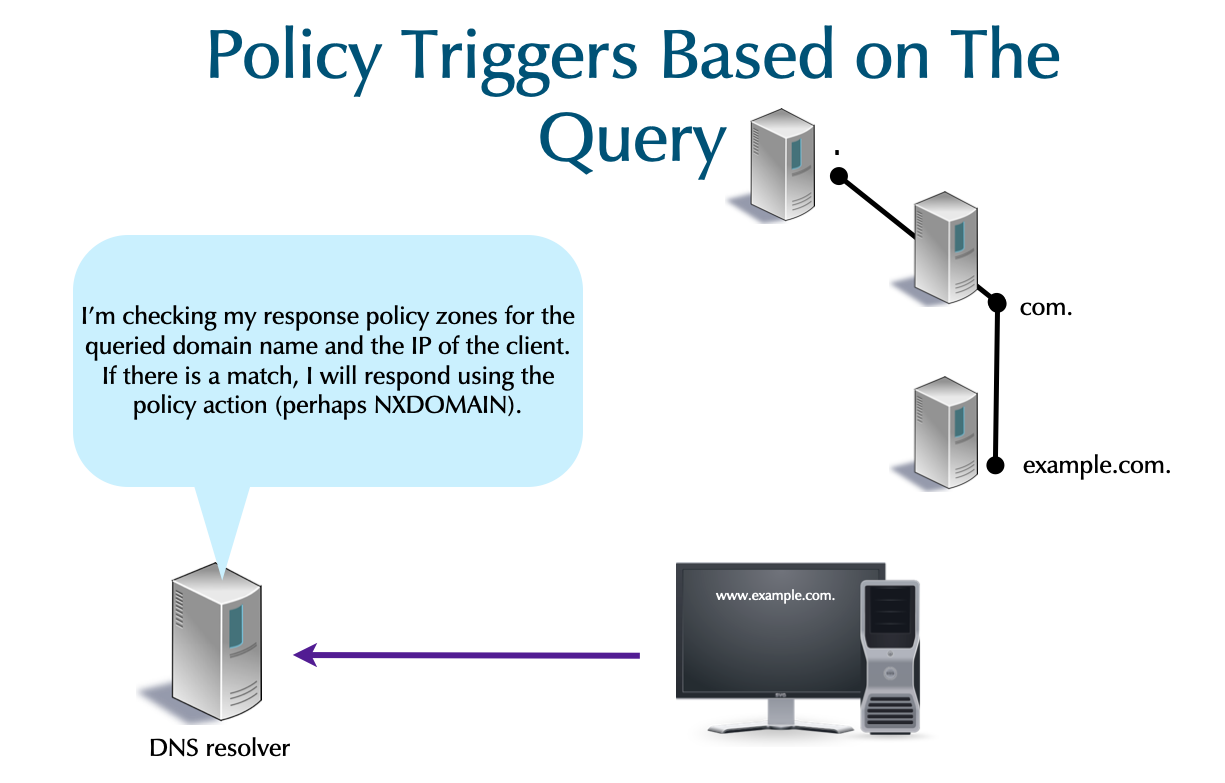
13.2 Policy Triggers Based on The Response
- Response IP: The IP address in the RR triggers the policy.
- This is only applicable to
A&AAAARRs. - It is only applicable to the Answer section of the DNS message.
- The label
.rpz-ipis used in the owner name.
- This is only applicable to
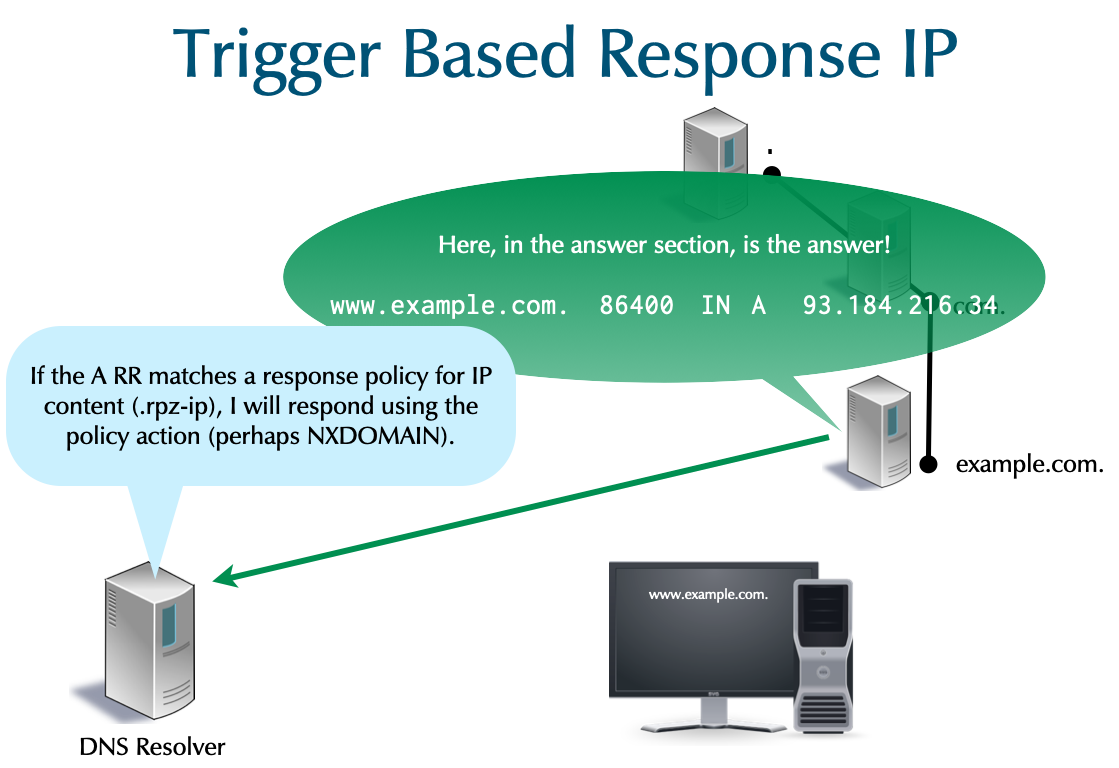
- NSDNAME: Any NS referral in the path to getting a final response
triggers the policy.
- The label
.rpz-nsdnameis used in the owner name.
- The label
- NSIP: An IP address of a NS in the path of getting a final
response triggers the policy.
- The label
.rpz-nsipis used in the owner name.
- The label
[sidebar] image::./images/RPZ-trigger-00.png[scaledwidth=65%]
[sidebar] image::./images/RPZ-trigger-01.png[scaledwidth=65%]
[sidebar] image::./images/RPZ-trigger-02.png[scaledwidth=65%]
[sidebar] image::./images/RPZ-trigger-03.png[scaledwidth=65%]
13.3 Policy Actions
- Six actions are available when a policy is triggered:
- Respond with local data trapping the query in a walled garden. (Most commonly this is a CNAME.)
- Respond NXDOMAIN
- Respond NOERROR/NODATA
- Respond normally (passthru)
- Respond with the TC flag
- Drop the query
- The bold actions are most common.
- When more than one action could apply (e.g. NXDOMAIN and passthru), precedence rules select which is used. The rules are beyond the scope of this course.
13.4 PowerDNS recursor RPZ configuration
- PowerDNS can load RPZ zones from files or transfer a RPZ zone via standard DNS zone transfer
- See PowerDNS documentation on RPZ for the details
- Example: loading an RPZ zone from a file inside the PowerDNS
recursor YAML configuration file
/etc/powerdns/recursor.conf
recursor:
  rpzs:
    - name: '/etc/powerdns/rpz.zone'
      defpol: NODATA
- Loading a RPZ zone via zone transfer
recursor:
  rpzs:
    - name: urlhaus-rpz
      addresses:
        - 192.0.2.10
	- 100.64.1.100
      defpol: NODATA
13.5 RPZ: Zone File
- The response policy zone is not delegated and NS RRs are unused.
- The draft RFC recommends the convention of using
localhost.
- The draft RFC recommends the convention of using
- Other than the
MNAME, all fields in theSOAshould be valid and reasonable for the sake of any secondary using the RPZ.
$TTL 1h
$ORIGIN rpz-z01.
@  SOA localhost. pm.example.com. 1 4h 1h 8w 1h
   NS  localhost.
- The domain name below is being declared disreputable.
- The owner names should NOT be FQDNs!
- A
CNAMEto the root,., is RPZ's code for anNXDOMAINaction.$TTL 1h $ORIGIN rpz-z01. @ SOA localhost. pm.example.com. 1 4h 1h 8w 1h NS localhost. evilstuff.com CNAME . ; NXDOMAIN - Wildcards usage in RPZ files is common.
- Also match everything under
evilstuff.com.
*.evilstuff.com CNAME . ; NXDOMAIN
- Also match everything under
- A CNAME to
*.is RPZ's code for aNODATAaction.badplace.us CNAME *. ; NOERROR/NODATA *.badplace.us CNAME *. ; NOERROR/NODATA
- Local Data is a standard RR without any special RPZ
encoding. Most commonly, a
CNAMEis used to point to a walled garden.vile.org CNAME fbi.gov. ; redirect *.vile.org CNAME fbi.gov. ; redirect
- A
CNAMEto the RPZ special targetrpz-drop.makes the RDNS server to simply drop the query (no response is sent).- The querier will eventually time-out.
yuck.reddit.com CNAME rpz-drop. ; drop
- A
CNAMEto the RPZ special targetrpz-tcp-only.makes the DNS resolver server set theTCflag (truncated) in the response.- A legitimate querier will re-query over TCP. This is tool to mitigate reflection attacks.
innocent.com CNAME rpz-tcp-only. ; truncate *.innocent.com CNAME rpz-tcp-only. ; truncate
13.6 Client IP Address Trigger
- To trigger on the querier's IP, use the
.rpz-client-ipencoding. The IPv4 address is reversed like in a PTR RR, but an additional first label indicates the netmask.16.0.0.31.172.rpz-client-ip CNAME rpz-passthru. 12.0.0.16.172.rpz-client-ip CNAME rpz-drop. 32.1.0.0.127.rpz-client-ip CNAME rpz-passthru.
- Drop traffic from all class B private clients 172.16/12 except the 172.31/16 block which is not subject to any policies. The 127.0.0.1 host is also except for policies, which is useful for testing.
- IPv6 addresses are reversed per four hex-digit field. Colons are
replaced by periods. The double-colon for zero compression with
"zz". Zero suppression and zero compression are required. The
addresses shown are:
2001:db8:bad::/64::1/12864.zz.bad.db8.2001.rpz-client-ip CNAME rpz-drop. 128.1.zz.rpz-client-ip CNAME rpz-passthru.
13.7 Response IP Address Trigger
- If the given IP addresses appear in
AorAAAAanswer sections, an action is triggered.- In the example, the IPs are associated with dangers on the
Internet, and get an
NXDOMAINresponse.192.0.2.99/322001:db8:ea::/48
32.99.2.0.192.rpz-ip CNAME . ; NXDOMAIN 48.zz.ea.db8.2001.rpz-ip CNAME . ; NXDOMAIN
- In the example, the IPs are associated with dangers on the
Internet, and get an
13.8 NS Domain-Name and NS IP Triggers
- If a referral contains
ns1.badactor.chor a referral'sARR is198.51.100.1, the response will beNXDOMAIN.ns1.badActor.ch.rpz-nsdname CNAME . ; NXDOMAIN 32.1.100.51.198.rpz-nsip CNAME . ; NXDOMAIN
13.9 RPZ - the full example
- the full RPZ zone with different trigger and actions
$TTL 1h $ORIGIN rpz-z01. @ SOA localhost. pm.example.com. 1 4h 1h 8w 1h NS localhost. evilstuff.com CNAME . ; NXDOMAIN *.evilstuff.com CNAME . ; NXDOMAIN badplace.us CNAME *. ; NOERROR/NODATA *.badplace.us CNAME *. ; NOERROR/NODATA vile.org CNAME fbi.gov. ; redirect *.vile.org CNAME fbi.gov. ; redirect yuck.reddit.com CNAME rpz-drop. ; drop innocent.com CNAME rpz-tcp-only. ; truncate *.innocent.com CNAME rpz-tcp-only. ; truncate 16.0.0.31.172.rpz-client-ip CNAME rpz-passthru. ; permit 12.0.0.16.172.rpz-client-ip CNAME rpz-drop. ; drop 32.1.0.0.127.rpz-client-ip CNAME rpz-passthru. ; permit 64.zz.bad.db8.2001.rpz-client-ip CNAME rpz-drop. ; drop 128.1.zz.rpz-client-ip CNAME rpz-passthru. ; permit 32.99.2.0.192.rpz-ip CNAME . ; NXDOMAIN 48.zz.ea.db8.2001.rpz-ip CNAME . ; NXDOMAIN ns1.badActor.ch.rpz-nsdname CNAME . ; NXDOMAIN 32.1.100.51.198.rpz-nsip CNAME . ; NXDOMAIN
13.10 RPZ Data Feeds
- The site https://dnsrpz.info maintains a list of providers of reputation data.
- Different techniques are used to access the feed.
- For example SpamHaus makes it available via zone transfer (AXFR/IXFR).
- Prices vary. Since 2018-02 SpamHaus has a free but very limited service: https://www.spamhaus.org/news/article/669
13.11 Response-Policies without RPZ
- Limited RPZ functionality is available without RPZ.
- A DNS resolver server can be authoritative for zones to block or wall garden.
- If there are 1000 zones, the server must be authoritative for all 1000.
- With RPZ, only one zone is required.
13.12 RPZ Notes
- The following types must not be RPZ data:
SOA,NS,DNAME, all DNSSEC related records
13.13 Exercise
- Download an example RPZ zone from https://urlhaus.abuse.ch/downloads/rpz/
- Load the RPZ file into the PowerDNS recursor from the YAML configuration file, restart the PowerDNS recursor
- Dump the RPZ file from the running PowerDNS memory into a new file to validate that the RPZ zone is loaded
- Query the name
testentry.rpz.urlhaus.abuse.chfrom your PowerDNS recursor and from Quad9/Cloudflare public DNS. You should see aNXDOMAINanswer from your PowerDNS recursor, and a regular answer from the public DNS services - Change the RPZ Policy for this zone from
NXDOMAINtoNODATA - Use
digto verify that the return status for a malicious request is nowNOERROR/NODATA
13.14 Solution
- Download example RPZ zone
# cd /etc/powerdns
curl -o rpz.zone https://urlhaus.abuse.ch/downloads/rpz/
- Inspect the RPZ zone
% head -20 rpz.zone
$TTL 30
@ SOA rpz.urlhaus.abuse.ch. hostmaster.urlhaus.abuse.ch. 2605071847 300 1800 604800 30
 NS localhost.
;
; abuse.ch URLhaus Response Policy Zones (RPZ)
; Last updated: 2026-05-07 18:47:07 (UTC)
;
; Terms Of Use: https://urlhaus.abuse.ch/api/
; For questions please contact urlhaus [at] abuse.ch
;
testentry.rpz.urlhaus.abuse.ch CNAME . ; Test entry for testing URLhaus RPZ
0022a601.pphost.net CNAME . ; Malware download (2020-05-25), see https://urlhaus.abuse.ch/host/0022a601.pphost.net/
111101111.ru CNAME . ; Malware download (2020-01-31), see https://urlhaus.abuse.ch/host/111101111.ru/
123.ywxww.net CNAME . ; Malware download (2024-11-02), see https://urlhaus.abuse.ch/host/123.ywxww.net/
1717.1000uc.com CNAME . ; Malware download (2022-06-30), see https://urlhaus.abuse.ch/host/1717.1000uc.com/
176.65.149.223.ptr.pfcloud.network CNAME . ; Malware download (2026-05-06), see https://urlhaus.abuse.ch/host/176.65.149.223.ptr.pfcloud.network/
18nnbu.fixionmunici9al.lat CNAME . ; Malware download (2026-05-07), see https://urlhaus.abuse.ch/host/18nnbu.fixionmunici9al.lat/
1ce6-route.fixionmunici9al.lat CNAME . ; Malware download (2026-05-07), see https://urlhaus.abuse.ch/host/1ce6-route.fixionmunici9al.lat/
1llume-sync.fixionmunici9al.lat CNAME . ; Malware download (2026-05-07), see https://urlhaus.abuse.ch/host/1llume-sync.fixionmunici9al.lat/
4dapt3-node.pavlore9.surf CNAME . ; Malware download (2026-05-05), see https://urlhaus.abuse.ch/host/4dapt3-node.pavlore9.surf/
- Load the RPZ zone into the PowerDNS recursor
recursor:
  rpzs:
    - name: '/etc/powerdns/rpz.zone'
- Dump the RPZ zone from memory into a file (useful if the RPZ zone is loaded from a primary server outside the own network)
% rec_control dump-rpz rpz.zone /tmp/rpz.out
- This is how to overwrite the policy with
NODATA
recursor:
  rpzs:
    - name: '/etc/powerdns/rpz.zone'
      defpol: NODATA
- Test of RPZ function (should return NXDOMAIN or NODATA)
[recursor]# dig @localhost 111101111.ru
- Test of RPZ function (should return an IP address)
[recursor]# dig @1.1.1.1 111101111.ru
14 DNS server operations monitoring
- It is difficult to monitor the internal operation of a DNS server
- Classic monitoring has a huge performance impact (on busy DNS servers)
- Example: PowerDNS query-logging
- Up to 200% performance loss seen
- Speed of the disk storage is often the limiting factor
- Conversation from binary to text format is CPU intensive
- Classic monitoring has a huge performance impact (on busy DNS servers)
14.1 Network packet capture
- An alternative solution is to look from the outside via a network traffic capture tool
- No performance impact on the DNS server
- Can only observe from the outside (no internal DNS server events, like cache-events, seen)
- Difficult to work with UDP fragments and DNS data in TCP streams
- Example: DNS statistics collector (DSC) https://www.caida.org/tools/utilities/dsc/
14.2 DNSTAP
- DNSTAP is an open protocol to capture and store DNS server events
- Events are recorded inside the server
- Fast and lightweight protocol
- Non-blocking, designed to have minimal impact on the DNS servers performance
14.3 DNSTAP Operation
[sidebar] image::./images/dnstap-00.png[scaledwidth=65%]
[sidebar] image::./images/dnstap-01.png[scaledwidth=65%]
[sidebar] image::./images/dnstap-02.png[scaledwidth=65%]
[sidebar] image::./images/dnstap-03.png[scaledwidth=65%]
[sidebar] image::./images/dnstap-04.png[scaledwidth=65%]
[sidebar] image::./images/dnstap-05.png[scaledwidth=65%]
[sidebar] image::./images/dnstap-06.png[scaledwidth=65%]
[sidebar] image::./images/dnstap-07.png[scaledwidth=65%]
[sidebar] image::./images/dnstap-08.png[scaledwidth=65%]
14.4 DNSTAP implementations
- DNSTAP has been developed by Farsight Security
(Paul Vixie and Robert Edmonds)
- Homepage is http://dnstap.info
- Implementations:
- Unbound
- Knot 2.x
- BIND 9
- NSD
- CoreDNS
- PowerDNS Recursor
- DNSDist (PowerDNS Load Balancer)
14.5 DNSTAP dependencies
- DNSTAP support is a compile-time option
- Sometimes not enabled in distribution package code
- Might requires compilation from source
- Sometimes not enabled in distribution package code
fstrm(Frame Streams data transport protocol): lightweight protocol to transport frames of data, can be used with any data serialisation format that produces byte sequences https://github.com/farsightsec/fstrm- Google Protocol Buffers: Protocol buffers are a language-neutral, platform-neutral extensible mechanism for serialising structured data. https://developers.google.com/protocol-buffers/
14.6 DNSTAP Receiver Tools
- dnstap-golang https://github.com/dnstap/golang-dnstap
- dnstap-ldns https://github.com/dnstap/dnstap-ldns
- dnstap-read (part of BIND 9.11)http://source.isc.org
- Wireshark with dnstap support https://github.com/dnstap/wireshark
14.7 Using DNSTAP with PowerDNS recursor
- Installing the
dnstapreader from the Debian 13 repositories
% apt install golang-github-dnstap-golang-dnstap-cli dnstap-ldns
- (Alternative): Installing the
dnstapreader from source
% apt install golang
% go get -u github.com/dnstap/golang-dnstap/dnstap
% mv ~/go/bin/dnstap /usr/local/bin/
- DNSTAP can be enabled in the PowerDNS YAML configuration file
/etc/powerdns/recursor.conf
logging:
  dnstap_framestream_servers:
    - servers: [127.0.0.1:9999]
      logQueries: true
      logResponses: true
- Start DNSTAP reader from the command line. For a production
installation, create a systemd unit. For forensic analysis, it is
recommended to trigger the
dnstapsystemd unit from a system event (high load, unusual traffic pattern etc)
% dnstap -l 127.0.0.1:9999
- Restart the PowerDNS recursor
- The DNSTAP reader will print out log information to
stderrafter successful connections from PowerDNS
2021/11/01 09:52:35 127.0.0.1:9999: accepted connection 1 from 127.0.0.1:47500
2021/11/01 09:52:35 127.0.0.1:9999: accepted connection 2 from 127.0.0.1:47502
2021/11/01 09:52:35 127.0.0.1:9999: accepted connection 3 from 127.0.0.1:47504
2021/11/01 09:52:35 127.0.0.1:9999: accepted connection 4 from 127.0.0.1:47506
- Example DNSTAP reader output of a resolution for
heise.de A
09:55:02.069423 RQ 2001:500:1::53 UDP 31b "de." IN DS
09:55:02.070849 RR 2001:500:1::53 UDP 366b "de." IN DS
09:55:02.071227 RQ 192.203.230.10 UDP 31b "de." IN A
09:55:02.079721 RR 192.203.230.10 UDP 736b "de." IN A
09:55:02.080183 RQ 194.0.0.53 UDP 37b "heise.de." IN DS
09:55:02.102337 RR 194.0.0.53 UDP 750b "heise.de." IN DS
09:55:02.102529 RQ 77.67.63.105 UDP 31b "de." IN DNSKEY
09:55:02.112821 RR 77.67.63.105 UDP 745b "de." IN DNSKEY
09:55:02.113324 RQ 194.146.107.6 UDP 37b "heise.de." IN A
09:55:02.126413 RR 194.146.107.6 UDP 810b "heise.de." IN A
09:55:02.126897 RQ 2001:500:d937::30 UDP 45b "pop-hannover.net." IN A
09:55:02.135566 RR 2001:500:d937::30 UDP 660b "pop-hannover.net." IN A
09:55:02.135752 RQ 62.48.67.66 UDP 37b "heise.de." IN A
09:55:02.145127 RR 62.48.67.66 UDP 255b "heise.de." IN A
- In production environment, the DNSTAP data should be written to disk for later analysis. The command below will receive DNSTAP traffic on Port 9999 and write the DNSTAP data to a file
% dnstap -l 127.0.0.1:9999 -w capture.dnstap
- To read the DNSTAP data from the file, open the file with a DNSTAP reader
% dnstap -r capture.dnstap
14.8 Exercise
- Install a DNSTAP reader on the PowerDNS recursor machine
- Start the DNSTAP reader to listen on port 9999 and to print the output in verbose YAML format
- Configure DNSTAP in the PowerDNS recursor YAML configuration file
- Restart the PowerDNS recursor and send some test queries towards the recursor
- Observe the output of the DNSTAP reader
15 Transaction Signatures (TSIG)
- TSIGs secure the communication of two endpoints.
- TSIGs uses HMAC (i.e. symmetric encryption).
- Trust is required between all systems (all endpoints).
- Securely installing the key on all systems is external to DNS.
- The endpoints must have reasonably accurate clocks.
- TSIG is independent of DNSSEC.
- TSIG use cases:
- DNS dynamic updates (client / dhcp-server <-> server)
- BIND server control messages (rndc <-> server)
- Server communication (zone transfers, notifies, queries, …)
- Queries (client <-> server): Impractical and rare.
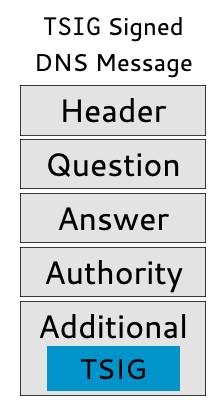
- A TSIG is a dynamically generated pseudo-RR.
- TSIG RRs are not found in zone files, but do have the standard format of RRs.
- TSIGs are never cached (TTL=0).
- A TSIG RR is sent in the additional section.
- A TSIG assures the integrity and authenticity of the entire DNS message.
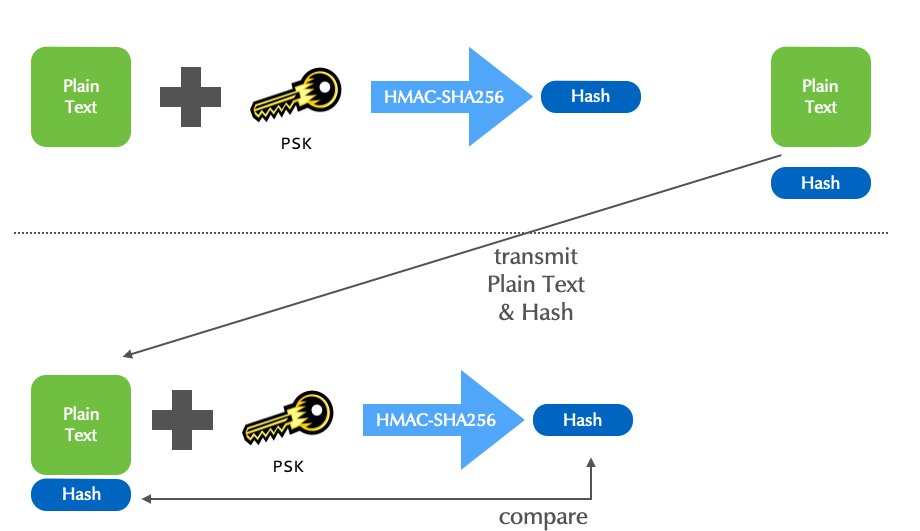
- TSIG offers a choice of HMAC algorithms:
hmac-md5(deprecated)hmac-sha1(deprecated)- hmac-sha224
- hmac-sha256
- hmac-sha384
- hmac-sha512
- All the algorithms take a random length input and create a fixed length fingerprint.
Algorithm fingerprint length MD5 16 byte SHA1 20 byte SHA256 32 byte SHA512 64 byte
15.1 TSIG with PowerDNS
- TSIG is based on symmetric crypto
- The same TSIG key for a zone should be configured on the primary and on the secondary
- Zone can share keys, but it is recommended to have one key per
zone
- Or even one key per communication (primary -> secondary)
- TSIG signatures are time sensitive: the TSIG signature on DNS
messages contain a timestamp
- TSIG only allows little skew between the clocks of both communication endpoints (~ 5 Minutes)
- Make sure your DNS server always have the up-to-date time using a time synchronization protocol such as NTP
- On the primary (
master) generate a new TSIG key. By convention, the key is named<primary-hostname>-<secondary-hostname>, but can have any name. It is important that the key name has the same name on both endpoints of the communication
[primary]% pdnsutil generate-tsig-key pdnsNNNa-pdnsNNNb hmac-sha512
Create new TSIG key pdns010a-pdns010b hmac-sha512 L5jN+m3yTSfwoU2A43M0C/+0m7afqO1wL4OLd2auFEcA3MYyvJHixwHa0l0gZWRec10MQSw5bUByygkbJyQ/BA==
- On the primary (
master), the key is activated to be used for the outgoingNOTIFYmessages
[primary]% pdnsutil activate-tsig-key zoneNNN.dnslab.org pdnsNNNa-pdnsNNNb primary
Enabled TSIG key pdnsNNNa-pdnsNNNb for zoneNNN.dnslab.org
- On the secondary (
slave), import the same key (same name!)
[secondary]% pdnsutil import-tsig-key pdnsNNNa-pdnsNNNb hmac-sha512 L5jN+m3yTSfwoU2A43M0C/+0m7afqO1wL4OLd2auFEcA3MYyvJHixwHa0l0gZWRec10MQSw5bUByygkbJyQ/BA==
Imported TSIG key pdnsNNNa-pdnsNNNb hmac-sha512
- On the secondary, the TSIG key is used to sign the
AXFR(Zone-transfer) requests. Once the TSIG keys are in place and activated, theallow-axfr-ipsconfiguration is not required anymore
[secondary]% pdnsutil activate-tsig-key zoneNNN.dnslab.org pdnsNNNa-pdnsNNNb secondary
Enabled TSIG key pdnsNNNa-pdnsNNNb for zoneNNN.dnslab.org
- Log output on the primary server for a TSIG signed AXFR request
Nov 03 21:29:26 pdnsa010 pdns_server[59737]: Remote 142.93.145.28 wants 'zoneNNN.dnslab.org|SOA', do = 0, bufsize = 512: packetcache MISS
Nov 03 21:29:26 pdnsa010 pdns_server[59737]: AXFR-out zone 'zoneNNN.dnslab.org', client '142.93.145.28:56771', transfer initiated
Nov 03 21:29:26 pdnsa010 pdns_server[59737]: AXFR-out zone 'zoneNNN.dnslab.org', client '142.93.145.28:56771', allowed: TSIG signed request with authorized key 'pdns010a-pdns010b' and algorithm 'hmac-sha512'
- Log on the secondary server
Nov 03 21:29:26 pdnsb010 pdns_server[34111]: AXFR-in zone: 'zoneNNN.dnslab.org', primary: '46.101.218.115', zone committed with serial 1635974966
- When using the autosecondary/autoprimary function of PowerDNS, after
deploying TSIG keys, the setting
allow-unsigned-autoprimary/allow-unsigned-supermastershould be set tonoto only allow TSIG signedNOTIFYto create new zones - On the secondary, the setting
allow-unsigned-notifyshould be set tonoto only allow TSIG signedNOTIFY
15.2 Exercise
- Create a new TSIG key (on the primary machine) to secure the zone transfer between the primary and the secondary
- Import the TSIG key on the secondary
- Mark the TSIG key as active for the zone
zoneNNN.dnslab.orgon both sides (see above) - Increment the SOA serial with
pdnsutil - Check that
NOTIFYmessages and AXFR requests are coming, and that the AXFR is TSIG secured (check the log files)
16 Automatic DNS provisioning with Catalog-Zones
16.1 Provisioning New Zones
- Adding or deleting new zones can be a challenge.
- In addition to updating the primary, every secondary needs to be modified.
- It is intensive work for installations with many secondaries, or with frequent zone additions & deletions.
- Many organizations have written scripts (or use tools like Ansible or SaltStack) for automatically modifying secondary DNS servers.
- A catalog zone provisions normal zones using standard DNS content and communication.
- They are an ISC creation, inroduced in BIND 9.11 (2016), and have been standardized by the IETF.
- RFC 9432: DNS Catalog Zones
- In addition to BIND 9, KnotDNS has a fully functional implementation since version 3.0.0 (September 2020)
- PowerDNS Authoritative Server supports catalog zones since 4.7.0 (https://doc.powerdns.com/authoritative/catalog.html)
- NSD: supports RFC 9432 style catalog zones since version 4.9.0 (https://nsd.docs.nlnetlabs.nl/en/latest/catalog-zones.html)
16.2 Catalog Zone
- A catalog zone works like a normal DNS zone.
- A catalog zone is maintained on the primary server.
- It contains zone names and configuration metadata that should exist on secondaries.
- Zones added to the catalog zone are automatically provisioned on secondaries.
- Zones in a catalog zone are member zones.
- A secondary will have a catalog zone for each primary.
- Assuming the primary is configured with a catalog zone.
16.2.1 Catalog Zone: Primary
- On a primary, a catalog zone is created and maintained as a normal
primary zone.
SOArecord and oneNSrecord must exist, but their values are not used except forNOTIFYmessages
# pdnsutil create-zone catalog.zone
Creating empty zone 'catalog.zone'

# pdnsutil add-record catalog.zone . NS pdnsNNNa.dnslab.org
New rrset:
catalog.zone. 3600 IN NS pdnsNNNa.dnslab.org

# pdnsutil add-record catalog.zone . NS pdnsNNNb.dnslab.org
New rrset:
catalog.zone. 3600 IN NS pdnsNNNa.dnslab.org
catalog.zone. 3600 IN NS pdnsNNNb.dnslab.org

# pdnsutil replace-rrset catalog.zone . soa 60 "pdnsNNNa.dnslab.org . 1001 3600 300 360000 3600"
Current records for catalog.zone IN SOA will be replaced
New rrset:
catalog.zone. 60 IN SOA pdnsNNNa.dnslab.org . 1001 3600 300 360000 3600
- A catalog zone-file contains the SOA record and the NS records for the zone
- It must also contain a TXT record with the version number of the
catalog zone protocol implementation
- Version 1: the catalog zone protocol as it has been implemented in BIND 9.11
- Version 2: the catalog zone protocol as described in the Internet RFC and implemented in BIND 9.16
- DNS server software will ignore catalog zones with a version number it does not support
# pdnsutil add-record catalog.zone version TXT '"2"'
New rrset:
version.catalog.zone. 3600 IN TXT "2"
- A catalog needs to be marked as a producer (source of catalog zone data) in the zones meta-data
# pdnsutil set-kind catalog.zone producer
16.2.2 Catalog Zone: Secondary
- On a secondary DNS server, a catalog zone is created and maintained as a secondary zone.
pdnsutil create-secondary-zone catalog.zone 178.128.198.145
- The new zone needs to be marked as a catalog zone consumer (A catalog zone that will be received and new zones will be created based on the zones content)
# pdnsutil set-kind catalog.zone consumer
16.2.3 Provisioning a new zone
- New zones will be created on the primary server
# pdnsutil create-zone example.org
Creating empty zone 'example.org'

# pdnsutil add-record example.org . NS pdnsNNNa.dnslab.org
New rrset:
example.org. 3600 IN NS pdnsNNNa.dnslab.org

# pdnsutil add-record example.org . NS pdnsNNNb.dnslab.org
New rrset:
example.org. 3600 IN NS pdnsNNNa.dnslab.org
example.org. 3600 IN NS pdnsNNNb.dnslab.org

# pdnsutil replace-rrset example.org . soa 60 "pdnsNNNa.dnslab.org . 1001 3600 300 360000 3600"
Current records for example.org IN SOA will be replaced
New rrset:
example.org. 60 IN SOA pdnsNNNa.dnslab.org . 1001 3600 300 360000 3600
- Register new zone inside the catalog zone
# pdnsutil set-catalog example.org catalog.zone
- Mark the new zone as a primary zone
# pdnsutil set-kind example.org primary
- Log output on the seconday
May 07 19:47:51 pdnsb009 pdns_server[45527]: AXFR-in zone: 'catalog.zone', primary: '178.128.198.145', Catalog-Zone backend transaction started
May 07 19:47:51 pdnsb009 pdns_server[45527]: AXFR-in zone: 'catalog.zone', primary: '178.128.198.145', Catalog-Zone create zone 'example.org'
May 07 19:47:51 pdnsb009 pdns_server[45527]: AXFR-in zone: 'catalog.zone', primary: '178.128.198.145', Catalog-Zone backend transaction committed
May 07 19:47:51 pdnsb009 pdns_server[45527]: AXFR-in zone: 'catalog.zone', primary: '178.128.198.145', zone committed with serial 1778183270
May 07 19:47:52 pdnsb009 pdns_server[45527]: AXFR-in zone: 'example.org', primary: '178.128.198.145', zone committed with serial 1001
- View the new content of the catalog zone
# dig @pdns009a.dnslab.org axfr catalog.zone +noall +answer +onesoa
catalog.zone.           60      IN      SOA     pdns009a.dnslab.org. . 1778183270 3600 300 360000 3600
catalog.zone.           3600    IN      NS      pdns009a.dnslab.org.
catalog.zone.           3600    IN      NS      pdns009b.dnslab.org.
version.catalog.zone.   0       IN      TXT     "2"
u455jfvg7dcpidisupprc6hho5u5d5ni.zones.catalog.zone. 0 IN PTR example.org.
17 Web-server, Prometheus Metrics and REST API
17.1 Web-server
- PowerDNS provides an optional build-in web-server. This web-server
provides:
- A simple web page that show vital performance data
- A metrics endpoint for the Prometheus (https://prometheus.io) monitoring system
- A URL endpoint for a restful API
- The web-server can be enabled in the PowerDNS configuration file
# Webserver
webserver=yes
webserver-address=127.0.0.1
webserver-password=PowerDNS
webserver-port=8053
webserver-allow-from=127.0.0.1/32
- After a restart, PowerDNS should now listen of the defined TCP port
% lsof -Poni :8053
COMMAND     PID USER   FD   TYPE DEVICE OFFSET NODE NAME
pdns_serv 29892 pdns    9u  IPv4  85197    0t0  TCP 138.68.87.93:8053 (LISTEN)
17.2 Prometheus
- The URL endpoint
/metricsprovides a metrics page that get be used ("scraped") by Prometheus and compatible monitoring systems
17.3 API
- Access to the REST-API must be secured by an API key. At least 16 byte
of random key is recommended. Such a key can be generated as a
hexadecimal string with
openssl:
% openssl rand -hex 16
W * The configuration settings below enable the API
api=yes
api-key=<api-key>
- Testing the API from
curl. It is required to send the API-Key with theX-API-Keyheader with every request
# apt install jq
# curl -s -H 'X-API-Key: ac90ae012cdaba61101a9061eda492d6' http://pdnsNNNa.dnslab.org:8053/api/v1/servers/localhost/zones | jq .
[
  {
    "account": "",
    "dnssec": false,
    "edited_serial": 1007,
    "id": "zoneNNN.dnslab.org.",
    "kind": "Native",
    "last_check": 0,
    "masters": [],
    "name": "zoneNNN.dnslab.org.",
    "notified_serial": 1007,
    "serial": 1007,
    "url": "/api/v1/servers/localhost/zones/zoneNNN.dnslab.org."
  }
]
- The API documentation is available from the PowerDNS server itself (benefit: it is always correct for the running version of PowerDNS). To dump out the API documentation, the API-Key needs to be send as well
$ curl -s -H 'X-API-Key: <api-key>' http://nsNNNa.dnslab.org:8053/api/docs | less
17.4 Exercise
- Enable the PowerDNS web-server to listen on the public IP addresses (IPv6 and IPv4) of the server, protect the access with a password
- Create an API key for your primary server using
openssl - Enable the API with the API-key, check the configuration
- Check out the statistics and Prometheus metrics page from a web browser
- Use
curlto download the API documentation - Find the API function to delete a record from a zone, test to
remove a record from the zone
- Does the SOA serial increment?
18 Performance tuning
- Performance tuning an authoritative DNS server requires some
experience. DNS server performance is bound to different factors
(network, hardware, database, logging configuration etc)
- Most installations do not need any performance tuning, PowerDNS on modern hardware works just fine and is fast enough
- Only start tuning if you know performance can be an issue
- Measure, don't speculate
- It is recommended to validate each performance tuning step in a
test lab that mimics the real world DNS traffic
- PowerDNS provides a couple of tools (located in the
pdns-utilspackage in Debian 13) that can help with benchmarking a PowerDNS server:dnsreplayreads recorded DNS query and responses and replays them to a DNS server and reports on the matchesdnsscope- sends data from a PCAP (Packet Capture) file towards an authoritative serverdnstcpbench- Tool to perform a benchmark of TCP connections to a DNS serverdumpresp- a dump responder that just echo back the query. Useful to establish a baseline of network and operating system DNS message performance
- Other DNS benchmarking tools:
perf(Unbound): simple but reliable DNS benchmarking tool, sends queries to a DNS server and reports the queries per secondsqueryperf(https://gitlab.isc.org/isc-projects/queryperf) - DNS server benchmarking tool from BIND 9queryperf++(https://www.jinmei.org/blog/2012/04/02/3074) a framework for performance measurement on DNS server implementations, support UDP and TCP, can benchmark AXFR and IXFR over TCP
- PowerDNS provides a couple of tools (located in the
18.1 Hardware
- The hardware used to host the DNS server can have a big impact on
DNS server performance
- Turn off symmetric multi-threading (aka Hyper-Threading) and run the DNS server on real CPU cores
- 4-8 Cores are usually enough for an authoritative DNS
server. More CPU cores can kill CPU cache performance.
- Pin the PowerDNS processes and the Database processes to their own CPU cores
- Check for IRQ balancing of the network cards. Sometimes all IRQs are routed towards one CPU core, which becomes a bottleneck for DNS style IP traffic (many small packets)
- When selecting hardware, use server with less number of cores but high performance of each core
- Configure the PowerDNS
receiver-threadsto be one per core - Memory bandwidth between CPU, cache-memory und main-memory is important
- Select quality network cards with good driver support for you operating system
- Avoid system virtualization (VMWare, QEMU, VirtualBox etc). If virtualization is required, use PCI pass-through for the network cards
- The Spectre and Meltdown type of CPU vulnerabilities usually don't affect dedicated non-virtualized DNS server. Consider switching off the kernel mitigation for these security issue to gain more performance. Consult with your security department first.
- Possibly adjust the memory allocation scheme of the operating
system LIBC library (see
MALLOC_ARENA_MAXhttps://doc.powerdns.com/authoritative/performance.html)- Alternative memory allocation libraries can help performance
(
jmallochttps://github.com/jemalloc/jemalloc,mimallochttps://github.com/microsoft/mimalloc,tcmallochttps://gperftools.github.io/gperftools/tcmalloc.html,scudohttps://expertmiami.blogspot.com/2019/05/what-is-scudo-hardened-allocator_10.html)
- Alternative memory allocation libraries can help performance
(
18.2 Logging
- Logging can hurt the DNS server performance. Generating text base log message is CPU intensive, and can slow down the PowerDNS server under high query load. Disable query- and detail-logging.
18.3 Server placement
- The DNS protocol has a build in load-distribution function
- DNS query load will be spread over all authoritative server (primary and secondary)
- Deploy DNS server in many different networks and geographic regions
- Select data-center with fast Internet access that are near potential DNS user
- DNS load-balancer in front of authoritative server can hurt the performance and increase the query latency
18.4 Network
- PowerDNS configuration options that have an impact on the network
performance
- If the operating system support the
reuseportsocket option, configure PowerDNS to use this option to be able to have multiple processes/threads listening on the same IP address and port. This helps distributing the load over multiple CPU cores - For DNS server with many TCP connections (primary with many
secondaries, large Resource-Records set that demand TCP
connections, DNS-over-TLS/HTTPS) tune the TCP network stack of
your operating system and the PowerDNS TCP configuration:
- Enable
tcp-fast-openwhen available in the operating system - Adjust the
max-tcp-connectionsandmax-tcp-connections-per-clientto match your PowerDNS server workload. Monitor the PowerDNS server to detect if these threshold - Limit the time a TCP connection can be held open from a client
(see
max-tcp-connection-duration) - Limit the number of transactions that can be send through one
TCP connection (see
max-tcp-transactions-per-conn)
- Enable
- If the operating system support the
18.5 Cache
- For a PowerDNS server with database backend, the packet and query
caches are an important performance factor. The packet cache holds
DNS responses that have been fetched from the database. The query
cache holds results from additional database queries required to
find DNS data in the database. Carefully tune the PowerDNS caches:
max-cache-entries- Max entries in the query cachemax-packet-cache-entries- Max entries in the packet cachequery-cache-ttl- How long are database queries resulting in positive answers be stored in the query cachenegquery-cache-ttl- How long are database queries resulting in negative answers be stored in the query cachecache-ttl- How long are full DNS answer packets are stored in the packet cache
18.6 Database
- Database performance can be the bottleneck with a PowerDNS instance
using a database backend. PowerDNS stores DNS queries in a queue
waiting to the send to the database. Settings that effects the
performance of the database query queue
max-queue-lengthlength of the backend query queue. If this threshold is reached, close the database connection and restart operation (to work around database connection issues)overload-queue-lengthdefines a threshold size for the database query queue. Default unlimited. Once reached, DNS requests are only answered from the packet cachequeue-limit- Maximum time (milliseconds) that a query can be waiting in the backend queue
18.7 Benchmarking
- The PowerDNS command line tool
pdnsutilcontains a build-in benchmarking function for database connections
% pdnsutil bench-db